VIDEO COPILOT BLOG
News, Updates, Projects Files & Tips


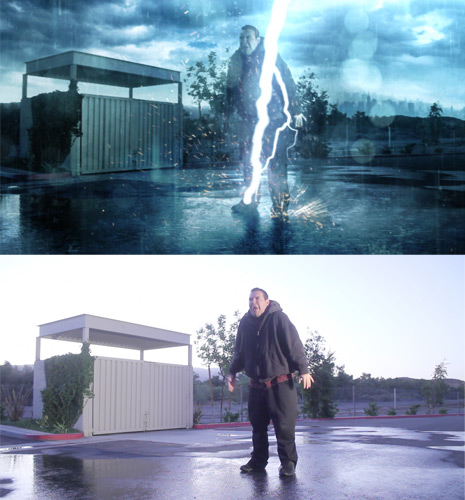
NEW TUTORIAL: Lightning Strike Part-01

In Part 1 of this exciting tutorial series, we will build a lightning strike with rain effects using built-in After Effects plug-ins and then composite stock footage from Action Essentials 2.

Watch Tutorial

BLOG SHOW: Go behind the scenes to see some on location preparation in our newest Blog Show episode.
Watch Show

95 RESPONSES TO “NEW TUTORIAL: Lightning Strike Part-01”

Awesome! This looks cool! :)

by Johann Torres

Thanks andrew, i was waiting for this!

Very nice Andrew!

Will have to purchase your products for Christmas for myself :)

Thank you so much Andrew!
I’ve been refreshing this page all day, and I can already tell it was worth it!

Can’t wait for my AE2 to come in the mail!

Finally…cant wait to watch

Finally, looks like a really awesome tutorial, maybe i’ll use it in my 48 hour film fest contest

Finally, i’m waiting the whole day for this, thanks mr. AK, love Video Copilot.

Frigen Outstanding Andrew!

Andrew,

Are you going to track AE 2 sales to see if they increase at all after incorporating it in your tutorials? I hope you start using more of your products in your tuts

Refresing the page every 5 minutes does work..

Cool. Now I can strike down my loved ones. In jest of course.

Great tutorail ive been refreashing for the whole day! =D

I tried tht too.. but am late

Finally! I’m so excited!

That was totally awesome!

Got action essentials a few days ago this should be interesting

Not bad, looking forward to part-2.

AHHHH…two parts. When is part two coming?

Once again.. lovely! :)
Also looking out to the new flares! (and why not a shirt 2……)

When will the VC hats be available? How about some shirts? I could get my gf to model some VC bikinis :)

I CANT WAIT FOR PART 2! LOL

Thank you so much Andrew! I wait for the part two!!

By Rafael from Brazil

TKS. andrew! for this wonderful status, we look in the second half.
matthew enke of Brazil

Yesss thanks andrew..we r waiting second part!

On Part 2 will you also go over how you did such a good hand held camera look?

thx! it was awesome, i can’t wait 4 part 2.

Cant wait for the second part!

Nice tutorial man! This is great!!

VERY cool… Thanks Andrew!

genial, me escanta este tipo de videotutoriales y los tuyos son los mejores. gracias Andrew, Saludos desde Chile.

by Ayb from the philippines

hey, andrew

nice effect!!!

hahaha. .

you really inspire us. .

thank you so much. .

It’s really nice,I’m expecting the second part to be more like a “camera shooting” tutorial than the usual VFX.
Thanx man!!!

by Creative Media

Andrew thankz for another fresh tutorial..

Great, I was just about to go to bed now I have to watch this. :)

Amazing sir…it is great…really

Thanks Andrew!
this is totally awesome !
just love your tutorials…

merci , pour ce tutoriel et vivement la suite !!!!!

Finally!
Thanks! I was waiting the whole day^^

Great tut, can’t wait for part 2!

THANKS ANDREW , GOOD TUTORIAL .

No offense but the still image just looks terrible. Anyway, gonna watch it this afternoon

Great stuff Andrew – How is the funeral arrangments going?!

Hey Andrew,
when will Part 2 be online?

Hey Andrew nice ‘background’

This is an awesome tutorial

once again you done it andrew. Thanks for tut

This looks great! Glad I took the 25percent offer, AE2 just arrived the other day ;-)

hey Andrew very very thanks :)

by Ljubomir Sinozic

excelent tutorial
refreshing this page — priceless

thnx for tutorial

Very nice effect. Hoping to see some more Hollywood effects.

lol sam allways taking damge

Looks like a great tutorial. Poor sam…

by Ilvin Trinidad

OMG, Andrew you blew my mind with this one. Simply Awesome, im speechless.

May God Bless you and keep up the great work.

Your friend, from Dominican Republic.

Awesome…just woke up. There´s nothing better to do than watching a tut now.

Simply Amazing!!!

Saludos desde España

Yeah Awesome!!!! When the next part?

Yeah Awesome!!! When the next part?

Yeah Awesome!!! When the next part Andrew?

its nice tut
this video
http://www.youtube.com/watch?v=DIGuarw8bD8

for this tutrial

you are always too goodddddddddddd mannnnnnnnnnnnnnnnnn

Hey Andrew, I think you need to add something to your blog. When your new and you make a demo reel, DON’T take these tutorials as they are and fill your demo reel with them. Use the skills from them to make something original like it’s part of a commercial or indi flick.

Andrew, this is great.
When next part?

hello andrew. I think that you forgot the add smoke efx in composting this shot… m i right? plz tell me…love u andrew

hello andrew. I think that you forgot the add smoke efx in composting this shot… m i right? plz tell me…love u andrew bro.

you always give the best thing for us.

Thanks! Love this tutorial!

FINALLY!! THERE IS A TUTORILAS USING AACTION ESSEN. 2 FOOTAGE…
THANKS MAN!!!

I WISH IF YOU COULD OF TEACH ME/ TUTOR ME 1-ON-1..THAT WOULD BE AWSOME…START—>>END

Great tutorial! Really learned alot of it!

Great!!! Tutorial

aaaw blast..
Was waiting until I had time to watch this and now I got some sort of database error which makes it impossible to watch the tutorial :S… anyone knows how to get rid of this?

Very good Tuto , THANKS ! Andrew Kramer !!!!

Heh :)
Andrew have seen District 9…
Great

Hey, when will part 2 be online?
Cant wait :-)

Hmm, I’m getting some errors too, but I have no problem watching the tutorial

Awesome tutorial! Some great tips in there. When can we expect part 2 ;) ?

When are you going to post part 2?

Awsome! i’ve just love your tutorials :p this one was the best i’ve ever seen! Love this website!

waaaaaaoooo coooooooolll tutorial i’m waiting for the next part thznx andrew

Awesome tutorial

Awesome as allways!!

Cool tutorial, very impressive.

waiting for the next part …

There are severel test u had done in this tutorial. I like the most is when the lightning strikes immediately Sam explodes.Thats creates a great impact.What do you say.

Too cool… I can’t wait to play with the blood splatters…mwahahahaha….I am already thinking of cool ways to use this technique in another type of footage.

lightning never strikes the same place twice? I guess Sam is the exception to the rule XD

by Luther Hadley

Hey Andrew

You know i would keep and eye on Sam one of these days he just might snap and blow everybody up .. you know your almost at 100 tutorials and Sam get’s the short end of the stick . I think you should at least make Sam save the day …. or have a contest and see what we can come up with I’m sure the community can come up with good ideas

Just give us green screen footage of Sam running and footage of you too .. lol You should make a Army of Sam chasing you .. or even better let Sam do a tutorial … with you tie up in the background … lol playing a guitar

what do you think .. just shout me out .. ok ..

Andrew! That was amazing, man! I wanna see the second part!! I can’t wait!! :) ;)

Cheers from Argentina.

another usfefull use of AE2 while waiting for part 2.
http://www.youtube.com/watch?v=0WhDl-wbgk0

Sweet!

What about a lighting reflection in the puddle below Sam? So much attention to detail, but no reflection? Sorry for being so picky, this is still better than anything I’ve ever seen before. Thanks for the tut as always, you’re the best!

I’ll always re-watch your tutorials because there are thousands of tips to always get refreshed on. Thank you, the collapse transformation tip was always something I wanted to know but always worked around it in a more complicated way… VC, just making things easier!

Tutorial left me (and Sam) speechless!. Can’t wait for Part two!

Thanks! And keep up the great work

Hey Andrew, Great tut, just wondering if you could share with my the name of the camera you are using? Best of luck with everything, keep it up.

I really enjoy your work! Greetings from Holland and keep up te good work!

Thanks.

It a very Exciting Tutorial !!!! Mr. Andrew

That Amazing

“Backround.” With no “g.” Classic.

absolutely brilliant ! We guys from the U.K are learning LOADS..thank you !

Post a Comment!

Before Posting
We're trying to encourage more thoughtful commenting.  Please take a moment to write a meaningful response to this post.

Also remember to read the rules on posting first.

Leave a Comment