|
VIDEO COPILOT BLOG News, Updates, Projects Files & Tips |
|
Chances are, if you hear sound through anything other than the speaker inside of your desktop tower, you probably have at least stereo sound. That’s good.
You might notice that when you watch Gone in 60 Seconds, some car sounds travel from one speaker to the next as it passes by. This is called the end of Nicholas Cage’s career but also the sound mixing technique is called panning.
In a continuing effort to waste your time I have devised a preset that will automatically PAN a sound or music based on a layers screen space position. I’m still working out a few bugs but I’ll post the presets when I can. My mind has been thinking about expressions a lot lately and I might have some more experiments to post as well. Until then.
UPDATE:
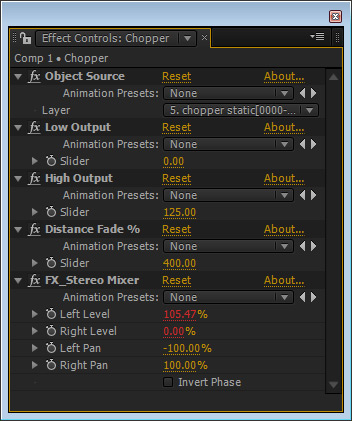
Here are the settings used for this comp. You can control the low & high output so that the audio doesn’t cut out completely. I probably wouldn’t mix my audio in AE but this was a fun experiment indeed. With a little more work it could be setup like the 3D falloff preset to fade the audio as the object travels away in Z space. Right now it is screen space (2d).

really cool stuff. looking forward to it!
Sounds cool.
Is the doppler effect included in this preset?
I thought bangkok dangerous was the end of his career!
Cool effect Andy, ill look forward to experimenting with the preset!
I thought I was going to be first
lol
This is awesome AK as always! can you give any info out on how this new preset works? like technical details of how this thing would adjust the sound to pan & scan like that based on a layers screen position? because I can’t wrap my brain around how that could possibly work
Thanks for the site and everything
Man I love Gone in 60 seconds. Mainly the epic sounds and soundtracks
melle
(Germany)
I actually really like Nick Cage despite not loving every movie he is in but it helped my joke. As for understanding how it works, I’ll probably discuss that in the preset demo and you can always look at my code, I keep it open.
Poor Nicolas, at least Angelina was hot at that time..
Hey that’s cool. is there a way to scale the level of the effect, e.g instead of something moving from waay left to waay right you can select to have a slight pan?
oh okay, thanks!!
Dude forget the audio how the heck did you do the sky and the flare? I wanna learn that! What did you use? Horizon?
Dude forget the audio how the heck did you do the sky and the flare? I wanna learn that! What did you use? Horizon? and how did you get that 3d flare?
Cool!
Is it possible to do the same thing with surround sound?
looks and sounds good cant wait to give it a go
you turn AE into an easy-to-use audio app with that preset…
Wow this technique would really help a lot in a scene with a lot of gun shots and fight.
I am working on a scene with a single persons cloned into making it a battle sequence. would really help with the rocket explosions and bombs goin off at different places..
Plugin seems versatile. Taking a small lead from this i would probably use few fighter plane flying randomly above…:)
Really great Andrew. And very nice Lens Flares ![]()
Did you made them with Knoll Light?
cant wait to learn that!!
very fast speed!!
hey that sounds great. will it be able to change the sound based on the Z-position?
and gone in 60 seconds was not the end of his carreer, i think ghost rider was the death blow.
Thank you Andrew! this tool will be really usefull for my next project!
I will wait for your preset! nice doing as always Mr. Kramer!
By the way. I hope your wife and your little daughter is fine and you have also much time for them and not just for us!
very nice
waiting this preset with impatience
Nice idea Andrew,
but you should make possible to change the value of the pan, sometimes it s not usefull to make pans so heavys
Nice work anyway
Thanks for all
WOW! great idea! and as the object moves further away in Z space the volume decreases and then increases again as it moves closer??? wow! u are on your TOES!!!! nice!
Yeah thats awesome! I love doing panning in other programs but didnt know how to do it in AE… I am still new to the program. Your tuts help so much man! Your awesome!
Sounds really interesting cant wait!!!! You are definitely the King of AE!!!
Thanks Andrew
South Africa
Thanks Andrew, this is really great quality stuff.
Cheers!
Joss
I beleve that boy this is man Thanks
…mmmmmm
Eleanor may not take kindly to your comments about Nicolas Cage!!
very good! Andrew
from GABON
Heres a link with a link of a soundtrack made for Gone in 60 seconds. I like the epic music.
Fits perfectly to the scene in the movie. Ok anyway, you are all right. The movie is not outstanding. In fact, one could have down so much more with this idea. The movie gets boring and not really thrilling:D:D:D:D:D. We can also create better music with Pro Scores:D:D:D Much better
melle (Germany)
At the very end when the chopper flies out of the picture to the left, there’s a glitch in the audio, like the panning is too fast and it jumps from middle to the left – is that in the source audio file, or is it an effect of the preset?
Cheers!
Nice, this has so many uses.
Eleanor is a beauty. This movie is awesome but i think that this szene in the youtube link ruined it a little bit.
Woah, I second (third considering his double post) Tony, the background is beautiful.
nick cage one of my favs
hey just watch/listened to it and works fine. Its like the chopper is moving from right speaker to left speaker.
wow never dream that was possible, how do you come up with these stuff. You most have a factory of MONKEYS in suites working for you, hope you feeding them well.
great stuff as always.
Hey Andrew, you’re great with visual graphics but hopefully you’ll never take up commercial flying or you’ll have a lot of sick passengers!!!
Very cool sound FX….another very useful tool.
Just for the record, his last movie “Knowing” is great and the cene of the crashing plane is amazing!
Excellent! Love the presets and all the work you do to help the community. Love the work on “Fringe” keep it up. Great to see you getting recognition and work, and by J.J. Abrahms no less, kudos!
Sound mixing inside of After Effects! An interesting tool, Andrew.
I’ve always felt that AE could do a lot better when it comes to working with audio. Is it too much to ask to be able to scrub through a composition and hear the audio?
Excellent! This will definitely be a great tool, and save time in editing…..so I can go order pizza…;)
Very cool idea.. but, but, but…
I don’t think I could do sound editing in AE.
But for people without a audio editor I would think this would be very handy. I made this ( http://www.fotgfilms.com/newProjectPages/kc.html ) and had 5-10 tracks for each shot. Trying to do it in AE would have been VERY hard.
What?? not even a reference to… THE WICKERMAN!!!!! somebody kill me if i have to watch that movie again
wow, that sounds great! I use other software for audio editing though.
Are you using Trapcode Horizon in the chopper video?
Wow that’s cool!
YES! Thank you in advance, Andrew!
That preset is just what I need! I’m tired of adjusting all the sounds manualy…
Thanks again! You’re awesome ^_^
Oh wow!
Thats pretty pro.
Thanks Andrew.
Andrew, congratulations, you are the best.
I wish meet you one day.
My dream is it
thank you mr. Kramer!
Somehow funny, dunno what the pilot has drunk already ![]()
No, real, you’re doing an excellent job, Andrew!
that’s a very big mosquito !
Thats interesting. I have just been learning some surround panning techniques inside of Sony Vegas. I know you do visual effects and motion graphics, but a tutorial on this new subject would be fab!
Wow, i like all the things that u do. i want learn to do this!!!!!!
My first comment
Thanks AK for this.
I know about the stereo panning and i also had practised this technique. But don’t know suround sound technique like 5.1, 7.1 are done. Hope you’ll forward some steps for this.
Holy taco that chopper is super fast! Glad COD doesn’t have that one…
I can’t wait for it…
Sounds VERY good…
Hah, the Nicolas Cage thing cracked me up… mr. Kramer has always got something new…
.
Well, yeah, the panning technique is really useful for creating realistic motion compositing. I don’t actually do it, but I have guys in my company that do it… me… I’m a compositor, that’s my gig
, I’ll pro’lly write a comment on that blog after this one
Thats AMAZING!What is the plugin going to be calld and will it be free or paid?
Bout time somebody told it like it is…
Aw man Andrew, Nic Cage is my favorite actor, even in the horrible movies, cool idea though
suggestions>
i would have a Kramer Looks Plugin
something that i apply and my productions become fantastic just like yours
please help me
Thanks again for sharing your hard work,insights, and jokes!!
I’ve learned A TON from ya
!
Hey, I actualy wrote something similar yesterday when I wanted to work with stereo sound – you could use simple trigonometry in expressions with with Audio Levels and Stereo Mixing efect in AE. It’ s useful and make good atmosphere to your mographs.
Man, this is a good one. You’re the man Andrew! Thanks.
Pretty easy to do manually, but will definitely come in handy with after effects. Can’t wait
>:|
My lawyers will be speaking to you very soon Mr. Kramer
haha this just made me relize my speakers were backwards
Hail the Doppler Effect!
You have such a good competent grasp on so many aspects; why don’t you find out about getting accreditation and just go ahead and open a Real PRODUCTION COLLEGE and charge 5k/semester with tracks for 2 or 3 levels of certification. I’d pop 5k a quarter to learn this stuff in a real class setting and be able to ask questions and get critiqued in real time!
(Sam could pick up some extra cash slinging mashed potatos in the school lunchroom too!)
Basic skills 5k
Advanced skills 10k
Pro skills 15k
…and a genn-you-ine Andy Kramer sheepskin at the end !!!
I completely agree about Gone In Sixty Seconds being the end of his career.
Wow, I was thinking of actually the same thing in my vecation, and how I could create it!
Oh, It’s not a chopper, it is a fly
Very cool effect,
teach me
teach me
teach me
your the best andrew
teach me
teach me
Hey Andrew, this is cool and all, but what’s the point? After Effect’s isn’t an audio editing software, it would be easier to just edit the sound separately in a different program.
YES! Thank you soo much Andrew
Even if the helicopter is at the right side of your ear you should still hear a low touch of it in the left ear and not only in the right and the volume should be lower aswell ![]()
Really nice I must say! Can’t wait for it, it’ll save lots of time! ![]()
Thanks!
Clearly you’ve never seen Lord of War or Bangkok Dangerous. They aren’t the best movies, but they’re certainly better than most of the movies he produced prior to Gone In 60 Seconds. :p
In any case, the expression idea is interesting enough, but I fail to see much value in it. I mean, who really uses AE for sound? The sound bed is either done before or after the motion graphics, and almost always in a dedicated sound application.
My negativity aside, I’m sure there are thousands of kids that will still benefit from your efforts. Keep it up.
In addition to my last comment….wouldn’t applying this plugin/script take more clicks then just panning the audio manually? I mean its not exactly difficult or time consuming.
Andrew, I have been trying for ages to do Anamorphic Lens flares. Could you please either post the project file, or maybe a tutorial on the subject of Anamorphic Lens Flares.
Knoll Light Factory itself won’t do them properly, and I have been struggling for a long time to make them in AE.
yeah, i heard this on my hi fi speakers listening to music :p , never known it’s called Pan
thanks
“by TOny
September 14th, 2009 @ 2:12 am
Dude forget the audio how the heck did you do the sky and the flare? I wanna learn that! What did you use? Horizon? and how did you get that 3d flare?”
Look at this for the lens flare: http://www.videocopilot.net/blog/2009/08/lens-flare-on-3d-lights/
Just put the light intensity down to 0. Or you could use a Null, I haven’t tried.
Are you linking to “Scale” as well for volume? Might be interesting.
Hey, I’m not if it’s my speakers, but it sounds like the sound is working in reverse.
Awesome *drools* yea really awesome…
*scans page for any negative comments…..nope…..all good…..continue on automaton droids!
2 words:
con air
Some actually think he can act?
If so….we’re doomed as a society I hope you know.
Hey andrew, i knw ths myt print off topic bt i wana knw wht the fractal(not fractal noise) found unda generate tab cn b used 4, iv tryd playn arnd wth it bt it seems am 2 dumb 4 it n i hvnt found tuts(as 4 nw) o hw 2use it. Any help/tip appreciatd. Thnx.
Its nice to see a preset for this. This can be done manually in Vegas using Envelopes but it gets really tedious. Nice thinking Mr.Kramer
” AirWolf the Return! ”
http://www.youtube.com/watch?v=AXehSng0NV4&feature=related
Very cool, I would love to add this effect to a particle system, is it possible? Also , Any news on Quickmatte ?
awsome, can’t wait, but yo andrew, do you make these lens flares yourself or is there a 3rd party lens flare pack you used in this demo, I loved that lens flare!
The flares are not from Light Factory, they are my custom flares actually.
Yeah, I figured they had to be custom, because KLF can’t create anamorphics like that. I have been trying to figure out a technique to do them for ages, so I do hope you would share your knowledge and technique on it.
Cool …except I would never use AE to mix/master audio.
If you are going to the trouble, might as well make a 3D surround sound version too.
–
KevinW
It looks good, but actually I use Sony Vegas to do the sound editing, maybe with AE’ll be easier but Vegas is cool too.
Andrew, you rock!
End of Nicholas Cage career indeed lol. I love that. cool post man. elements like this though shouldn’t be abused of cause then it can make the movie bad lol
Yo, you have to talk about the lens flare in your tutorial.
Good to hear sounds awesome as always thanks Andrew
Did you use this expression for the demo?
If so, will there be some sort of setting to “gradually transition” the sound from 1 speaker to the other?
Jumping from 100% left to 100% right doesn’t sound very good.
I assume you can add something to the expression(s) to gradually transition. If so, I think it would make the sound much more realistic.
(Unless this is one of the bugs you are talking about that will be fixed)
Hey you are cool. Great, great, great!!!!!
you`re my idol men.
Jean from Chile
Hey, is this going to be compatible with 5.1 channel surround sound?
THANK YOU! As someone who wants high quality work (audio included) and someone who wants to save time, this is it! Ive constantly had to edit the audio in an external editor (Mixcraft) and produce a new audio file at the right timing! Thanks again, Andrew:D
You could apply a Falloff like effect or just an automated volume slider for shifts in z space. you might also apply a pitch shift or eq preset to roll off the lows to approximate doppler as objects recede. Very cool stuff Andrew!
Good idea Lindsay. Controlling the audio eq would be quite clever.
Dang it! You made me realize… my speakers must be backwards!!!
(all this time…)
-thx
- just like Nicholas Cage
Thanks for letting me know my left and right speakers were hooked up wrong.
Just a side note make sure that when your sound travels all the way left or right that it doesn’t get eliminated, or maybe even add a white noise track so that the audio remains something. (I noticed that when the choper was off screen you lost the audio on that channel)
Otherwise keep up the good work AK
AWESOME work man!
Its actually called the doppler effect,
@Richard
The doppler effect is the changing of pitch with distance, not the changing of volume with distance.
Although a doppler preset would be amazing too.
@Andrew Kramer
The falloff idea is very exciting. Lots of possibilities there. I’m thinking we should create a futuristic city like in Blade Runner, with various compositions (flying cars) zooming past a 3D Camera.
Hey guys,
If you’re interested in editing audio for your videos and don’t have a good editor I would check out Cockos Reaper. It’s free. Well… you can buy a liscense depending on how you decide to use it. But the eveluation time never expires, no sound blips, or limits what you need to do. Sounds weird? yeay I know. I use it for my editing audio for videos.
For my music I still use Pro Tools. But for free you can’t beet it! It looks pretty nice as well and comes with some great sounding plug-ins right off the bat. It excepts VST, DXi, and VSTi plug-ins from almost all major companies.
and no… I’m not here to spam. I just like it a lot. Check it out! It may help you out a lot.
http://www.reaper.fm
Will you be able to move an object within -Z- space and the audio higher and lower?
@Lee
I stand corrected, been looking for a way to do a doppler effect for ages, still have not found a way yet. As for the fall off I completely agree with you.
Regards
Rich
Awesome!!! thanks, I’ve been needing a preset like that!
Yay! Previously I’ve been importing sounds into FL Studio and using it’s pan function, but this should save me a step
Thanks!
Great!! Just what I needed
It just helped me realize my speakers were on the wrong sides
Gak sabar nih tuts nya yang baru…
(I can’t wait for the tuts…)
Indonesia
Andrew states “In a continuing effort to waste your time…”
I think we can all agree that he needs to double his efforts. He has never wasted a minute of our time.
Thanks for your true efforts Andrew!
some folks are very talented than Andrew Kramer,
you should agree with this Andrew Kramer.(Lindsay)
thanks for your Presentation.
since you dont recommend audio in AE, what program do you usually edit audio in?
I thought this might be something that could also be used in Premire Pro CS4 as well, but now that you’ve added the screen grab, I guess it can’t.
Still looking forward to it though!
Hi Andrew
new nice idea ..
but If you Allow to me ..
the sound should not be cutting From one of two side
if noise coming from left , sound should be a little higher from Right .. in math
Left Right
60 40
like in real life
thanks Andrew
You are the best
actually i dont find after effects a useful tool for audio. i rather prefer sony vegas, a lot more fast and user friendly.
ok this is an experiment but.., better use your energy to develop video plugin
Thanks for sharing this, just what i lookd for!.. Realy cool stuff!
Hi andrew,
how did you this nice lens fler?
I messed with fading audio a bit and this is what I did and it seemed to work. I made my source video a 3D layer. I made a null object and applied a slider control to it. I alt-clicked on the slider’s stopwatch and put in this expression:
((thisComp.layer(”Source Video”).transform.position[2]/72)*.0254)*340
*this was kind of a pick-whip onto the z position of the layer.
I then pick-whipped the audio levels to the Null Object’s slider control and added a little bit more to it.
temp = thisComp.layer(”Null 1″).effect(”Slider Control”)(”Slider”);
[temp,temp] *.18655
*I added the .18655 for a smoother transition to -48dB and back.
I think it might be a start.
this willl be soooooo awesome ![]()
when r you gonna post it
Now this is amazing, Genius Andrew!!
hehe to be honest i was thinking to make a preset like this too… seems like you are first
Wonderful Andrew
I’m Looking forward to see it a live
and BTW…..the Idea is very creative
Thanks
Andrew, I never knew this was possible, fantastic, and am I correct in saying that the volume of the sound is directly relative to the position of the layer?
Thanks man
Wait a second, did you use Optical Flares in that Super-Chopper?
“Gone in 60 Seconds” was not the best but it was definitely an entertaining movie.
thanks! now I know I have my speakers hooked up backwards!

Before Posting
We're trying to encourage more thoughtful commenting. Please take a moment to write a meaningful response to this post.
Also remember to read the rules on posting first.
Leave a Comment


YES!! I’ve needed something like this! Save me time editing it later in vegas.
THANK you ANDREW!