VIDEO COPILOT BLOG
News, Updates, Projects Files & Tips


TWITTER FEED

Dynamic Bar Graphs

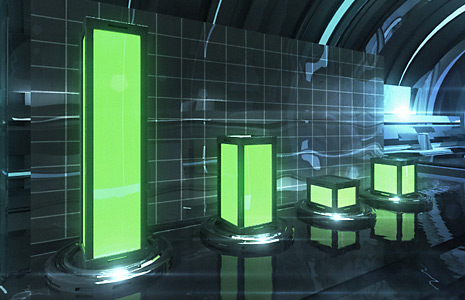
If you have ever made a Bar Graph, you know they can be a bit tedious to manage especially when your statistics change and require adjusting all of the bars!  (And they will) Well, if that made sense to you, I feel your pain. For everyone else the picture will get much clearer when I take you through a practical use of expressions involving Time-Remapping.  I will be using a bar graph chart as the example but these expressions are versatile and will likely give you ideas for your own projects.

One of the key benefits here is that I have rendered out my 3D Bar scene (that was designed for this tutorial) and it took about 5 hours but inside of After Effects I can control each bar individually eliminating the need to perform additional 3D rendering to adjust the bars.

Harry J Frank has a cool little tutorial from back in the day (AE 6.5) for building your very own pie graph in After Effects.

I know expressions can be a little tricky so I want to make this tutorial easy for everyone, stay tuned.

Watch Sample Video HD
Set Image On JPG
Set Image Off JPG

90 RESPONSES TO “Dynamic Bar Graphs”

wow awesome man.
could do with some camera movement though

looks more 3dmax tut :P

Thanks Andrew. Your site has helped me out so much.

Very nice,I can’t wait to see what will be tutorial 100

That is awesome

I think the smoke doesn’t match with the scene ! (my opinion)

The rest of the scene is nice !(especially the background :p)

And I agree with Adam, a nice camera move (like you always do) would be cool.

anyway great job !

@Adam,
Camera movement through a pre-rendered 3D scene? No. But if you are clever, you can make a camera movement before the Bar animation begins.

@Andrew,
I’m not going to be demonstrating the 3D portion, just a lot of time moving cylinders around.

pretty sick i think i can make something like that but the background looks insane

how long did this take you?

thats even better (honestly- hate 3max parts :) )
love tuts for beeing “AE tuts” good choice

If this is what I think it is, this is going to be a good one!

Nice, looking forward to it Andrew.

This is a great work-around in After Effects. I actually used this for a project with a 3D-rendered TV, rotating 360 degrees. I believe what I did, is render the TV at a full rotation in 6 minutes, so 360 seconds. I brought the video of the TV into AE as a comp, time-remapped the comp, and then pick-whipped the rotation of a null object to the time-remap layer. It’s been awhile, but I think that’s how I did it; which allowed me to manually rotate the 3D TV within After Effects. This also allowed me to place video on the screen in AE by linking the video’s rotation to the TV’s rotation. Great, practical insight Andrew!

curious how your deal with the reflections on the backside. hmmm?

Is it possible to make the samples/teasers iPhone compatible? It gives me inspiration until I can get back to my computer :)

Excellent. This gives me a couple ideas. Ty³.

Yet another giant leap …

I’m gonna need to auto-expressionate the sentence

‘You guys should be on the moon’

if you keep making this awesome stuff

I’m actualy pretty sure I’ll have to do that :p

Well if that ment anything to you … GREAT

If not, I’ll be killing your family …

No seriously

Just kidding

A big thanks and congratz to Andrew from good ol’ ShoeToad for making people like me this interested in this stuff

AWESOME

Wow verry nice. its a shame its not possible with camera movement

That looks really awesome
But I’m sad that this isn’t a 3D tutorial.

Excelent! Very nice. When do you make a film?

Aw I thought we had a new max tut!

nice ! , really looks awesome

Would be cool to have somebody stand on them and get ejected into the air

Add a camera to the 3d scene, and render a movie? That is territory I’d love to see you explore Andrew, especially if you used Luxology Modo = ]

Any updates to the banner post soonish?

Dynamic? Why always dynamic? What’s wrong with static? We would be so much happier if things just weren’t so dynamic.

CHANGE? NO, WE WON’T!

Now that’s a slogan!

Creating a 3D scene like that just takes time and practice. But it sure does look awesome. I want to make awesome lens flares like that…So much for doing homework today haha.

amazing, best bar graph ever!

Hey Andrew… Stop doing this, you don’t let us live with all this cool stuff in your site haha. :)

Andrew has the incredible talent to make everything look so cool!!!! Even bar graphs!!

dude your taking all the cool ideas! leave some for the rest of us lol great work man!!

Cool, I can’t wait for another 3D’s Max Tut!

Watched your interview this afternoon and I can’t wait for next week to watch the second part. I’m dying to see if you changed your shirt…

p.p.s. I’m ashamed but must admit that unlike your wife, I don’t have an Andrew to ask who J.J. Abrams is so I had to google him… guess I’m a little disconnected from the world… damn AE! :-)

by Anthony Breslin

Great idea Can’t wait for tutorial!

You think It could be used for other stuff besides graphs too??

Ps Great Interview Can’t wait for second Half!!

Kind Regards

looking good cant wait for the tutorial- nearly to the 100th

awesome dude i like it

cool cool, i look forward to seeing this tutorial.

i love how you’re updating the blog at least once every day now. it makes my trip to the site daily worth while =D

i Rather have a tutorial on how u made that amazing scene in 3d max! :D

Awesomee Andrew
From Argentina.

i wish you could help us build a scene like that :(

Interesting concept. After Effects taking the place of those boring Powerpoint Graphs with 3D renderings. I like.

Damm!!! the last 4 days you were giving updates,,, thats unussual, I guess you have more free time for this!
Can’t wait for that new tutorial!!!!
And the second part of the interview!

Wow, you do inspire!

That looks isanely awesome, its too bad that your not doing the 3d portion, but I’m sure its still way informative. I would never even think of doing something like that with After Effects, or 3ds Max, but thats how you do a bar graph man!

Can you include the 3D Max project file in your tutorial?

Probably won’t release the MAX file but it is just a bunch of cylinders with a wide-angle lens. All of the glow and light is done in AE. The bars are just rectangles all around. If you actually look at the scene it should be quite easy to reproduce.

I used a raytraced material with a small noise filter in the bump channel for the reflective gloss! For the glow material I just used self illumination.

Some things make good tutorials, others are better left to experimentation and practice.

Andrew: “Probably won’t release the MAX file but it is just a bunch of cylinders with a wide-angle lens. All of the glow and light is done in AE. The bars are just rectangles all around. If you actually look at the scene it should be quite easy to reproduce.”

Right….

That was actually extremely satisfying to watch :)

Shame you won’t show how you did the 3D portion. I’m really interested in that background wall thing for sci-fi backgrounds.
So, I do hope you’ll release the 3D MAX file, so I can at least mess around with that :P

(I’m pretty n00bish in 3D at the moment)

andrew when are you comeing back to ny ?

Why dont u share ur max file andrew….everyone wants to c ur talent in 3d…real talent…i mean we know u’r a god in after effects…what about max…r u just an angel?

Wow, too bad we won’t be seeing how the background is done.
I know it’s probably made mostly of cylinders, but you make it look natural.
Whenever i try to create something similar it looks too artificial, too symmetrical.

I like the sound effects, where do you get them from?

You sure like your lensflares don’t you Andy you naughty boy ;P

That’s just looking insane.
It’s a pitty that I am really suckage at 3d software.

wow thts a awesome part of adobe after effects…………. we know this is nothing for Mr. andrew……. guys he is goin to do some special for us…………….

and can be use for special effects……..

I had a go at recreating the 3d scene so when the tutorial comes out I can use mine for it.
It’s alot darker but more glowy.
http://www.filepak.com/upload/9_FinalBar.jpg

Damn Andrew’s is good though

how did you do the tunnel?

This could potentially be my favorite of all time, as I really like doing business promo videos… Would be cool to key out the bars with something

Awesome! Btw, in your tutorial, consist have some number above the bars(or something like that), that would be awesome :D .

Tim that was good go, Im glad someone took the time to try to recrate it to show to potential.

by Alfalasi from Dubai

waaaaaaaaaw !!

amazing Androw

u r gret man

yaahooooooo

^^

very very nice
thank you very much

wow man looks like great fun! I’ve been working in cinema4d (never used it before) while you’ve been preparing new tuts so it will be good to go back to AE because of the familiarity.

I had an idea (probably already been thought of) of putting numbers on top of the bars to represent their value and as they go up the value increases.
Also I think the link died on my previous comment of my version so I did a little more work and added the numbers I mentioned.
http://www.youtube.com/watch?v=VytJUcpRz2w

Wouldn’t be half as good at AE as I am now without you Andrew!

i hope this tutorial hv so muc expressions…cant wait,,,

ae can do reflection that bar on the floor??
y the reflection so real..

thanks andrew thanks for evrithing

I wish the 3D max file would be released. Andrew says its quite easy to reproduce but its not if you dont really know much about 3D studio max. I actually wish it was a two part tutorial with one part being how to make this scene but i totally undertand that you cant make a tut for everything

Tim, again that is a really nice recreate… Perhaps YOU could do the tut on the 3d and post?? Im sure Andrew would link?

@Andrew:
“Camera movement through a pre-rendered 3D scene? No.”

Please, mistake me if I’m wrong, but couldn’t the technique you demonstrated in The Bullet be used to accomplish precisely this?
Specifically, couldn’t the camera move be created in the 3D program, and then exported into after effects? Then the AE camera move of the graphs would match that of the scene, making the information more visually interesting with a trucking pan or something.

@Seth.. good point on the bullet, as far as your second part of the responce; ie. “couldn’t the camera move be created in the 3d program”?, that is kind of why the word “pre-rendered” was the key. You can’t add camera movement after the fact, that was the point?

The bullet technique is a bit differn’t. In this exacmple you can’t add camera movement because the bar video plays up to a certain point in the animation based on the graph value.

If the camera is moving when you render the scene, the bar will be displaced. If you need animation, you will just have to do it in the 3D program. But like I said above, you can add a little camera movement before the stats pop up to give more life. This technique can be done with solid layers inside of AE too, the 3D stuff is just a way to make the tutorial look cool. The information is the subject.

This should be much clearer when he tutorial comes out.

Fortunatly, the tutorials are not product related.. Would stink to need to know 3d in order to get the most value.

Hint Hint nudge nudge: Pay pal donation setup to raise money to get Andrew to release the 3d file!!!!

Hey Andrew. This kinda reminds me of the Tron Legacy teaser. I think it would be awesome if you could do a video of Sam in the Tron world on a lightcycle. With the energy walls behind’em & all. That would be pretty cool. Thanks so much for being a great teacher.

This looks fantastic, I don’t reckon as a C4d user I’d be able to recreate that exact scene but I’m looking forward to making something cool and linking it up with expressions. Very exciting.

Thanks for everything

Wow, its really a fabulous and a fantastic 3d view.. I really like it..

Very nicely done, man, Outstanding, as always, But may I suggest, Maybe adding some camera movement would enhance the future effect, or probably filling them with some sort of liquid, with little radioactive bubbles?
And the grid behind looks kind of out of place.. =/
Maybe If you add lasers as a grid, then it would look better.. idk, Experiment! :)

This need s to be your next tutorial

this is awsome

WOW, this is truly amazing Im curious though how you did the smoke/steam was in in AE or 3ds Max? And if so did you use a plug-in or just standard particles?

Once again WOW :-)

Could this be used to make a nice looking graphics equaliser? (a challenge for you to work out Andrew). Tutorial please!

Wow, This is very nice

I’m waiting for tutorial………….

Don’t forget the reflections of the green bars on the reflective wall behind them!

What about reflection off of the “glass” panel behind the bars? Could you use duplicates of the bars with a displacement map and blending mode change? Just a thought.

we ever gonna see this tutorial? Looked really interesting.

yeah, its like a month ago, hope you didn’t forget Andrew ;p

by Matthew Park

Lol ya, I agree with Tarrizz, I’m looking forward to this. MAKE THE TUT DUDE!!!

For all of you wanting the camera movement in the 3D scene, here’s what you do (Note: This will not have the raytrace lighting effects):

1. Save your BKG (everything but the bar[s]) as a 3D model.
2. Save your Bar as a 3D model.
3. Open the BKG in Photoshop CS4 Extended and save it as a PSD file BKG.psd.
4. Choose add a 3D file and add the Bar
5. Go to AE CS4 and open the BKG.psd file as a composition making sure the “Live Photoshop 3D” box is checked.
6. Go crazy with the camera, which is already included in the AE comp.

So Andrew do you plan on making this a tutorial?

Post a Comment!

Before Posting
We're trying to encourage more thoughtful commenting.  Please take a moment to write a meaningful response to this post.

Also remember to read the rules on posting first.

Leave a Comment