VIDEO COPILOT BLOG
News, Updates, Projects Files & Tips


NEW TUTORIAL: Scene Re-Lighting

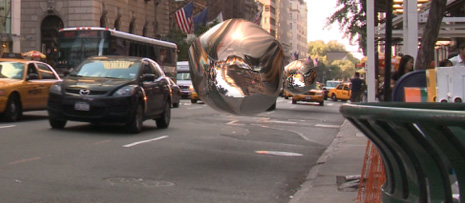
In this tutorial we will use the free plug-in Normality to add 3D light effects in After Effects.  Using a simple Normal-Pass, we will also create stunning reflection and refraction effects with amazing speed and control.

I can say that there are some fun stories and situations through-out the tutorial that are mostly unrelated. Sorry :)

Watch Tutorial

Download Free Plug-in: Normality CS3+

Background:
As the world of post-processing 3D render passes and depth of field in After Effects grows, the ability to perform relighting is now more powerful than ever.  By using a simple normal map with the Normality, it is now possible to use After Effects Lights for fast, believable relighting and reflection/refraction effects.

Normal Maps: These special render passes are similar to standard bump maps but contain for acurate contour information. These passes can be created in nearly every 3D program as well as generated directly from a 2D texture, (as you will see in this tutorial) for relighting capabilities without the use of a 3D program!

70 RESPONSES TO “NEW TUTORIAL: Scene Re-Lighting”

I, for one, love your stories :)

Thanks again, Andrew!

tnx man

by Joshua Rodrigues

Thankyou Mr. Kramer!
…and KEEP IT UP!

Oh Yeah! Another amazing tutorial!

And yes, the silver bubble on the image… that’s the FRINGE’s bubble!!!

wow awesome .. you are genius man.. you should get your own tv show!

This looks simply amazing; danke, herr Kramer!

Awesome! Thanks!

Brilliant! As always. Keep it up

Video Copilot is a TUTORIAL MACHINE!
*ahem*
Many thanks for this awesome one.

Andrew you never fail to amaze us. Keep up the great work! I am LOVING AE2. My film company just got it! :-)

Im excited to watch!!! I am forever grateful for your tuts, for two years you have facilitated lots of good grades in my graphics classes :-)

Hey Andrew,

you might like the news that the Blender export script by ‘osxrules’ has been updated, and now exports position, xyz-rotation, and scale values of all the objects contained within a Blender scene.

Could be a good base for a ‘Scene Re-Lighting 2.0′ tutorial ;)

Check my blog if you like.

Andrew this is your best tutorial yet, this was amazing!!!
Thank you so much for this :D

Matthew Sabia
Sabia Productions

Its amazing, because video copilot can show you how an effect can be achieved, they show you how to to be smart in the manner you approach y(our) work yet also add to the amazing arsenal of teaching; techniques and technologies at the fore front of computer design that have not come apparent to alot of people in the industry.
Video copilot is an essential and powerful reference and learning junction.
Yet another applaud and thank you.

Nice! 2-in-a-row GJ.. Btw what have you planned for your tutorial number 100?

Cheers from Norway!

Plus the amount of tricks Andrew has up his sleeve is ridiculous…he must wear like a clown costume when he does tutorials….

Can anybody explain the blur problem you seem to have encountered during the meeting in LA ?

AWESOME :) as usual, thx buddy

by Brian Fontenot

Andrew, another great tutorial from your vast bank of AE wisdom… Now – to sweeten the deal, could you possible do a tutorial on direct importing 3D objects from C4D into AE with the plugin?

@Brian fontenot

This one might help you out:

http://www.youtube.com/watch?v=e9yCwSkZLUI

Awesome video TwentyFour, I’ll publish this on the blog with some other resources.

Wow, excellent Andrew. You are the best man on this thing of AF. Well thats what i think. I have a little question for you. Whats the program that you use for this videotutorials…i know about another programs like Jing and screen cast Omatic, but i think that yours functions better…so let me know if you can bro!

Awesome tute Andrew, Thanks!

I noticed with the water blob relfection that it seems to be backwards, as in the reflection of the taxi should be on the other side. And I dont think theres an invert option in the plug in for this. But I was thinking, couldnt you just duplicate the background image and flip it yourself manually, and use that as the reflection?

Amazing tut. Good jokes about water blobs, showing a new free plugin, solutions for Mac and PC for Normal Maps and three examples of using Normality….Perfect tut.

@Doug: I just noticed the bug with the mirrored reflections myself.

I’ll release an update when I find some time, but for now you can set the Tile Mode to “mirror” and the Azimuth to 1 rotation.
That should get correct reflections!

Just an idea:

A 3D Light Casting 2 Tutorial, using this techniques to cast lights on the asphalt.

Great Tutorial, The superhero thing didn’t really land with me but you redeemed yourself with the “that’s exactly what my wife said to me the other say, anyway that doesn’t really make any sense.” It’s always the accidental things that turn out to be funny. Anyway keep up the great work.

The superhero bit was a warm-up :)

I knew It would get better. ;-)

by Akhil Tanwar....

Man……2 tuts in one day…..whts better than this…….;)

by Akhil Tanwar....

oops sorry…not the same day….lol

by Juan Francisco

Hi andrew, can you explain me please how did you rendered out the .mov video which includes the normals and alpha channels from 3ds max?.

I have rendered a video but it didn´t preserve the alpha channel, instead there is a purple background :s

Greetings from Ecuador

@Andrew

Loved this tutorial. But I hope you got some support from Stefan though – regarding your understanding of the bunch of parameters. If not, then I’d like to know your IQ… well, maybe not.

@Stefan Minning

Your Normality plugin is… ok. But I missed the caustics!

Just kidding, you did an amazing job!

Actually all of the parameters are straight from the world of 3D applications so it was quite logical to begin with.

hey cool tut.
amm can you use the effect to make an easy kind of silver liquid terminator two substance to person effect? mmm just an Idea

any way keep the good work :D

I meant the speed an the accuracy you showed up in this tutorial. But hold on… reviewing your tutorial in my mind: yes, you’re right! You ain’t a genius! – which lets me feel quite comfortable again.

As you just said, it is true that the functions you showed in your tutorial are ’straight from the world of 3D applications’. It might have been because of the astounding speed with which you’ve been handling the plugin parameters. You must have hypnotized me! Voodoo!
Or I simply had to many beers…

Whatever… I didn’t really get familiar with the plugin on my first try, but you pushed my attention to the next level. Thanks for that.

great tut bro. very helpful

by Clayton Light

Hi all,
This awesome tutorial is cutting off for me at 32:20. About the time that AK is adding the shadow solid. Is anyone else having this problem?

Andrew take my first born!

In all seriousness though, the possibilities of this plugin are freakin massive!

Clight: seems OK on my end, perhaps give it another try. We’ll check it out though.

Andrew what would you say is the best program for generating normal maps? (free or paid)

and once again best tutorial yet ;)

Andrew I can’t believe that I’m gonna say this but I love you in a totally non-gay way! But as fan of yours!

That was mind blowing, I’m sure for some people it won’t seem as impressive as your other tutorials, but I think its by far your best one yet. Instead of just showing us cool things to create you just opened up a door for a million more things to be done. It doesnt replace a 3d program, but those of us like myself without a lot of 3d experience it is a very good alternative. I think in the future their wont be a need for different programs, but they’ll find a way to contain in all into one. Thanks again Andrew!

Please don’t ever stop making these tutorials!!!

+1 on what Filmaker92 said.

Awesome… the tutorial and plugin are great…

very useful tutorial and great plug-in too .. but i think this plug-in will need more tutorials because it’s complicated a bit i think .. and needs to more Explanations .. but anyway this is very very great addition for After Effects Plug-ins thank u Andrew and thanks for Stefan and hey I’m really loved the name of the plug-in ( Normality ) is very interesting name :D

“not very good!” :D
Great tutorial, I hope we’re going to see you using this plug-in in some of your other tutorials in the future

Good Idea If I Put This plugins with the Growing Elements Like 3d Vines Tutorial.

Google Translate
Andrew,
Normality is an extra plug in
offers many opportunities, I need a few
examples of this plug in.
Thank you, that you shared this with us.
I appreciate it.
One question?
Do I need to normality always be 32bpc
or is it a matter of composing.
Thank you.

Not very good

thank You Andrew Very Much

uh! waoww!.. thanks again Andrew :)

One of the most useful tutorials i’ve seen in a long time. Thanks for sharing this with us Andrew.

Alex

What is not good ???!!!

Can You Make Something like this ??

we are vary happy because it’s Free Tutorials For us

He is tired For Us

And We appraise him

so that its very Good and thank for Andrew

excellent tutorial, this concept really creates a great visual effect

Great FX tips. I can see using this technique in a wide range of things. I always love the way you end your videos. The ending on this one cracked me up. It is like staying for the deleted movie scenes after everyone left the movie when it ended….sometimes the best stuff is where nobody looks…. Thanks for giving me a chuckle Andrew.

does the quick matte plugin and tutorial come this weekend? :)

Yeah! I loved the final minute of the tutorial. I think the final was better than the whole tutorial!! :) (just kidding)
I think that’s a great idea… Joking around with some blog posts.. like “Not very good!”…

It’s because some of this kind of funny moments that Andrew Kramer’s Tutorials is the best of the whole WEB.

Oh man, normality is really a great plugin. It is much more fun to tweak things nearly in realtime inside AE then creeping in a slowmotion mode inside a 3D application. My weapon of choice is C4D but it wont render out clean normal passes, dont know why…Anyways, thank you VCP and a even bigger thank you to Stefan Minning, a true AE-Hero!

by Aleksander S.

Hello Andrew.

Nice work with the tutorials ! !

I was just woundering, the tutorial about improving fight scenes, how long is that?

Or is it a no-go?

Sry for the bad english

Regards
Aleksander S.

really great tutorial, but how do you make reflection images like that? what effect is applied to bend the image in such a way that it will make realistic reflections?

Great tut! I found that using Zaxwerks 3D Invigorator, and Normality for lighting, I was able to produce custom refractions and reflections, also using the custom shaders, and far more control over the lighting on 3D Text. Exactly how Normality does this I don’t understand, (maybe it reads 3D Invigorator’s 3D data directly?)

@Erik Ekholm: That can only be explained by pure coincidence.
Normality is not only not aware not Invigorator, it has not even been tested in this combination.

Cool that you’re getting good results this way, but Normality definitely is not doing anything fancy behind the scenes to make this work.

Hi Andrew! If you want normals with antialising i suggest you try this: (3ds max)

1. Switch renderer to mental ray
2. In material editor, make “mental ray” shader
3. Choose “ambient/reflective occlusion (base)” to “surface” slot.
4. To “type”, switch 0 to 3.
5. Check “return occlusion in alpha” if you feel need to ambient occlusion too (it will created to alpha in same rendering time).
6. Assign the shader to all your scene objects

Using this method, you dont need to render pass two times bigger and you get ao in same pass (alpha). For better guality, you might want adjust samples and max distance.

Like a month ago I saw in maltaannon’s site his “Youveelizer” plugin. Is actually the same thing but cost $30 bucks. and still has some, so I gonna try this free plugin instead of. Thaks Andrew you save me $30. But I don’t think Jerzy is laughing right now.

@ X-Dim: This is from my most recent post:
_________________________
I noticed a few people confusing the idea of UV texture re-mapping and Normal Map re-lighting so I wanted to make sure people understand both concepts and possibly how they can be used together. In a 3D nut shell, UV Mapping allows texture replacing and Normal Maps allow surface 3D re-lighting.

Mylenium published a very detailed outline of UV map integration with a plug-in called RE:Map that allows After Effects to adjust texture positions.

Maltaannon demystified this concept and also created a very clever preset called “Youveelizer” ($29 CS4 Only) that also uses UV passes to adjust the bitmap textures of a 3D render in AE.

The Re:VisionFX plug-in Re:Map costs a bit more at $149.95 although it does work with earlier versions of After Effects.
_________________________

Stefan, the developer of Normality published this plug-in about 3 years ago for sale and made it available for free about 6 months ago. I would hope people appreciate how much work he has put into the product over the years and especially now as a free tool for the community…

“Can anybody explain the blur problem you seem to have encountered during the meeting in LA ?”

I’d love to know too :)

If I was a water blob, that’s not where i would be xD. Made me laugh.
And nice tutorial :) . But where are your “quick tutorials” gone to? They were also nice. Not that i’m suggesting your long tuts are bad xD

Great tutorial, great plug-in.
One problem: if I parent a light to a Null to make, for instance, revolve the light in circle, Normality doesn’t detect the absolute position of the light but that relative to the Null, so no movement at all. This happens also with other plugins, Particular with the Orient to Motion option, for instance. So, is there a way to “bake” the movements of an object parented to a Null?

Post a Comment!

Before Posting
We're trying to encourage more thoughtful commenting.  Please take a moment to write a meaningful response to this post.

Also remember to read the rules on posting first.

Leave a Comment