VIDEO COPILOT BLOG
News, Updates, Projects Files & Tips


Grain Works

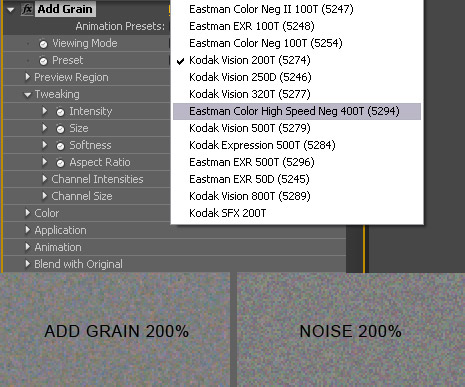
Film grain is a necessary part of visual effects and used commonly in motion graphics to add a more natural look. After Effects has great tools for adding film grain that are based on real 35mm film stock. The only problem is that it renders very slow! There is an alternative plug-in called noise that creates nice random but somewhat sparatic grain that can look a bit ‘digital’. The add grain is a much more fluid formula. Only problem is that it renders very SLOW!

What I like to do is create a grain video loop that I can place on top of my video with the overlay transfer mode. Similar to our free fast film grain preset found here, except the quality of the grain is much better.

Quick Tip:
When matching grain of CG elements with Live Action footage it is sometimes hard to see grain detail in dark areas for accurate matching. What you can apply a temporary adjustment layer to the top of your comp and add the equalize filter. This makes it easier to see the grain frequency more clearly. Yay!

Steps:

  1. Create a new comp that is 150 frames
  2. Apply Add Grain and adjust the settings to your taste
  3. Render the video out to quickTime PhotoJPG
  4. Import to AE and set the loop to 10 in the interpret settings
64 RESPONSES TO “Grain Works”

That one comes in handy with all the 3D tutorials and compositing. Thanks!

cool i notice allot how cg doesn’t match the grain of a video THANKS!!!

With everything and everyone trying to shoot HD, wouldn’t that grain take away the reason why we got HD in the first place.

by Peter Valcanas

Thanks for the tip Andrew! Dealing mostly with photos I’m usually trying to get rid of the noise.
I’ll definitely have to try this and see if I can get the effect your talking about!

Thanks again,

Pete

Just a simple question cause me, i shoot on the sony ex-1 and the DVX 100a fitted with the letus 35ex with a 50mm lense and I loved the way the it gives it a grain, I rather shoot with that more then the sony ex1.

You are a never ending flow of good ideas, and bad jokes…haha..Thanks again :)

Cool. I’m getting into more 3D compositing, so I’ll have to keep that in mind.

Speaking of 3D, why don’t you use Maya?

I don’t use Maya because I use 3D max.

Even HD footage has “grain” or at least noise and when you composite perfect 3D elements or use images they are too clean and perfect so you want to use the match grain to create a grain loop. The key is matching the look.

by electrikFrenzy

good stuff.

Thanks for the tip — Looking forward to new products being released.

Cool. That’s a great idea. I’ve done that with dirt and film scratches. Never thought of doing it with grain. Thanks.

Awesome! thanks for the info AK!

Thank Andrew, I guess that’s why i hate HD cause its just to clean, it looks like broadcast and crushes black, I know for now on I’ll be adding that grain to my footage.

Good tip thanks man.

word up home skillet, good lookin for your peeps.

Thanks for the cool tip! I was wondering if shooting a short clip with the lens cap on and then extracting the noise from that could work for this effect also? I’ve not tried it yet but if it worked you could always guarantee a sample of grain to match your cg elements with. I’m still a little fresh to this side of things so I don’t know how easy it would be to pull the noise off a nearly straight black background. If anyone knows about this I’d be grateful for any suggestions.

> john

It’s not that you should hate HD because it’s too clean. Grain is simply used to match footage. So if the live action footage has little to no grain, then you won’t have to add much noise to composited elements.

Andrew I know your always busy, but this is actually a great tip, and making this a mini 5 min tutorial to show us
an example would be great.

Thanks

andrew you are my luv

Damn youe alsome

If I go to my mail and see if there’s a message
from you I will just die!!!!!!

Please mail me and say anything!!!!!!

by ErvinTheGreat

Just a question… if you’re not using any 3D pieces or images that are “too clean” in your work.. is there a reason to add grain? I mean… lets say I have a scene where really the only special effect is a muzzle flash. Will that even require anything more than a simple color correction?

YESS!! i was so looking for this tip somwhere, i had a grainy dv footage and was tryna upgrade the quality to HD or similar and wasting time.. but this method IS what gives the realism to the shot.. to add the grain instead!!! THANK YOU HEAPS MAN!!

oh i was tryna motion track 3d txt for integration with live footage by the way!! and adding the footage’s environment wall texture to the 3d txt element with some grain should do the trick ;) thanks again :)

One of the reasons I bought and use a JVC HD100 is because of the noise/grain (on tape). It’s never clean even at the best possible setup for the camera a lens. It has a look that is all it’s own for sure. I personally like it, others may not. now all I need to do is match it in AE, thanks for the grain tip.
Jon

i’ve always figured to use noise in projects before , because if you don’t , your overall image can look too much like a print ad, too still . All my commercials have an overall motion to them anyways , like they have ADD or something.

cool

@ NONE ….Okkkaaaay! Little weird.

Any chance to see some tutorial on grading (Rob Chiu’s aka Ronin work for example – most of the OFFF open credits are just mind blowing).
Maybe I missed how you did the grading on the meteor.

I do look forward for more AE only tutorials. I think those were the most popular anyway. Evolution, Fancy title plate (BTW all over Europes best channels – Sky Movies etc.)

You’ve used the Photo Jpeg codec a few times recently. What are the benefits/drawbacks? I’m always afraid to use it because I see so many bad Jpeg stills, I know that compressor discards a lot of information!

when is last part of Meteor……………..iam waiting for that……….

nice)

AK,
Very handy tip. I’ve been using Match Grain on an adjustment layer with a source layer of video footage, but this sounds like the way to go for efficiency. As long as the human eye doesn’t pick up on the pattern, which I would wager it wouldn’t.

I liked Ziran’s question, “Speaking of 3D, why don’t you use Maya?”…… If Andrew would use Maya his question would probably be, “Speaking of 3D, why don’t you use 3ds Max?”

Thanks for the tip as always.. But why don’t they just advance technology and get rid of grain :)

Grain is awesome!

I added grain to some footage a few days back. I didnt get it to work like…well it looked worse than without grain, which was not my idea. I have to play around with it some more. By the way, I used the built in grain in Vegas. Maybe its suckier than this grain…Or maybe I suck at grain.

without grain the motion graphics would be very “digitally” and unreal.
thanks Andrew !

Andrew you are just a great guy
i wish i could help others as you do

Grain is becoming more and more intense in some newer shows… I love it..

it adds so much tension..

Thanks.. I was wondering what you used..

Grain is awesome!
Yes if you need more fiber in your diet :)

Great tip Andrew, been doing this for a while now but applying the effect straight to comp.
As you said SLOW render times even if you render out the comp and just apply the effect to that.

This is much better!

Thanks :D

for the best way to add grain is well first you take a good 3 sq acre patch of land than strap on a plow to your trusty ol mule, till up real nice, than wait till about late february and plant em in rows, come april youll have a whole bunch of grain!

by Noman Khanzada

Sir Andrew kramer my name is noman khan and i belong to pakistan. please sir can u please help me i have sony hd handycam but when i grap my footage into computer so they have grain and noise so how can i remove those noise ? please help me sir im media production student thanks

by Ziran (Joe)
“Speaking of 3D, why don’t you use Maya?”

by Andrew Kramer
“I don’t use Maya because I use 3D max.”

LOL… Classic Andrew Kramer!

Great Tip Andrew! Sometimes it is just the little things…

Hey Noman Khanzada,
please check out the forum. I’m sure that many users will help you with your problem.
cheers

Fabian

Hi, I am afraid I am not original if I say thank you very much for all the tutorials, tips, info, files, etc…you share with all of us. I am just starting to dive in the turbulent and exciting world of video effects and I really thank you for your help.

Well u should use MAYA it is the industry leader, ILM use it should i say more

thnx andrew that was helpful.

by Kilian Koeltzsch

Wouldn’t it suffice to darken and blur the noise a bit. That always seemed to do the trick with me…

And thanks for the link to the preset, I must’ve overseen that earlier.

I can see the importance of grain for matching videomaterial. I’m a wedding videographer and would love to know if there are some really good ways to remove grain without making it look blurry? Sometimes the lightconditions in churches are poor, and I have to gain a bit. Feedback on this would be great.

when is PAART 3 of meteor coming?

Hi, Mike here, and welcome to my comment…
I know this is slightly off topic but …
I would love to know what system specs you are using. I notice the way that you can just pan around in full render mode willy-nilly without too much slow down. And though it fills me with a little bit of rage, I could overcome this flaw in my personality if I were able to get a system as close to yours.

Cheers

grain IS awesome. Thx again for being there, Andrew. 10/10.

Another method of doing this to match the camera grain is to shoot a gray plate with the camera. (hold a 50% gray board in front of the camera) and composite that over the elements… :D

Anyway… nice quick thought…. I actually hadn’t thought of it myself…. but it’s just such a good solution…

Andrew: Are you kidding? “It renders very slow”…in your super dual quad-core Xeon machine!?

Have someone used grain in motion graphics to ad more realism look to their piece?

One guy did… but I killed him.

I have probably 15 pieces of 35mm, 4 pieces of 8mm
and alot of film clutter .mov files. The skips and jumps, are easy to create, and the 8mm looks alot more convincing for film look, with using redgiants frames plus, underneath for the motion. Looks also has a great
bleach bypass, with a little tweaking you can get a great grindhouse look and feel!
Oh yea, and TWITCH! That has set the standards for the film burn! THat rocks!

hey andrew been a follower or lets say disciple of your works man! hehe. i recently did a composite for a msuic video and lots of motion graphics work before i even graduate cause of your tutorials.

could u maybe post new motion graphics stuff? recently it has all been composite stuff. can u maybe if you have free time to post a new tutorial covering on motion graphics for us who dont dig 3d modelling.

thanks! and more success to you and videocopilot!

i dont follow ,i need to see a tutorial sorry am not understang the 150 frames where and how and iam getting headech

Do you apply the noise to an adjustment layer or a solid? and I cant find where is the loop option in the interpret footage…can somebody help me?

Great preset ! Just used it and the quality is, I think, much better than the preset already in AE (CS3)…
Thanks again !

Hey Andrew! I have been watching your tutorials and I think they are awesome! You have everykind of tutorial and I’d love all of them… You are just missing one tutorial :P ! You should do a tutorial talking about picture presentation! Like mixing pictures with the time.. or maybe some 3D effects and ideas! I was asigned to make the graduation pictures and memories video! I would like to use some of your ideas in my video! I always put you and this site on my credits list! :D

Well, Use “Adobe After Effects” If you people want to edit videos or still pics or whatsoever. Tutorials are also available on webs.

Noshad

Post a Comment!

Before Posting
We're trying to encourage more thoughtful commenting.  Please take a moment to write a meaningful response to this post.

Also remember to read the rules on posting first.

Leave a Comment