VIDEO COPILOT BLOG
News, Updates, Projects Files & Tips


TWITTER FEED

Fix QuickTime Gamma Shift

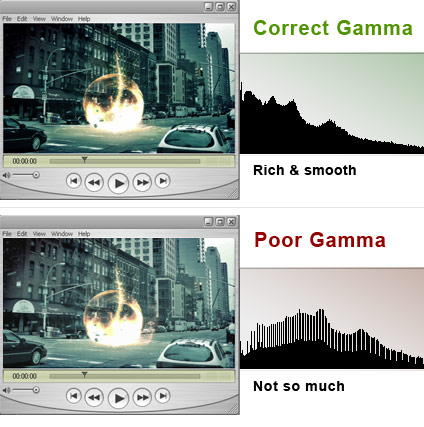
Using mp4 or h.264 when compressing through QuickTime can make the final video look washed out. This is a common problem that seemed to have no solution… until now. The gamma shift can actually be fixed inside QuickTime Pro without re-compressing your video by simply changing a few settings.

Scrimski at CGtalk.com posted a good walk-through. Thanks!

SOLUTION: After rendering into a QuickTime/h.264 file, open it up in QuickTime and select “Show Movie Properties.” Highlight the video track then click on the “Visual Settings” tab. Towards the bottom left you should see “Transparency” with a drop-down box next to it. Select “Blend” from the menu then move the “Transparency Level” slider to 100%. Choose “Straight Alpha” from the same drop-down and close the properties window and finally “Save.”

See the difference on our Promos:
Download and follow the steps for yourself.

The Bullet

Twitch

Evolution

In a few weeks many videos will be updated to the correct gamma but I though I would pass along this great tip.

89 RESPONSES TO “Fix QuickTime Gamma Shift”

That’s perfect for one characther of mine who travels in time

Wow, thats a great tip Andrew, thanks!

Greetings from Holland.

Sweet! I’ve had this problem and it sucks!.. Thanks for the solution.

That is spooky…I just had to export some h.264 files and noticed that problem…I did a quick fix by compensating by +5 contrast -2 Brightness in the AE export. It sure is a bad way to do it but nobody noticed!…good to hear it is possible to do within QT Pro…Thanks man.

Thanks Andrew! You guys always keep us abreast of things. Its nice to know you’re looking out for us, helping us along the way.

Nice! I have to remember that.

Thanks! Great tip, to improve my video.

Awesome, thanks for the tip.
I’d previously just increase the contrast levels in Quicktime Pro, but I’m glad there’s a more suitable way to fix it.
I wonder why Apple haven’t provided an update to fix the problem? I mean, it certainly effects a hell of a lot of people.

Ahh, thanks for that tip Andrew. Been wondering why h.264 renders look more washed out than other codecs. Finally a way to fix this!

Oh thank you Andrew!

You can’t imagine how long I searched for something to solve this problem! Finally I got it! Thank you so much!

Greetings from Germany!

cool! thanks andrew your great!

Thanks AK!

Thank you for this, http://www.youtube.com/user/reenhanced, thanks again andrew

I get some strange results when using those sliders. It’s like the sliders don’t react in real time. Once I move it over to 100% it takes a few seconds and then it goes white.

http://i54.photobucket.com/albums/g109/Bonesone4/Picture1-3.png

If I wait after I change it back to straight alpha, it goes back to the video once again but looks no different. ???

Here are my results: http://i54.photobucket.com/albums/g109/Bonesone4/Picture2.png

Pretty much the same right?

thanx again andrew , u’r king of ae

Good tip man thanks. It’s always the simple things that do it. =)

thanks Andrew, solved my problem

Thanks guys … great tip … long time wondering how to solve that annoying “defect” in QT.

Thanks for share! >> Scrimski at CGtalk.com

BIG HELLO TO VC Team!

thanx Andrew great tip! Quick question, where does all the great music for your promo videos come from? do you compose it in a program or somebody else composes it for you? cheers…

Thanks! Great tip,

Heck of a tip…

This will help in many ways.

Thanks!

Chris

Sorry I am a bit on a rush right know, so I’ll keep it brief:
Well, this will fix the final output slighly, but will not work (correctly) for every movie.
The trick is much more simple: Render your footage as Motion JPEG and convert this to h.264 inside Quicktime Pro. This will avoid the gamma shift at all. Try it. :-)

Andrew, do you remember? It was June 17th 2007 – exactly one year ago – as you made the first blog entry. We even saw a comment from your mother. It was an informative, entertaining and just awesome year!!! Thank you and good luck in the coming year!

Yep really a gr8 TIP. thnx

Nice! thanks for letting the community know, great tip, thanks again

Thank you Andrew, Great tip! I always appreciate your helpful tips and my work is better for it. Check out my watercross DVD project im working on. Thanks to you and your products its looking better than ever.

Great tip! Thanx fo’ sharing this (and many more tutorials).

VideoCopilot fans are doggedly enthusiastic, and rightfully so! Count me in.

I’m going to pass this tip around to some aesthetes who could use it too!

Thanks Andrew.

Hey, are you going to the Cine Gear Expo at Universal Studios?

http://www.cinegearexpo.com/

I will be going on Friday. I think Redrock Micro will be there. I’m looking forward to seeing that adapter you were talking about awhile back.

Now that you have had that adapter for some time, how do you like it?

Tim

andrew u rules!!!!
thnx for sharing this solution
the best is we dont have to re-render the videos

btw, have you seen the selective focus lens called Lens Babies?

http://www.lensbabies.com/

Check out the sample clips. Some interesting DOF effects in there.

It’s actually a Core Video issue, and something that Apple hasn’t address properly for over a year.

VisualHub users can circumvent the problem by selecting “Force: FFmpeg Decoding” when compressing H.264 material.

StaxRip and MpegGUI are great Windows H.264 encoding solutions that also don’t exhibit the issue on files they produce.

Hi Andrew!

Thanks for that tip!

By the way, what operating system do you recommend (XP or Vista) as the most efficient with APremiere and AE?

Good luck!

Not sure what i amm doing wrong guys, but when I follow the steps all i get is a white screen when i put the transparency to 100%

Great tip Andrew!!

Wow, thats a super tip. Need to get my hd camcorder first…

Wow, simple solution. Powerful fix. Thanks!

It seems that I need the PRO version of Quicktime to acess those options. But that is a awsome hint! Thanks Andrew! I really like your work!

how do u make a good mp4 file in quicktime pro? anyone know of any good settings? mp4 better then h.264?

Thank you, very nice… now how about the Contest? :D

Hey Andrew,

Thanks so much for the tip on this. How can you get around this at the encoding-level, instead of the work-around at the ‘playback-level’? Do you happen to know? You mentioned that all your new encodes will fix this gamma-shift… was wondering what needed to be done for that to happen? In other words, since most people won’t know about this quick-fix within QT player, how can we encode our h.264’s so they display properly without shift for everyone else? Thanks a ton!

BE CAREFUL:

If you have quicktime 7.1.5 [which btw, is practically useless as a standalone player] you must ignore the fact that it appears not to do anything at first.. but it does change it when it closes and you re-open the video!

BTW, anyone know the best version of quicktime for a windows XP user?!
I know AE CS3 requires 7.1.5 for QT .h264 [which if you don't need to load QT files in your AE proj for some reason, you can use Core AVC instead which has a simply fantastic and easy to use .h264 encoder] but I have so many problems playing .mov files with QT 7.1.5!!

BTW, you guys need to check this video out:
http://www.youtube.com/watch?v=oVwdAqQXf7s
I used Evolution [amazing!], Trapcode Horizon [amazing!],
and a load of other plug-ins, some Chad Perkins-esque, and
Crazy Talk 5.. vote for me please :-]!!!

Thank you VCP for the great products!!!

Thanx for the tip, Andrew! :]

U know? ive been thinking bout it…and i REALLY think, that a Good quick Tip [maybe as a part of the SHORT-CUTS] would be about Exporting\Rendering in the Best\Sharpest quality in AE.
I always feel like i dont know something, and that my projects come out not as sharp and Crisp as yours.

This is something So Basic..its a Must…and i bet alot would find this useful.
i know im probably missing something there.. :\

@ Kevin (June 17th, 2008 at 1:49 pm)

Try to encode a h.264 in QuickTime Pro out of a Motion JPEG (100% quality) encoded mov. For some reason, the gamma shift (which seems not to be encoded “hard” into the videostream but rather as information on how the movie will behave when played as far as I know) will not occur this way.

Source for the MJPEG tip: http://www.geoff3d.com/blog/labels/h.264.html
Source for Gamma-Tag: http://aeportal.blogspot.com/2008/02/quicktime-gamma-stripper.html

You know why Andrew’s vids are always sharp and crisp.. because he actually sings to them..

and you know I am not saying that a friend of a cousin of an ex-girlfriend’s blind step-mother’s father-in-law.. who was related to Andrew… told me or anything..

BUT I heard from somewhere this was the trick..

so Andrew.. the question is: how much do we have to pay for you to sing to our videos?!

Sweet! I’ve been wondering about that for my videos. Thanks man!

You all right, my clinic eye is too bad…

and now is better.

Christopher Gruber @ good stuff but couldnt you get better actors…

If anyone knows Bruce Banner, they should really point him to this page — I understand he’s had troubles with ‘Gamma Shifts’ in the past… ;p

Great tip, thank! I was wondering what settings you use in Sorenson Squeeze to output your videos so they come out clear and not huge file sizes. This seems to be a mystery to me as well as the Gamma “Crush”!

Hey Andrew, thanks for all of your hard work.

Although this does correct the gamma problem, it creates a huge amount of overhead because its actually changing the properties of each frame. Playing HD material may jerk or cause slow playback.

Does anyone know where to get the Gamma Stripper Utility? It doesn’t seem to be at the link posted anymore.

Cheers! Great business plan Andrew keep it up.

Great discovery Andrew.

Oh, and just chucking this out there-even though it hasn’t happened in this post….people asking for forums!!!!!!!!!!!!!

I think Andrew already knows that people want forums, and he doesn’t need people chanting it repeatedly in their posts. THIS IS A FREE TUTORIAL WEBSITE!!!!!!!! Don’t take it for granted people!

Does anyone else agree with this?

Andrew has a forum on creative cow anyhows….

@Ben Wotton

I 2nd that, but I think it should just be NOT to BEG for stuff. Yeah it’s a free site for Andrew to do what he wants with, but it’s also a business. I’m sure AK would agree with me that it’s fine to ask for things that aren’t here, but not to pester him with repetetive requests and anoy him. The worst thing that could happen is he says “No.”

Thanks again for the great tip Andrew.

Unfortunately the “Blend 100%/Straight Alpha” solution Andrew mentioned above is NOT a complete fix. It only gets you about half way there as far as matching gamma levels to the original. Better than nothing but still not a perfect fix.

That is great Andrew, just tryied and worked perfectly. Ty from a brazilian in Spain.

OMFSM!
Now I don’t have to tolerate Animation’s [the codec] massive file size..
Thanks to you guys.
Keep up the good work!

Great find!

I have finally got the time today to work with this awesome trick. I tried it on some of my most washed-out videos and it did a a great job fixing them! Before i was attempting to fix this issue with color correction tools but i now realize why that does not work.

Thanks for the great post and as always looking forward to more!

by Kevin Christopher

As a recent Final Cut Convert(Insert Kicking and Screaming) I noticed this right away. I Searched and searched the web for answers and got many puzzled looks by FCP users until I demonstrated it. Now finally a solution, until apple finally fixes it.

Kevin

I have a different issue when exporting with the animation codec. My videos always look alot darker after they’ve exported. Anyone else have this prob?

hey andrew

I know this is only for after effects, but is it possible that you can upload or send me the 3d max file of twitch, cause i followed the tutorial you did and it worked out great but its would be nice to have the 3d max file and play with it too (cause i saw other elements and lights)

pleaseeee, thanks!

Alvaro from Chile

Nice tip Andrew, thanks for bringing that up for us. And for Daniel H., thanks for that info as well. I will have to rerender some clips of mine to see how they come out.

This will come in very handy guys. Thanks again.

G’day Andrew!

Is this more of a QT on PC issue?

Because on our MACs we have no real issue with washed out h.264 files having produced nearly 50 TVCs in this codec.

Also, I just tried the Fix as a test on some of our MAC produced files and there seems to be no real visable change.

So I’m with Bones!

Love your work!!!

cheers
Dino

Thanks for posting a fix to this annoying problem.

The one trouble I still have is that when I render out a video with hinted streaming to be viewed in a browser, performing the gamma fix in QT seems to remove the ability to stream, causing the video to take ages to download before it plays. I’ve messed around with the streaming settings in Quicktime a little bit, but haven’t been able to fix it.

Any solutions, anybody?

You could put Sam inside that energy in tutorial it would be cool :D

@ Paul: THAT IS GREAT!!!!
What program are you using for Motion Tracikng, and do you have some tutorial on how to do that??

Moca, to make that, just use a program like Boujou, create the solution, then export the camera data under .ma . Then using Max or Maya, etc… Import the .ma file, place the cube, text or w/e and render it out.

Thanksssssssssss

did u guys notice that after this gamma fix the video playback is laggy ??? any comments on fixing the lag while retaining the gamma fix ?? !!!

here are my results of my gamma correction:
http://i28.tinypic.com/530fbn.jpg

Thanks man! That problem has been haunting me for quite some time now. I’ve even switched to flv with On2VP6 to avoid the loss in contrast. This bug ( or feature ) really mucks up your nicely graded colors.

Many thanks for the 264 fix.

Now, have you run across a solution for Sorenson 3 (which darkens the picture and increases the gamma) when we have to make QTs for people with slow computers?

pls I need to know your (Krammer) system configuration thatr makes your afffter effect work so fast cos i have this lap top with 250 g hardrive 3 g ram core2duo, 1.83ghz but my after effetc does not work well. i believe u can help cos u are a great guy. You can reach me thru my email now. Thanks.
Zaccheus.

Has anyone found a way to automate this? I’ve got alot of un-corrected H264 files that I want to correct. Do I have to do each of them individually?

Hey Andrew and Co…

there might be another way to solve this problem, at least it solved it a few times for me now:

In the render settings / output options, go to the color management tab and check the box saying “Maintain RGB” (I’m not sure it says exactly that as I’m using a german version of CS3…). That way it doesn’t mess around with color profiles and there is no way to interpret it wrong. Worked for me. I didn’t check it on TV screens, though…

Take care, everyone. :)

Jules

That just came in very handy. Thanks

This tip didnt work for me at all. Im rendering my reel out of final cut using compressor. All the other codecs work, but h.264 gives me the gamma shift. I use this tip, close and save. Opening up the file again, and it still looks exactly the same, washed out compared to the same video with a motion jpg export. I am on a mac using QT Pro 7.5. Any other solutions that work?

You can download an x264 encoder for Quicktime that is separate from the default Apple encoder, and produces better results faster. It’s still h.264, but a different implementation of the standard.

http://www.macupdate.com/info.php/id/20273

I always knew, that the author is very competent of this question! Thanks the Author! Has received weight of pleasure after perusal of clause. I would like to talk to you more in detail, on this question, but I have not found yours Icq or skype … :-[

After hunting around for more definitive answers, I came across this, which I recommend reading: http://provideocoalition.com/index.php/cmg_blogs/story/brightness_issues_with_h264_quicktime_movies/P0/

Thanks for posting this. I was searching for days to find your solution! Maybe you should post this on youtube or other sites as well. Totally worth it!

by Andrew Stewart

Hi all,

I have a quicktime gamma workaround that works for exporting h264s and other codecs that have the gamma shift issue. We use it at work for sending h264’s of telecine color grading reference to some very fussy clients, and so far no complaints :)

The blend/transparency/alpha trick comes close, but the blacks are still a little bit grey and dosent give the same results on both mac and pc. The trick we use has been coined the ‘tiff trick’ and works by tricking quicktime into using default tiff image gamma before an export.

How to do it:

1) Create a small (32×32 pixels or so) tiff or bitmap – dosent matter what color, just make it 8bit and RGB
2) Open a new player and ‘Open image sequence’ and select the tiff/bitmap. set the frame rate to whatever you’re going to be working in
3) Open your desired quicktime in another player, ’select-all’ and ‘copy’ the clip
4) Back in you ‘tiff/bitmap’ movie hit ‘add to movie’ – this will add the video over the top of the tiff/bitmap on a second video layer
5) Export using your desired codec

All going well the gamma will match your original video very closely

Dude, that was SO helpful, you saved a film of mine, thanks!

Adjusting the Visual Settings tab is BAD!

Use:
-x264 (can still be viewed by anyone with quicktime7)
or if you can get it to work:
-FUELvfx Quicktime Gamma Stripper software

by Mike Behrens

Zach – How do I install x264 into After Effects or, maybe Quicktime?

I know that it is an encoder that may require meGUI, but I once saw a screen shot showing it as a option in a drop down menu in Quicktime.

-Flyzilla-

I tried everything and the best solution for me is the TIFF trick! Thanks Andrew Steward for posting that.

I tried the following approaches and here were my results. NoteL I’m rendering out of Premiere on my PC to a Apple Uncompressed MOV file (6GB file for a 3-min reel), then going into QTPro:

1) The QT Blend/Transparency/Slider thing never worked for me (using PC, XP x64, and QTPro 7.6). It would simply do nothing, even when re-opening the file. I did notice that it lagged the file’s playback though. So I assume this no longer works in the latest versions of QT.

2) Tried using x264, but the PC version takes a CS degree to use (which I have and I still couldn’t figure it out). Tried using the x264 on my MacBook Pro with QT Pro (Intel-based, OS X 10.5.6, QTPro 7.6), but it would crash every try. Even changed a lot of the settings to try to get a different result. So no luck there.

3) Tried rendering out of Premiere to a motion JPEG. This did work and I was able to render to a H264 in QTPro but I noticed a lot of quality loss due to the double compression. This is good, but not great.

4) Finally tried the TIFF trick on my Apple Uncompressed MOV and it works beautifully. My video looks great!

Thanks for this comment thread. I searched all over and was getting really frustrated. Check out my reel at my website (http://www.rossmenwton.com).

Hi there.
I’m also having problems exporting some videos to quicktime using the H.264 codec (Windows), I’ve tried the various approaches that are suggested in the above posts, even the tiff trick, and none work perfectly, the one that produces the best results is still the QT Blend/Transparency/Slider, but unfortunately this disables the streaming. And contrary to what was posted, the tiff trick still washes the colors out. I wasn’t very successful with the QT GammaStrip, from Fuelvfx, didn’t work for me, the movie was the same after applying the gamma strip.

My question is, why does Apple has to make it so hard for normal people to use their codec, because it is possible, you just need to go to the apple trailers website, and you have nicely encoded movies in both platforms, mac and pc. I decided to switch to flash video instead for web video, excellent quality and consistent in all the platforms, and plus you don’t need to install more software, specially Apple software :P And nowadays 99% of the browsers have flash player installed(http://www.adobe.com/products/player_census/flashplayer/).

Bye.

“My question is, why does Apple has to make it so hard for normal people to use their codec, because it is possible, you just need to go to the apple trailers website, and you have nicely encoded movies in both platforms, mac and pc”

They don’t though, they have the gamma shift problem as well! It’s an infuriating problem.

Ahhh, thank you!

Having just switched to Snow Leopard, I was frustrated with QuckTime 7 (Pro). This fix is so simple! Thank you very much.

Post a Comment!

Before Posting
We're trying to encourage more thoughtful commenting.  Please take a moment to write a meaningful response to this post.

Also remember to read the rules on posting first.

Leave a Comment