|
VIDEO COPILOT BLOG News, Updates, Projects Files & Tips |
|

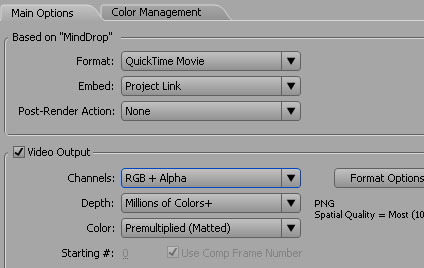
When you create a title or graphic in After effects, you may want to composite the render over footage in your editing application instead of AE. To do this you need to simply export your video with the alpha/transparency information.
To render it this way, add your comp tot the render queue (be sure to have no background layer) and use QuickTime as the output format. Select a codec like Animation or PNG and be sure to change the depth to RGB + Alpha. This option is not available for all codecs.
Some editing applications like Vegas video require you to set the properties of the footage to premultiplied so that it will interpret the transparency correctly.

Nice!
Back in the day when I was a producer on the Quantel Paintbox & Harry/Henry (before AE) we had to output Hold-out mattes for every foreground element, then line up the separate elements to pull the key.
Now we can output the foreground with alpha matte included for an automatic key. NICE!
I remember the first time I saw AE. It wasn’t an Adobe product yet. I think the name of the company was CoStar, but I might be wrong. It’s kinda like the first time I saw Photoshop, but it was called “PhotoMac”. It was a grey-scale only product published by Knoll Software, but the brushes were the same quality as the Quantel Paintbox.
I saw the future. And it wasn’t sitting on a couch telling a Quantel artist what you wanted, it was sitting in front of the computer and making it yourself.
Kai Krause taught me Photoshop. Andrew Kramer taught me After Effects.
Thanks Andrew,
c
wow, all these little nits of info are nice! Kinda out of nowhere but nice hehe. I knew about the vegas bit, but I was a bit suprised to see that you did too
And hey, dont worry about folks demanding the release of a new tutorial. I’ve been posting my stuff on the net for a while now and I put up with the same crap.
I think that some of the time they aren’t asking for its release but rather, are just trying to display their excitement. I suggest ignoring those comments even if you know when its going to be finished. Otherwise, if you tell one person, folks will continue to ask because they will hope for an answer again. You dont owe anyone anything. You give out free tutorials because you love to share your passion with others (and let’s face it, draw people in to buy your vfx products) and we appreciate both your willingness to share and your products (free or other)!
That’s enough typing on my ipod >.< … Lol
Nice little nugget of information.
Yeah the day I got hold of this a whole new world opened for me
Cool stuff
thank youso much
i’m making rollerblading dvd right now and that’s what i really needed to make titles for each person tricks in montage sections)
Thank you, Andrew Kramer!
Been using this in game development. PNG for the win.
Hi Andrew,
you told us this already in one of those great Tutorials – this about the dead planet. Thanks a lot anyway!
Regards,
Lucas
OOO, this can be very useful. Thanks a lot. Also, it would be cool if you could show us how to render out with alpha in C4D and 3DS Max.
wow great tips andrew. Ive learned so much. Keep up the good work. 2 thumbs up!
hi andrew, and all.. this is off topic, but i was wondering if theres anyway to somehow keyframe the Gravity in trapcode particular… i know there isnt a keyframe option, but is there a way to adjust the gravity of time?
I did this the other day with a green screen footage nice to see it on Video Co.
Cheers
P
Nice, I knew it was possible, just havven’t had the time to find it;)
Calling all new products, come hither so that you are to be purchased!!!!!!!!
Whoa Andrew, these bits of info help a lot to the non-savvy of the AE world…
Thanks, I really appreciate your tutorials, and really enjoy them.
Take Care!
Can we see an example of this in use anyone? I’m an idiot when it comes to picturing some of this stuff. Alphas and transparency layers all tend to intimidate still a bit.
I’ve been using this technique for a while. It’s great and it keeps the quality of the text or foreground graphics crystal clear. Nice to see it on Videocopilot. Great tip Andrew! Keep up the good work!
alpha channel, yea!! But where is the next tutorial? you promised there will be a lot of tutorials and noone knows wich comes next…
patience tommie, patience…..it’ll come soon
Give Kramer time, he gives so much to us…
Jesus with a wife like his his famliy I would never post a tute….
talk about no patiance!!
Very helpful Andrew – thnx a lot – u always keep us updated – reagrds – sandy
Nice! Good to know!
Cool. I’d learned that concept the hard way a few weeks back when I was exporting a bunch of titles. It turned out to be the simplest little thing that did it. Always does. Peace man =)
could you explain what premultiplied alpha does for the outcome?
I read somewhere something about instead of (r,g,b,a) it is (ar,ag,ab,a).
What exactly does this do? Does it just separate each channel as an alpha? I’m confused.
First of all, you are very good with teaching to with of tutoriales and I am grateful for it to you. but, what has happened with this tutorial?
http://www.videocopilot.net/blog/?p=136#comments
and the teaching perspective for reactor:
http://www.videocopilot.net/blog/?p=113#comments
I apologize for my bud english.
Gracias =)
When I get a few emails asking me a quick question, I post it in the blog.
Oh and as Conan O’Brien might say “Patience my babies…”
Industry standard is
Format: Animation Codec
Millions Colors + / RGB + Alpha.
Avid loves this stuff.
Oh. That’s pretty cool.
@clight
At first there was a “big bang” then lots of unimportant things happened in between the “bang” and the foundation of a company name COSA.
COSA (company of science and art) trying to establish a primitive form of quicktime type of software that nearly bankrupted them and later went on to develop compositing, and plug-in software. first version on AE was called EGG.
Aldus bought COSA. Aldus then was bought by Adobe.
…some one named Jesus fits in there somewhere to.
Nice to see you’re a Conan fan, Andrew! “Be cool my babies!”
Obvious but easily forgotten , thanks.
@ %$@#$
Thanks for the reminder. I should have remembered because my best friend was an employee of Aldus and was absorbed by Adobe. Duh, too long ago. Senior moment.
I think the Jesus part comes with the attachment “Lord help me.”
c
have u ever tried using maya 3D models in after effects?
TWITCH? Where is it? What is it? It’s almost March? Wasn’t it promised it in February or did I misunderstand? Thanks.
perfect example…
man, I don’t use to leave messages in blogs and forums, but the things you do, are amazing. I really realise that you know a lot of this programs, but instead of take all that like a mistery, you take valious time and you posted here, in the web, for everybody. I don’t see that kind of man everyday, you really are one in a million.
I wanted to congratulate you, and encourage you to continue with this, because it worth it more than anything, even than those marvellous things you do with AE.
Thank you, really really thank you, for the learning that you bring to me in each tutorial.
best wishes.
Seba
be patient babies.
And remember it takes time to prepare a GOOD one/product
dont take it for granted
I can’t believe that people post comments like “Great tip but where’s the next tutorial..and things like “why haven’t you done this yet” STOP busting Andrew’s BALLS for christ sake! The man has given us sooooo much….for FREE. Let the MASTER do it when he’s good and ready….GEEZ
hi, ok cool…i’m also waiting for the new product man !!!!!!!!
I do indeed agree with benny, but i dont see how Christ is going to benefit from pushy people. I like ashes approach. a simple line like “Dude im totally psyched for the release of twitch!” will do. Thanks for being considerate Ashes
Sweet! works perfect with Sony Vegas after setting the properties of the footage to premultiplied.
Good to know Andy Thanks!
certain AVI codecs also have the RGB+ Alpha option. It is not limited to quicktime.
Thanks Andrew! I look forward to the advanced tutorials DVD
Premultiplied huh?
Oh the days before the blog.
Typical! I just needed how to do this today, and where do I go in my break? Oh yeah!
Conan is great!
Andrew do you have a recommendation for any match moving/3d tracking software? I’ve tried a couple free ones – Voodoo and Icarus – with varied results.
Haha this is great!
I was trying to figure out how to export with transparency just like 1-2 days ago, and here it is.
Thanks Andrew
wat does that mean?????????????????
How about a tutorial about making flourishes aquired from vector format, broken up in Photoshop and animated using Trapcod 3D Stroke and CC Bend it?
Is this time consuming to do? (the subject matter, not the tutorial itself)
andrew, what pc do you have? I mind which components it had.
see you
Thanks for this. Weird I was having trouble with this and the next day it was posted. Does anyone know where I can find a quick guide on importing widescreen footage. Having trouble bringing it into after effects then rendering it out and importing into Vegas. Any suggestions?
I think with the Quicktime codec setup as well, if you were to change that MILLIONS OF COLORS + drop down box to just MILLIONS OF COLORS (sans the +), it would render without the alpha. So when you are looking at tweaking things, that isn’t one you want to change if you are requiring the alpha and using Quicktime. Apparently the (+) is the extra alpha channel in there, and without that, you are without alpha.
which is the better way to convert a .MOV file to a .AVI file, because, when i do this with premier my video loose a lot of quality, and when i export my file with after effects in .AVI same thing happens, i realy need help with this.
God bless you!
Charles, you have to make sure that you don’t compress the footage with any codec.
Hey, that’s the fisth time I’ve see your site and this is really great!
(sorry about my inglish).
I’m from Brazil were we don’t have material about this software,so
thanks a lot Andrew.
You have some site about your company(do you have one, don’t you?)
Sorry again, thanks again.
Hey I just made a video with Action Movie Essentials, I didn’t know where to post it, and I really wanted to show it off to this community, so there it is :
http://youtube.com/watch?v=0CBrdkGlaqU
Great tutorials and content Andrew ! You Rock
Mxthe that was very graphic.
I attended this week’s After Effects New York seminar, hosted by Adobe and Creative Cow, and Andrew Kramer was brought up quite frequently as the be all/end all of AE. Your piers truly love your work, dedication, products and tutorials. You should at least be on Adobe’s payroll.
We all feel like we know ya. And we all wished you could be the one up there giving the presentation as the event was horribly unorganized and not at all informative, fun or interesting. You would be treated like William Shatner at a Star Trek convention… (I mean that in the best way) Cheers
I hope this is not off topic, but I was wondering about “multiple frame rendering”. Many of us has these days dual/quad core and would be a very usefull feature as with this option unchecked one of my cores stays almost inactive. I tryed to use this feature, but I get an error message saying that after effects can’t use multiple frame rendering. I would like to know why. Thank you very much. Oh… and must say… you rock, Andrew… Thank you so much for your work.
Mxthe
ahahaha i really usually dont laugh at things death related… im not that morbid.. but when i seen a dude get ripped apart by that little gun, i had to laugh lol. Good job blending it all together though, bad job on the acting/camera work.
im dying for twitch been holding off shooting and everything waiting for this plugin .
is there a final date release yet?
wow ! great
hey andrew u are a realy master for me, n i wanna know if u can put a tutorial who show more moviments of the camera, like rotation on scenes and that kind of stufs ! pls !
Mxthe: Hahaha. The relentless machine gun was quite funny. Come to think of it, the acting was pretty funny too.
Little tid-bits of info are always nice. Gracias.
-Daniel Reynolds
I hope everything goes fine with Andrew? It has been quite around him the last few days?
Or he is working very hard on Twitch and the DVD and the new Tutorials!!!
Cant wait….
Greetz from The Netherlands
Rob
comp tot?
Hi, Andrew!
What version of the QT to use with AE7?
Thank you that you there is !
_ forgive for mistakes if there is_
Remember: Premultiplied Matted, that gives you nice borders when you import that footage. Great tip for video editors!
Gracias
Hi Andrew, I just wanted to say thank you for sharing that bit of info, you gave me the answer to the question I was trying to figure out in my head for a few days now. Rock on and many cheers to you good sir!
You can also chose -video for windows
– No compression
– RGB+Alpha
If u want to use it in Adobe Premiere…
I’m trying to make explosions from DetonationFilms have an alpha channel for Vegas. I export and set to premultiplied and nothing happens! Help! Does it matter if I have the transparency grid turned on?
(Slaps forehead) Exactly what I needed! Thanks
Does anyone know why a QT PNG rendered in AE keeps crashing 3D Studio Max whenever it is imported into Max? I rendered it with these settings:
format: QT
format options: PNG, RGB +Alpha, Millions of colors+ Premultiplied (Matted)
It keeps crashing Max. weird!
It imports fine into Premiere, with an alpha channel. As an alternative, I rendered a PNG sequence ( you know, with each frame a separate PNG) and that seems to work. But… it’s not the way Andrew taught us and i want to be like Andrew cuz he is the coolest.

Before Posting
We're trying to encourage more thoughtful commenting. Please take a moment to write a meaningful response to this post.
Also remember to read the rules on posting first.
Leave a Comment


Losless with alpha is also OK! I’m waiting foor your new products!