|
VIDEO COPILOT BLOG News, Updates, Projects Files & Tips |
|

Another new tutorial in the same week! Holy Carp!
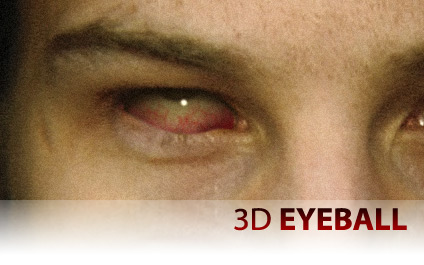
In this tutorial we’re going to create a flexible 3D eyeball that can look around a room and even read your mind. This makes it even easier to create more advanced eye effects.
Now, if you want to show your appreciation for all these free tutorials… check out our great DVDs including Evolution and Riot Gear.

Haha, looks awesome thanks Andrew
YAY
Thanks again Andrew. Certainly have used for these. While the effects in the tuts are cool, it’s everything else we can do with this that rocks. Thanks.
wow!!!! nice one, thanxs for this!!! love theses ones that i can use to make a horror movies cause i just started one with some friends for this year Halloween. thanks again
that’s a huge carp!!
Thank you, Andrew! Now it’s perfect.
Damn, Andrew! 2 In one week… you’re the man! See what happens when we’re patient? We get 2 in one week!
Great tutorials Andrew, just great.. breathtaking so on and so forth (not kiddin).. But unfortunately i dont get to enjoy them as much as i would have hoped since i have to edit LQ videos
Well… this was kind of an intro to my question. You see i have a Sony DCR SR-42 camera (i know this is by far not the best camera out there but is in my price range).. Anywho… It is recording videos in *.mpg format (i dont know if there is a way to change it) and AE CS3 does not import the kind of files it is recording (at least that i know of). And when i convert video using several different softs i end up losing quality (in noticable amount)
So please if you can help me out. Either tell me if there is a way to import mpg file format to AE, or how can i convert video format without losing quality or in worst case scenario tell me if it is not possible at all. So that i dont waste my time and nerves and just go shoot myself.. Sry again for littering your blog, just was really desperate ;( Thanks in advance and thanks again for great tutorials
Regards
Taleh
Awesome! Thanks Andrew!
Wow, 2 tutorials in a week? I think I just carped myself!
HAHA The eyes didn;t match color, but other than that, I was blown away!!
Great tutorial! Amazing how far you took this effect, I really like it.
@Taleh
Have you tried ‘Super?’
It’s a conversion software which allows you to convert from many formats (like .mpg) to .avi, flv, and so on with minimal quality loss. Good luck!
Thanks Kramer!
Interesting… Still waiting for the collection Dvd
Awesome tutorial as usual excellent work Andrew! I wanna show you something that i saw 2 or 3 days ago. Look at this music clip they use Evolution product for making the background of their video. The first time i saw that i couldn’t believe it! Here is the video [/url]http://youtube.com/watch?v=nO23DOc-vBY[url]
koooool
That hurts my eyes just looking at it
grrreat !
i didn´t expect another tutorial THAT soon.
Ãll give it a try with a dollar sign and a slot-machine-like rolling eye ..
I thought you’d missed a trick by not using CCSphere in the last tutorial, How little faith do I have
. But of course you were just saving it for yet another triumphant tut.
i know you dont want to hear the sandpaper joke, but in the picture it looks like you really tried it. But without a mirror.
Can carps fly?
AWSOME!
carp taste nasty…Great tutorial. I was just creating an I in C4d when you released this tutorial.
Hello Andrew,
Great tutorials and great products (I own a few of them). I don’t surmise you take requests but I would very much like to know how you created the subtle lighting effects that are in the basic training opening video (its a blurry fog type light flare you have throughout the opening video).
I was very much hoping to find it when I recently purchased Evolution but was disappointed to find that it’s not included (and they obviously aren’t included in the free Boot Camp Training videos.
Id be happy to pay to learn it??
Keep up the great work.
Mike Ward
wow, nice tutorial, again….
the specular makes it very realistic!!!
Hi Andrew, great tut, i just have 1 question… is that Carp real? lol
Great tutorial, Andrew. Are you planning on opening forums for Video Copilot?
I hope he dose open forums… it would make the site that much better. As for the tut, it just blew me away! Thank you!
-John
hello Andrew,
my name is andrzej from Poland
I have a question.
what do you use the computer for after effect??
i would be grateful if you write to me as soon as it posible
Jeeeeeezus – kraaaaaaaaaaaamer rocks, oh oh man I’m going nuts here, so many great tutorials!
keep it up kramer!
hey. You should check this out http://spikedhumor.com/articles/8189/Prince_of_Persia_Commercial.html
Its a funny commercial for Prince of Persia xD
My guess is that they’ve used a 3D model when he’s climbing. What do you think?
@Mike Ward
The fog light effect from what i can tell, looks to be some particles with the DOF set to make them extrememly blurry and possibly the opacity taken down a bit.
just a guess though.
Awesome Man! I have figured out a cool effect to add to this… in the EYE COMP, insert a video clip, or pic or something and scale it down to fit the eye, and then in the MAIN COMP – you get an eye reflection looking thingy! and it all follows the null! But, of course – you rule! Thanks
lol holy carp xD
guhross!!!! more please!
Thank you very much Andrew! I love all your tutorials. Superb!
BRIDGE TUTORIAL!!!
Seriously, that is hilarious…I was watching the first “eye” tutorial on Monday, and I was thinking to myself…wouldn’t it be cool if you could move the eyeball and retain some semblance of realism….and look at that…
I ask (at least in my head, I asked), and therefore, I shall receive!!
Thanks for the double dose of tutorials!
All the best,
bE
TOO COOL A K THANKS………
great tutorial andrew taught me some new things =] and the part where you make the veins is my favorite.. how do you even know how to get that look?! lol XD keep up the good work man thank yous!
holy mackerel andrew!!!! you rock… 2 in one week!
http://webhome.idirect.com/~blueeden/Personal/newspersonal/CansoMackerelFishing.jpg
@stefan: that ‘dj take me away’ video was pretty nonstop with evolution (i suspect they used the lightsaber preset for the light keyboard thing), but still, it was pretty well done. just goes to show you how some badass stock elements can jazz things up.
the 3d eyeball tutorial blows me away for a number of reasons. honestly, i learned a hell of a lot from this one (match grain & growing veins = awesome, plus a great subtle use for the roughen edges effect). really impressive stuff. i just watched ‘28 weeks later’ the other night, and i’m going to run a test using this technique to duplicate the growing veins that appear with the rage virus.
andrew: when the writer’s strike ends i’ll be moving to CA. i seriously owe you a beer for pumping out all these killer videos. keep up the inspiring work.
Nice one andrew, I really like it. Thanks for giving us some extra tip on these effects.
Just wanted to say thanks andrew having alot of fun with this program now
Does anyone have any suggestions on where to go to get information on working with footage taken with an XL2 at 60i? Having issues but can’t find a good reference with google that makes much sense. Thanks!
hi i watched ur new tutorial its good
thanks andrew
Not sure if this topic has been dealt with already…..how would one import .mv2 files into AE? or do you recommend quicktime conversion within a non-linear edit package first? (I’m thinking about importing bluescreen footage directly from a firestore, without loss in quality)
hi andrew,
firstly cool tutorial as always.
now to my shameless request, is it possible you could do a tutorial on the indiana jones red line on the map thing? you know what i mean?
i think it would be cool, and as i know your a bit of an Indy fan yourself i’m sure you could bring yourself to do it….:)
dan.
Andrew, you’re amazing. You’re a great and generous teacher.
Love the Holy Carp Link!
Keep up the good work!!!
Luke
wow i just got done watching it, it was great but i noticed it was kinda hard for you to match the eyes what you could have done it the with the real iris there was lines going toward th pupil, you could have replacated that on the fake one, or you could have made the real one fake like the other one but that would not have worked because you were trying to make it look like the real one, anyway i loved it prolly one of my favs. keep it up. i have purchased all of your products. i am always happy when you announce a new product. and daniel challan who posted on the indiance jones line just make the line and use stroke. pshhht ameutures (or however you spell that)
Great job Andrew.
Just a suggestion.
Do you remember Professor Moody in Harry Potter films ?
What do you think about a variation in 3D eyeball tutorial replicating Professor Moody eye ?
my version here, notice how ive used riot gear on the face also …
http://www.stage6.com/user/Realtime/video/2159493/Zonbiefied
A
See you in New York
Have you seen that Paula Abdul dance like no tomorrow video? I’ve been hunting around for that slow motion shimmering depth of field glitter- on the video it’s obvious just a overlay, you would do it so much better… love to see a tutorial of how to create that effect. I’ve already looked in the wondertouch product line for a pre created emitor – no dice. humph
Here is a link to a video I created using this tutorial specifically.
Youre the best Andrew

Before Posting
We're trying to encourage more thoughtful commenting. Please take a moment to write a meaningful response to this post.
Also remember to read the rules on posting first.
Leave a Comment


this guy needs to lay off whatever he’s on, lol