VIDEO COPILOT BLOG
News, Updates, Projects Files & Tips


TWITTER FEED

Compression for the Interweb

How to compress for the web? That is the question. Well, there are a lot of options out there but the main consensus is that you don’t want to use your creative programs like Premiere or After Effects to do it. Although you can use great formats like MP4 and H.264, the handling of the compression is not very good.

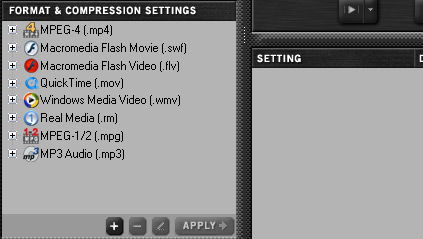
I use Camtasia Studio to record and export my tutorials in the FLV format (flash video) and the results are great but require some tweaking. The new camtasia studio has some great features although some important ones still missing… Another good standalone app is shown above called Sorenson Squeeze which allow batch processing of many great formats but some need to be unlocked to use them. The one think After Effects does well is exports to Flash Video, but you need to have some flash experience to embed the video for the web.

Our good friend Aharon Rabinowitz has a pretty cool training DVD that covers how to properly compress video using a bunch of different software. He is like that magician on FOX that gave away all of the secrets and he was smart and wore a mask but then he took the mask off and that wasn’t a good idea because all the other magicians killed him or made him dissapear. I think that is what happend… anyways.

Check out his DVD if you ever need to that kind of stuff it is good one :)

UPDATE: Here is a link to one of the lessons:
http://library.creativecow.net/articles/rabinowitz_aharon/ITKVS.php

54 RESPONSES TO “Compression for the Interweb”

I’ll second Sorenson Squeeze.

Had really good results using this program for all kinds of different media, the newest version is pretty fast too!

Episode Pro is another that gives good results!

Laters

by Morten Enoksen

K, i will!

i’m #3 :) :)

great info

I certainly need to pick up this DVD. There are so many different ways that I’ve tried to compress my movies and every one of them is slightly different. I just finished a movie that I’m posting on sat. and I think it’s like 6.2 gigs!!!! trying to compress that for the web is going to be pretty tough. I may have to split it up into seperate parts.

Bones

I picked up this DVD the day it came out. Chock full of great information. I agree, I can’t recommend it enough either. If you think you know how to compress your video, you may, but Arron really gets in to the settings on this disc and give you a real, Ohhh that’s what that setting does, experience.

It’s only 6 in the morning here. I meant Aharon.

Only if his tutorial (demos) showed more in depth examples such as you do Andrew with your tutorials, perhaps i would have jumped on it when it was first released. You have to give a little, then a little more sometimes to gain in the long run. I’m sure you see this in your case. If a chicken bone wont lure you in, throw a chicken leg and they will come.

Jeff, thanks for sharing your experience.

the masked magician on Fox TV was not killed! He is magician Valentino who never made it big in Vegas. After being uncovered as the masked magician he did not manage to succeed all the same. The “secrets” he gave away were mostly bogus methods invented for the occassion, not the real deal!

Great Andrew thanks!!!

In case anybody on a Mac wants to do screen capturing, you can capture ANY SIZE, ANY frame rate, ANY resolution, and compressed ANY way you like…it’s from Ambrosia called SnapzProX: http://www.ambrosiasw.com/utilities/snapzprox/

You and Aharon rock the AE world!!!! For realsies….

I need to pick it up as well. One more thing to add to my list of wants.

I hope I can convince my pastor to let me purchase the DSFX and the soon-to-be-released Evolution. I already own the Riot Gear and he likes that in the Youth Activities promotionals. When we decide to go bigger for our videos, I’ll definitely have to check out Aharon’s DVD.

I’m 98% sure that aharon has the great same taste of humor as Andrew has :D

@ Tobias

I disagree, Andrew’s humor is much better.

I always use windows movie maker for compression…. the size will be like: from 300 MB to 50 or so….. but the quality will be very very low, but good for youtube…. (windows movie maker calls it the best quality , lol)

I also use Windows Movie Maker for compression! My camera kinda sucks so i don’t see any difference in the quality. I so need to get a new camera -.-

I just ordered this dvd yesterday and can’t wait for it to arrive in the mail. Kind of funny you post a blog topic on it the day after…

Windows movie maker? *gunshot*

I agree Andrew….on my Mac and PC I use Squared 5’s MPEG Streamclip which does a GREAT job and it even includes an approximate file size. But on the Mac I usually use Compressor 3.

Why do you need After Effects if you have Windows Movie Maker? Together with MS Paint they are unbreakable!

I usualy export my movies to .mov (H264 or Sorenson3) using After Effects. But the problem is that Black becomes Grey and the White is not White anymore. So I have to create Adjustment layer with some Sharpen and Curves on to make picture a little more contrast… And the result is acceptable as for me…

I do the same thing on occasion for MPG2 compression. Compression Color Compensation.

hey dont be talking bad about my win movie maker and paint .. =\

andrew i know you use vegas thats the reason i got it
can u give me some tips of exporting final projects in vegas?
and what type of fiiles u render out from after effects to put into vegas ?? pls

every time i try and render out a project in vegas the quality is all lousy and the ratio gets screwd up . i went to creative cow to try and get the low down but didnt get much help . my email is owiseo@aol.com maybe you could drop me some tips .. or post thme in here about vegas. seems like your the only one i can learn from ..
i feel all a.d.d. when i watch some one elses tutorials or try and read thier explanations

I bought this DVD and it is a great one. The DVD is very helpful and provides what you need to know when you in this business or do produce videos for Fun. Of course I buy as you should do the Products Andrew offers, they are all flawless and provide so much beyond the free tutorials you can watch here.

Thorsten Meyer
http://www.StrongMocha.com/

DFX (Digital Effects) VFX (Visual Effects) Compositing Food

Aharon and Andrew, separated at birth? just kidding
this was very informative, thanks AK

btw, anyone else have problems importing avi(xvid) files to AE

Andrew any tips on setting up after effects a core 2 quad with 2gb of ram? I’m not sure of what to do to get maximum performance from my machine.

i just use Compressor for mac. the settings are there and fairly easy to use. plus you can export the same project with different settings for different uses at the same time.

Aharon is cool. He’s 2nd place on my video editing learning list. I should pick up that dvd even though my target isn’t the interpipes.
I’m kinda confused why his parents stuffed an ‘h’ in his name though :P

by scott middleton

Hey I bought your serious effects and compositing DVD a while ago but I wondered what encoding software you used on the DVD transition videos to get them into m2v’s

Scott, for transitions, I believe you can use really any format, encore should encode it for you. Some one correct me if I’m wrong.

by scott middleton

thank you

Yo Andrew..

So how about when your actually capturing the tutorial. Do you keep your resolution at full, and shrink after effects up to 1024×768 then capture that area? or do you actually change your screen resolution and capture full screen.

Also I notice on some of aharons videos he is doing zooming and such do you guys record your videos at a higher resolution and size them down?

I honestly cant think of a good way to say thanks for everything you have given to the film community… but I think you get the idea! thank a lot man

and thanks to Sam too… I feel like he doesn’t get the love he deserves! :)

-ross

To be able to open an Xvid file in AE, you need a plug-in, but I’m not very sure if there’s really a such plug in for After Effects.
Kramer, you’ll be better of answering that one.

Drobins, take a look on Gridiron Nucleo 2.0… I’m working on 2xXeon E5310 and the only way to make 8 cores to work at ~100% is using Gridiron Nucleo…

CRAZY stuff!

That will REALLY help me!!

Thanks!

Hi mate,

Looked on Creativecow.net but couldn’t find an answer to my question, was wondering if you could answer ir for me…

Is it possible to buy the DVD as a download, in the same way as your products?

I ask because UK postal services are on strike at the moment and I’d may be waiting weeks to recieve goods from the US.

Cheers.
CraigT

f1a5h84ck thanks i’ll take a look

…maybe an another tutorial for the Star Wars birthday ? it’s today !
Common Andrew ! :p

(sorry for my english, i’m french ^^)

I already bought it and now looking forward to get it.
I need to learn as much as I can.
Thanks for sharing all your knowledge, I still remember the first time that I saw your site……wow,wow,wow I am startin to become very corny..

Andrew, when can we expect to see a trailer for your great new DVD?

We didnt kill him Andrew, we just reminded him of how hard it would be to go to the bathroom with ten broken fingers. He went away. Also you need to proof your type a little better. Think should be thing.

I recently discovered the free Riva FLV encoder and I’m very happy with the results. Much better than CS3 Flash encoder … (or may be I don’t know how to use it)

I use Cleaner

And I call it the Interweb too!

cool. I picked up a few dvds there. was going to get the particle one but its set up all goofy on a stand alone site. guess I’ll mess with that later.

Andrew, I have entered into Apple’s Insomnia Film Festival. The Only effect that I used the entire 3 min film was your day to night preset. check it out, and if you have anytime or like the film please vote for it either today through Nov.

http://www.youtube.com/watch?v=W5TZTCugYRI

I use the RIVA FLV encoder:

http://rivavx.de/index.php?encoder&L=3

It’s lite, fast, and easy to use. And the image quality is superb!!!

Ross Gerbasi – I capture at 800 x 600, scale down to 320 x240 and zoom in and out with AE.

bwoogie – Technically, my name is actually pronounced Ah-HA-rone but growing up I was called “Ah-Rone.” According to my birth certificate, my name is actually Aaron, but all of my ID’s says Aharon. Someone somewhere screwed up. I like it.

mark – I think after giving away about 8-9 hours of free video tutorials, you’d think I’d have shown enough to convince you. But it’s still a good point. I hope to release another meatier chapter in the near future.

J – We may have been separated at birth, but he got all the looks.

Tobias – Andrew is funnier hands down. My target audience is males… who are my age… who are… me. If anyone else laughs then I consider it a bonus!

Everyone else – thanks for the compliments and support!

Andrew – Thanks for the plug. You rock, buddy.

Aharon Rabinowitz: Thanks man. You do that for all your tutorials? It would seem 800×600 is kinda small in this world of CRAZZY HD everywhere… So do you take your screen resolution down to 800×600, or just capture a 800×600 section of your screen? Do you capture higher for your DVD’s?

Andrew: Do you do the same thing? Capture large, and shrink? It seems the VCP tutorials are 1024×768, I think. Do you just capture a 1024×768 box?

thanks guys
-ross

Ross – I keep AE’s interface size to 800×600. It works for me. The bigger you go, the larger the file size needs to be, and I really want my content to be accessible to as many people as possible.

My latest DVD was captured at 1024×768. I was working with a lot more than AE, and needed the screen real estate. But I output my tutorials at that resolution and at 800×600 for those with slower machines.

Sorry Aharon… that comment was for andrew…

Hi all. I have been following you for a long time, and I always wanted to know where did you get that great flash video player you use in your video tutorials. Did you build it your own?

Thanks!

by Marc Biorklund

@scitrek
The Flash player Andrew use is:
http://www.afcomponents.com/components/flv_player/

It cost around 25 $

Andrew!- I loved masked magician reference. I was about 13 when he did his TV specials and at that time I was VERY serious about becoming a magician. Now I’m 24 and working hard to improve my VFX. Only recently did I come to the conclusion that the reason I love both so much is cause I love to fool the eye and the brain into thinking it’s seeing something that isn’t there and vice versa.

Aharon!- Whatever Andrew says…You are WAAAAAY cooler than the Val Valentino (AKA “The Masked Magician”). I can’t even put into words how much cooler you are than him……you too Andrew.

sorry for the off topic post but I laughed inside when I saw it.

Post a Comment!

Before Posting
We're trying to encourage more thoughtful commenting.  Please take a moment to write a meaningful response to this post.

Also remember to read the rules on posting first.

Leave a Comment