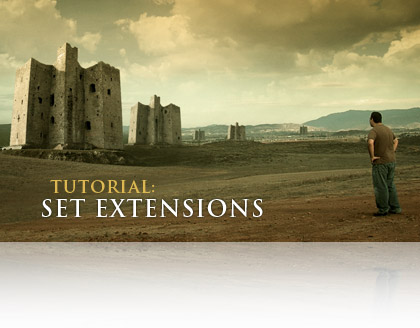
TUTORIAL: Set Extensions

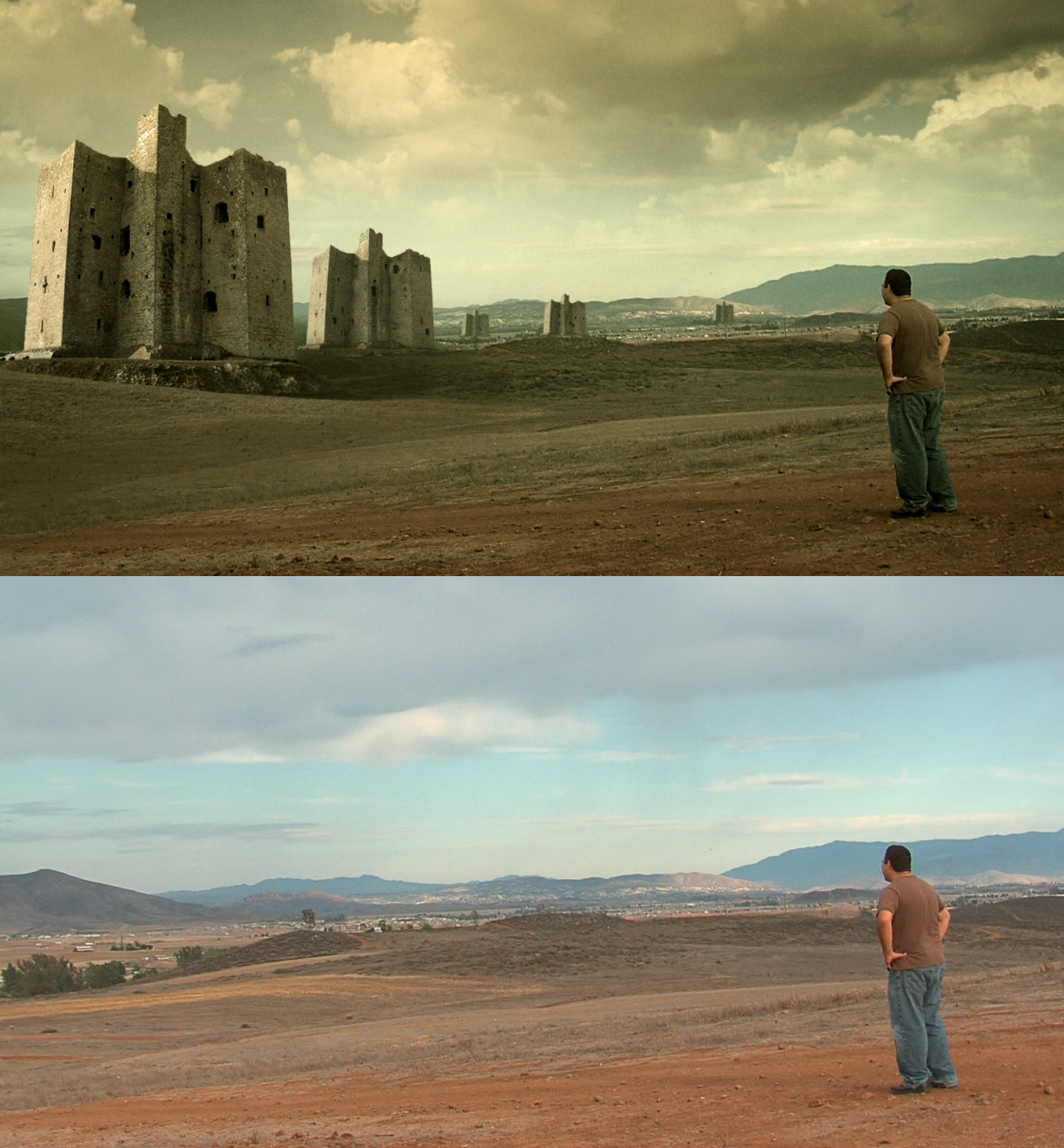
In this video tutorial you’ll learn to incorporate matte paintings with your live action footage. You’ll also learn a great technique for linking tracking data together. Plus a bunch of other cool stuff as well maybe some MS paint too!

Watch Tutorial
View Still Images

It’s another long one; 30 MINUTES! … and I love Canadians :)

UPDATE: Sean Emer, has created a great video demonstrating the Photoshop portion of the tutorial at normal speed :)

http://doodlesofamadman.com/PhotoshopSetExtensionforAK.html

UPDATE 2: I may also make an update and cover some 3D tracking techniques to incorporate 3D Sets as well. But don’t expect that too soon :)

ADMIN NOTE: Please read blog rules before posting. Remember we’re still on old servers so thanks for your understanding.

297 Responses to “TUTORIAL: Set Extensions”

Yes, awesome, thank you Andrew.

Also, whats this tutorial all aboot? (Ha!)

Wow, that looks awesome!!

Checking it out right now :).

Sorry to spam, but it’s a clydesdale horse. http://www.suomenclydesdale-shire.com/images/clydesdale_clara.jpg

Delete this after you know, haha.

I’m going to allow that. But let’s not elaborate further. Thanks

Guess what I will do for the next 30 min ? :D

wow Im impressed with the jpg image and now Im going watching to video Nice work Andy ;)

Cheers
PBoy

Great work Mr Kramer

awESOME!

Great Tutorial. I was looking for something like this for a long time. great work ;-)

Thanks a lot!

by Justin Kirchhoff

Great stuff once again….I’ll post a video on you tube with the same footage. I got an idea.

W00t for the tutorial

Waho ! It’s the best I have never seen ! I’m very happy ! :)

Awesome tutorial, to bad its gonna rain so I can’t get footage yet. :( But when you did the tracking, is that 3D motion tracking?

by Bryan Benitez

You have done it again Andrew!! Thanks!!

Awesome tutorial like always,
Thanks

WOW that was amazing I always wanted to know the best way to use tracking and that did it :), … could not stop laughing throw the thing funny guy Andy, Cam is going to work with me tomorrow and after it (or lunch time) Im going to try get footage :)

Cheers
PBoy

great tutorial. I’ve been wanting to get into matte painting but I was worried about the tracking. You solved that issue for me. Keep up the great work.

Cool tut. I’ve always wondered how to track things that were out of frame, and now that you’ve mentioned this way, it all seems so obvious.

SB

Great, Andrew. I just woke my wife because I laughed too loud at the end of this tutorial, brilliant that MSPaint stuff:)
It was really worth the wait.

The link is going to the tutorial page for me..

Hey Andrew, another great tutorial. Can’t wait to try that stuff out. You should make a one on creating photo-realistic painting with MSPAINT. I’m impressed… once more.

Greets from Germany,

b-Roc

Andrew, how do you make such photo realistic images in paint! lol
damn that was funny! :P
Amazing tutorial as always
Oh yeah any updates on any new DVD’s

thanks…
Rick

Oh great! It’s midnight here and I’m just about to head to bed when a tutorial goes up! Darn you Kramer I need my sleep! Sounds like a good one though and may come in handy. Looking forward to trying out the techniques.

Just watched the tutorial, it’s really great.
Thanks for the sharing Andrew

Hey Andrew

this thechnique rocks, so useful on composing.

I’ve bought some matte painting dvds but they ain’t good
Seriously you straight forward, I don’t know how we can repay you back? dobule buing your DVDs?

And I wonder if you gonna jump on any 3D compsoing and tracking software? there is a program called mocha you can track off screen too. but your 2 nulls usful for seperate color correction too…

regards

p.s by the way your film magic pro did some magical look in my little brother video.

please take a look and let me know what you think

http://www.youtube.com/watch?v=FLrTqM1REQ8

Glad to have you man

This is awesome! OMG, this is too good for a free tutorial. That’s what makes you the best, Andrew. Thank you very much! Keep up the fantastic work.

PS: At the end I thought you will come up with a Windows Movie Maker tutorial… :-D

Love the tip about linking motion tracks. Thanks!

very cool tutorial. I had always wondered how to link multiple motion tracks… thanks for the tips!

Amazing tutorial Andrew. I can’t wait to go try it!!!

Jonathan

By far the best tutorial ive ever watched, and its what? free?Holy crisnap you rule Andrew. It kinda makes me feel bad for total training though, I think they may try to buy you off in the future if the havent already. Good job, it was well worth the wait. Viva la Canada!

Hey boss ,on this one i have to say that once you jumped to photoshop i lost intrest in the tut, cause i thought its going to be only AE .I think if its an AE tut it should stayed in AE only ,don’t forget not all of us are masters in these things .i feel like i was waiting for something realy cool that guys like me can work with .dont get me wrong i love the look and the castle thing but the prosses is to hard for me once you start blending two progs together.

by Micklevietch

Hey Andrew! I check your site most days (it’s a quick link bookmark!) Never posted before but just though id say thanks! You must put alot of time into all this free stuff and i think its top.

Cheers,
Mike

Great tutorial thanks, this is very useful.

“big horses with hairy feet,” nice andrew, nice.

@clancy, keep in mind, as andrew said, it can all be done in AE…. but learning these other programs will make things so much easier on yourself. seriously, photoshop is such a great program

Great Tutorial, I’ve been looking for this!!! Thanks Andrew!

I know i work with photoshop cs2 and painter x but as for the vfx it would be nice just to focus in one program .its been so long and i was exited to come out with somthing with midevil time scene but cuase iam shooting a dark film and this tut is perfect to what i have in mind but phtoshop made it difficult for me.
judd.

Wow… love the tutorial, but a little fast on the photoshop portion… Had to watch it a few times, but i still don’t think i got it. Cool tutorial though, gives me lots of ideas, assuming i can pull off the photoshop effect.

Keep up the great work, looking forward to seeing the new site.

by ian t hammer

Andrew, Fantastic work as always, multiple tracks, lovin it,

Once again thx for yet another truly inspirational tutorial.

ith

@ clancy, I know what you mean, but in a creative field like film, you should never be afraid to approach a learning opportunity Photoshop is very similar to After Effects, and it is the industry standard for still photo design and manipulation. Knowing how to use AE is good for a resume, but knowing how to use AE and Photoshop is even better.

“If you fall off the horse, then get right back on. If you find a horse that you have never ridden on… try climbing on, you might like it.”

hahahahaha! that was funny! i loved the mspaint part! my family thinks i’m goofy cause i’m always laughing at the computer! :o

Very nice Andrew. Worth the wait! Thanks!

Fantastic tutorial!
gotta love mspaint - by the way they looked like 3 outhouses for sam to choose from.
Oh, us Canadian’s don’t mind the jokes. I’m watching this tutorial in my igloo as we speak.

thank you, sir.

Without a doubt the best tutorial yet, and that’s saying something. Andrew, you’re the greatest. THANK YOU!!!

rjf

by Jack McKinney

Wow. Just wow. Holy mother of…

So here I was thinking that Andrew was talking out of his…well you know…when he said that this would be a top 5 tutorial (or top 3) but man was he right. That was absolutely fantastic work. I’ve read a number of articles where industry professionals debate whether or not AE is actually a feature quality compositing tool and I think Andrew’s work alone pretty much proves that it can be, if only for specific shots. Between this tutorial, the earth flyout and his ridiculously easy method for replacing blown out skies, he is singlehandedly showing just how powerful AE can be in the right hands. There will always be a place for the Shakes and Flames of the world, particularly for large effects houses that require built-in network file sharing and node rendering, but I think he shows that AE most definitely has a place in any video production arsenal.

Amazing work as always, Andrew.

But still no mention of the baby? Are we still waiting? Can’t wait to hear that the baby Kramer has arrived. Good luck.

Jack M.

Andrew, that was simply amazing. Frankly, call me lazy or inexperienced, but I never considered using multiple trackers on footage with things that go out of the frame. You have literally saved my life sir haha.

You are a gentleman and a scholar, and don’t let anyone tell you otherwise.

Thanks for the new tutorial Andrew - It’s been a tough last few weeks without a fix.

I think I can speak for all of us here when I say - we know how tough things must be with the new servers and site, to say nothing of impending fatherhood.

Now on to the tutorial

You are on OK dude!

Pete

OH CARP! I’m canadian!!!! It’s carp isn’t it??? Crap, Carp, Carp, Crap.

Great tutorial, we just got a JVC HD7 and I was trying to do this very effect as i had a sky i wanted to replace on a pan shot but couldn’t figure out how to track it. Now i do.

Thanks Andrew

Great tutorial Andrew! But hopefully in the next tutorial you’ll explain to us what Frank Marshall has to do with 300!

Wow. This extends my knowledge of what Adobe After Effects can really do.

This is great!

Peace,
Asher Kaye.

OH and yes, my pet penguins watch the tutorials as well. Some other common myths are that we Canadians don’t have power in our igloos. Well, how would I be on the computer then?

Nah, as long as we can make jokes about americans, americans can make jokes about us.

Hi Andrew, are you going to do any new DVD’s please …

Dude! Seriously! You are out of control. You are single handedly teaching a generation of mograph and visual effects artists (oh… hi COW, I was just kidding, you’re important too.) Speaking of which, what happened to Serious FX? Not that it matters. I’d rather tune in here, without a download. You and Aharon should team up on a tut. You two could literally blow our minds.

Thanks for sharing your talent, knowledge, and experience with us. Just when I think you couldn’t top the last tutorial, you do. Where else can you learn the basics of matte painting from the comfort of your home for free? You know how to roll, baby! YES!

Brilliant as always. Please don’t branch out to Photoshop, you are my primo AE guy!

So that was probably the best, least patronizing photoshop tutorial ever, and that was merely while you were on a tangent.

The MS Paint stuff was just too funny. Good to know this technique is so accessible. And it’s to see you’re having as much fun as ever with these tutorials..

You’ve inspired me to go out a shoot a small little idea I’ve had for awhile, but didn’t think was practical without a huge budget. So thanks a lot. I’ll post a link once it’s done.

Oh, and if anyone has the time, check out a spoof fitness infomercial I just made for a friend’s showreel: http://www.youtube.com/watch?v=U6BCG9jCtrI

as always, awesome work Ak, thankyou…

love the MS tute too, I so forget to use that program - this link is “on topic” ;)

http://youtube.com/watch?v=Hxx2KcPWWZg

Any news on the baby?

very nice, this is one that i really think is extra useful. thanks for not leaving us hanging even when your super busy, but also no pressure. we know how busy you are. thanks for the killer show, and thanks again.

Niiiiiice!!! Love the integration between PS and AE.

well done andrew. can u please provide the files the jpeg of the castle and the footage. i got nothing to work with to practice???
many thanks for all u doing
daz

Wow, great stuff Andrew. Exactly what i was looking for. Time to contribute to VideoCopilot and buy some dvd’s :)

Keep up the great work.

-George

Educational and funny tutorial, i liked that last bit near the end… Great job! :)

Hey Andrew,
Could you add the _blank statement to when people put in links so that it opens up a new window and VidCo.net stays put?

That for the tutorial.

lol, love the paint thing in the end. however, me and my genius-ness forgot i don’t have a camera when i bought production premium, i always borrowed my best friends dads which is fancy and HD but he broke it and now i don’t have camera. im very sad cause now im back to good old miniDV which i have to talk the teachers @ school into leanding to me for the weekend…. but the point is maybe you could add the project file when the new site up? it would be greatly appreciate, if not, thats cool. thanks a ton, your tutorials mean a lot to me. Amit ; )

Ahhh… The pure entertainment value… Worth every dime…

That was fantastic! Thanks again :) You use a little and make a lot!

Great tutorial and one of the funniest ones! Hey Andrew I am going to shoot a movie here in Brazil soon and I am going to use the demon face effect in it. Thanks for all the tutorials so far.

I got curious tonight about making video tutorials, so I threw together a crude 10 minute tutorial that goes over the photoshop part of the set extension tutorial to see what it was like putting these together. Its not as good as an AK tutorial, but it might help some people who aren’t familiar with photoshop to catch up when trying to do their set extensions. I hope that Andrew doesn’t mind, lol.

http://doodlesofamadman.com/PhotoshopSetExtensionforAK.html

I don’t know how long that link will hold up with my bandwith, since its free hosting and all.

Hi Andrew,

this is a very helpful tutorial. Well done as always. Poor Sam has always to go to grotesque places.

Thorsten

http://www.StrongMocha.com
(GFX VFX DFX Compositing Travel Food)

Very nice man thanks a lot, it got the creative juices flowing as always. Good luck with the new site and more importantly with your baby.

I like adding the photshop element to the tutorial. You can rarely complete a project using one program so it is nice to see some ways to combine them. Can I add my voice to the calls for Sam hosting some photoshop tutorials on the new site (cos you clearly dont have enough to organise!).

Thanks again, all the best.

Sweet tutorial. Just got home from work and have to work again in 8 hours. Now I am not going to get any sleep.
Check this out guys.

http://www.youtube.com/watch?v=UobxabpUGF4

Sweet tutorial man, and you only really covered the basics of what you can do with this technique… I mean think about it, you could make a whole town, or add mountains, trees, rocks, etc… I said it once and I’ll say it again, SWEET TUTORIAL! :)

awesome once again. whens the next one? :P

Awesome stuff as always, Mr. Kramer!

However I’ve always wanted to ask you this: could you kinda go into motion tracking a little more? I know I can find other tutorials and texts on other sites or read the AE handbook, but I’d much rather learn coming from you - in fact, thats probably the only way I’ve really learned. So if it isn’t too much, could you possibly sneak into one of your future tutorials a couple tips about motion tracking? Where are the best places in the footage and what kinds of points work best? How do we know how and when to resize the two boxes?

I would REALLY appreciate if you could teach this a little more since IMO the best way to learn is to learn it in context with the best AE tutorials around. Your tutorials really do mean a lot to us, so thanks!

by Josh Johnson

I must say this was great one of my favorites!!!! I hope to see some Cinema 4d tuts in the new website!

nice tut AK !! We’ll wait for the 50 tutorial DVD, I HAVE TO BUY IT!!

VIVA MEXICO!!

Frank Marshall LOL, I”m an idiot. The research team was out.

@ Clancy, I understand what you’re saying, but sometimes AE isn’t the best program for every effect and I wanted to show you the best way to do something like this.

The tutorial is mainly about compositing in AE, many times you will have a different artist create the matte painting for the shot and your job is to composite it. In your case as a painter, you could seriously paint it in your studio, scan it in and bring it in to AE.

In a real situation you would export the still frame and send it to the matte Painting artist and he could create the files for you.
http://www.mattepainting.org/

Sean GREAT WORK. please send me an email, perhaps I could host it with this tutorial, I think it is a great addition.

Good car video Jason :)

PS Thanks everyone for following the rules.

OMG AWSOME PLEASE MORE STUFF LIKE THIS AND MATTE PAINTING PLZ

by Andrew Brinkhaus

Hey Andrew, once again an amazing tutorial! I have always wanted to know how to track scenes that move on and off screen. Thanks so much!

You are awesome for distributing these free of charge. Keep on keepin’ on!

Thanks, that was really great. I think that was the best “SAM” trash talking yet. You probably owe him a few dinners after that one though. You are really making it so easy for us all to learn this stuff, I feel that I “OWE IT TO YOU TO BUY SOMETHING!”

Thanks for all the hard work. Maybe SAM should hi-jack the PC and do his own tutorial.

This tutorial is really nice, gives all of us a HUGE new tool to experiment with, thanks.

Great thank you

Thank you!!

how did you get such a good track. My computer almost never cooperates on tracking. I have been having to do it in icarus. Even when there is just one thing on the comp, it still messes up on tracking. I think you should do a small tutorial on just getting TRACKING TO WORK!

Wow. It kinda sucks though cuz I just did something that needed double nulls for motion tracking like this talks about, but I didn’t know how to do that. I ended up doing it the hard way and it took me longer. Well, this will be good for the future.

And to clancy, I know you’re hearing it from everyone, but Photoshop and After Effects are great programs to use together. In a perfect world, you have someone in different departments to call on, but when your’e doing it all on your own, you need to know everything about both. It really helps. I was just working on a logo for a company and I started of in Photoshop, and then I went into to After Effects for some 3D and lighting effects that I had to do, that were basically just easier in AE.

And Andrew, thanks for the heads up on Color Range in Photoshop. That was awesome. I mean, I knew about it, but I never thought to use the shift key to pretty much remove the entire sky. Awesome! You learn something new every day!

THANKS SO MUCH FOR THE NEW TUTORIAL!

Andrew,

Been a huge fan for a long time and this is just another great tutorial you’ve put out. I feel like I should give you some royalties or something for all the great information you give us.

Good luck with the kid and all and keep on keeping on!


James

Cinematic!!!!

wow! amazing work! thank you!

never knew about these cool mspaint features… :-)

Nice cool tutorial and very usuable
How about another one composing 3D elements and 3D Tracking?
Thanx for this one :-)

Finally,
thanks for the tutorial but i was wondering what After Effects you use because i’ve got 7.0 but i can never find motion tracking and when i go into help it says that it’s professional only ????
Thanks anyway though.

Haha, the paint-work was nice. :D

Great Tutorial.

Woow, anther is out! And with Sam Loya, thanx :)
This tutorial is amazing, very simple and powerfull!

Great one again. Thanks Andrew

This was probably one of your most useful tutorials yet!

you super man!!cool!:) greetings from ukraine

Awesome work again Andrew!!!!
I think it would be nice to have the possibillity to download the video tutorial since it is very useful instead of following the proccedure of loading the html file agian an again…thanks!!

and I must say:

your matte painting rules ;) :D

Yeah that was amazing. Its funny, i’ve been experimenting a lot with matte paintings in PS recently and then Andrew comes up with this. Great stuff. I’d love to know how to remove objects from a scene though through matte paintings. I guess thats more of a photoshopping tutorial. Great work anyway! Cheers

Thanks for the tutorial! You are the best Andrew, but hey man don’t trashtalk paint. It’s very useful in all my works. Here is an exampel of one of my earlier works.

http://youtube.com/watch?v=uk2sPl_Z7ZU&mode=related&search=

What to say! I have made a lot of improvements since i know your website. You are Amazing!!!!!!!! The best in world! Thank you again, direct from Brazil.

by Morten Enoksen

OH YEAH!!!!!

Just came out of my mind an idea………..Andrew how about making these towers coming out of the ground like growing and exploding????

Yeah….yeah……i must be thankfulll for the things yo gave us but i think you like challenge,,,isnt it?

Love it. You actually cleared up a problem I was having with tracking in other projects, and this looked great. Dunno how you worked it out but good on you for sharing this.

p.s. the horses with the hairy feet are “shire horses”

by grafist from algeria

hi Andrew!!

without any doubts, you’re the king of AE, Especially you didn’t use any blue or greenscreen to make it!! realy cool

by the way, please i’ve AE PRO CS3 and i wish if you could make just a little tutorial to speak a bit about the new features of cs3 ;)

thanks again
hakim from algeria

Sam looks exhausted…he must have been walking all night to get to those castles. :) Andrew I love that green easy look man. Very nice.

Amazing Tutorial, Some of the thing your covered in this tutorial helped me with motion tracking text in a project i’m doing.

The horses with Hairy feet are “Clydesdales”

http://en.wikipedia.org/wiki/Clydesdale_(breed)

This tutorial hit the Gong for the best in the series :P. thnx a million A.K
i was wondering if this technique could be used to make a jump look bigger (say for eg i shot a guy jumping from a cliff and make it look like he jumped from a mountain (mountain = greater height))
PS: A.K rocks!!!!

amazing Tracking Techniques.. !

your such a gifted person….heehehe thanks guys… keep it up….

awesome tutorial. only Andrew Kramer could make a ms paint image look good! (it actually looked like it fit in the footage)

andrew, what about the project files so we can put some weird things and practice? :P it would be fun

Gracias Andrew e aprendido varias cosas de AE por tus tutoriales, Saludos desde Chile.

That was a great tutorial! Thanks!

MM.

Haha loved the paint tutorial at the end ! :D

Thanks again for a great tutorial, Andrew ! :)

by Morten Enoksen

ahahahaha the end freaked me out with MS paint xD
I know that its a usefull program to, but when you parented it and added shadow and to it, i lol’ed xD

by Morten Enoksen

you could NEVER waste my time! I tell you that!

Well, Just like the others, I just like to say thank you. You have a simple but efficient way to teach. You´re good. Thank you again.

Hahahhaa microsoft paint tutorial. I didnt see that one coming andrew xD

Congratulations Andrew, I am of Brazil and I follow its site to a good time, its tutorial ones are excellent and they had really helped me to know the program.

Great I hug.

Nice tutorial dude.. — just made my day at work better by 30 minutes.. but I better get back .. my boss has been staring at me ;)

Sorry for the spam but this could be useful, i started searching a lot about tracking and matte painting lol, and i found a nice tutorial to track complicated things with other program, its cool check it out and sorry for spam andrew…

http://library.creativecow.net/articles/rabinowitz_aharon/Mocha_Tut_1/Tutorial/mocha.html

by Jacob Behunin

awesome!
Now…just need to take that matt painting….put it into a comp….then anamate things ontop of it. Like…ships flying in the background and stuff :) Make the scene look more alive. :)Awesome tutorial! Been wanting to do that kind of stuff for a long time!

hey,
this is the coolest tut’ yet! it seems that they get better with every one you do (and i’ve watched and done them all)! i wounder where i could buy your actual work on films so i can see the great master in a real life production! i will keep comming back and learning with these awsome tools! before i found this site i was clue-less about after effects and now my composites have a style that can be seen in any high profile b-movie(which i hope to make some day soon)!
yah!

Hahaha good tutorial! I laughed my but of when I saw you demonstrate Paint ;) you owns, greetings from Sweden!

by Hoarcio Diaz

hey bro i miss you thanks for this tutorial set extensions…..very good god bless you and you family hellosssss from dominican republic

Just nice!

//martin, sweden

Top notch stuff as usual Prof. Kramer! Thank you for all your hard work and inspiring others to create.

By the way, I enjoy the integration of other programs like Photoshop to see how they integrate together and get new ideas on how to do so. As awesome as AE is it can’t do it all (at least not as well). Thanks again!

wow, thanks alot! I laughed so much when you demonstrated paint…

by the way… I like long tutorials!!! longer=better!!!

Thanks Andrew! it really was worth the wait!! :)

i think this will go on your permanent sass record!

HAHAHAHHAHA HUNCHBACK, that was the best! The tutorial was awesome! Thanks!

Hey Andrew, cool tutorial.
1 question, is there a chance you will ever make a tutorial about importing boujou’s or any other tracking program’s tracking data into After Effects? Or maybe even give a link to a good one?

wow, absolutely beautiful!

poor Sam. Andrew, you should make a tutorial just for him when he’s at his best to compensate for all the suffering :)

Nice tut, as always, i can’t even remember how i found your site, but since then, it has been a joy to come here :)
One thing you mentioned something about CS3 (i have both photoshop and Ae in the CS3 versions), can you explain it please? :) Good luck on the baby, and with the site :)

Best regards, keep up the exelent work :)

Btw, i know this has been said before, but i say it again, do you have any plans on lauching a sound FX CD/DVD only on action sounds? :)

I recommend you guys to buy the 7 pack bundle of VIDEO COPILOT

I’m using this 7 packs in my production house and my customers are surprised. I did use this in my documental movie and is one of the best sellers here in Mexico.

VC of AK

http://www.youtube.com/watch?v=uGXRNacLfrk&eurl=http%3A%2F%2Fwww%2Esonoratv%2Ecom%2Findex%2Ehtm

by Finalrenderfilms

Huh…I just tried using this technique, except I did it of my lake in my back yard, and i used like a cool water castle in the middle of the lake, :D, and i made some birds using ahroan robinowitz (sp?) tutorial on a flock of birds, and it came out really cool. I’ll see if I can post it..What was hard about mine is that it was such a big pan, that I had to use four four nulls with tracking, lol…

hey nice tuto man thank you

Andrew - why is it, you always come out with a dynamite tutorial just when I need it?
I love your tutes. man! I also used your techniques and Action Movie essentials in DEAD MOON RISING, my zombie movie.

I am working on a trailer for the next film; I’ve got to give you a technical assistance credit.

I’ll post some of the footage once we begin shooting and I start to apply the great techniques.

Thanks!

I think any one who hasnt bought atleast 1 of andrews dvds
should go do so right now . This man works on giving us so much . The very least we can do is go purchase a dvd full of great stuff . Lots of tutorials on the dvds that are alot better then these free ones (not that the free ones arent really good as well) ALL im sayn is support the man giving us such ideas and knolledge in this entire visual effects world

RIOT GEAR AND ACTION MOVIE ESSENTIALS ARE my absolute favorite

MS Paint joke knocked me down! :)))))

i was pleasantly suprised to see you using th windows paint ..
covering all the area’s for ppl that dont have photoshop very good tutorial … sometimes i allready know what your doing but i still watch them a few times .. because it gets me in the mood to really create . it gets my creativity jump started thank you so much .. i plan on buying the 7 dvd bundle for xmas even though i allready have a few of them

Very Very Nice,
I’m looking for “Virtual Screens” tutorials, like the tutorials number 4 in Specials Effect in this web site:
http://www.xtreme-is-back.com/tutorials_speffects.html

plz plz Andrew.

anyway thank u for this tutorial.

Aymane Form Morocco

das ist sehr gut!

And yet another great tutorial. Thanx gazillion!

Aymane, just get a video clip or some clip art then lower the opacity and rotate in 3D space (toggle their 3D switches…)

It’s there tutorial man, very easy to do.

Great work, Andrew.
This tutorial is brilliant. Thank you.

Keep up the good work, Andrew!
Thank you.

Very nice tutorial, Andrew.
Somthing you said in the tutorial reminded me of a question that I’ve had for some time now.
You said that if you wanted, you could have had a blue screen behind sam in order to pull him out from the background. I’ve seen this being used, however I never understood how it worked, since you are essentialy taking out only a bit of the entire picture. How do you fill that emptyness back in with sufficient background?

Nettes Beispiel :-) Aber ich glaube ich brauche noch viel Übung mit Motion Tracking.

Andrew, seriously, you’re AWESOME!!! I mean, it’s MS Paint + Photoshop + After Effects + Sam in 300 + Canadian jokes + Budweiser employee’s special hidden place to drink + ADVANCED MOTION TRACKING. What else can you ask for?

Dude, seriously looking forward to 3D tracking, seriously thankful for all your effort, seriously inspired by your sense of humor and talent. You rock!

Nice tutorial, makes me want to get CS3 now.

One comment though is that when you went to the feather properties for the mask on the clouds instead tapping M twice, you can just press F. Kind of a stupid comment, but I didn’t know if you knew that. Just telling ya.

hay Andrew
iam ehab from egypt we love you
very match here
and you have agood tutorials an idea to make it
and i hope you make a tutorial for transporter
like amovies
and thanks
for every thing

ehabmostafa
egypt , alex

by Flim by tim productions

Here is my video of me doing that i was very impressed with my result. I LOVE YOU ANDREW KRAMER (you make me popular at school)(thats not even a joke) http://youtube.com/watch?v=rB9xzS1O7R8

Nice Video Tim,
Next time make sure to shut off the auto iris/gain so the exposure doesn’t shift.

Best,
Andrew Kramer

ANDREW!
U ROCK IN PHOTOSHOT TOO!

U Gotta Do some more Photoshop integration Tutorials man! its SOO important!
Dont rush with it the next time!!

thanx :]

I also would like to know what Colin Harvie asked before. I mean if you would use a bluescreen to add a castle far behind Sam. For example something like in this picture of the TV show “Rome”:
http://mag.awn.com/issue11.10/11.10images/rome04_r206_051a_010_v051.gif
How do you fill the background behind the bluescreen. Especially if you have a camera movement/panning. Is it possible to do that without a clean plate and tripod or Motion-Control System?

PS: An update with 3D sets would be cool.

Really great, your tutorials are the best