VIDEO COPILOT BLOG
News, Updates, Projects Files & Tips


TUTORIAL: Day to Night Conversion

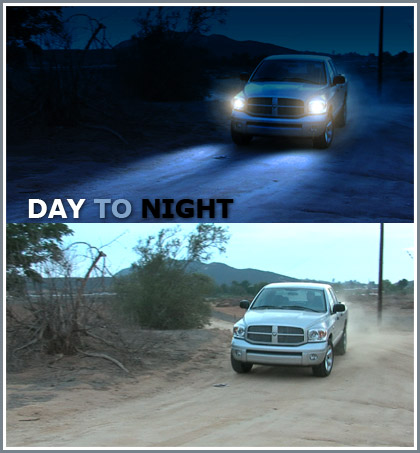
In this tutorial you will learn a several techniques for changing daytime footage to night with impressive results. This tutorial can also be used in conjunction with the sky replacement to add stars or clouds.

BTW:The tutorial is on a new testing server, so please hit it hard so we can see what it can take. I have it set to cap the speed so that there is enough for all. I apologize for testing it out on you guys with new stuff. Although the blog is on a less powerful server so if it goes down you won’t be able to access it… ; (

But soon we will have capacity for everyone! Of course if you would like to help out, please check out our Products page and get one of our great DVD’s.

NOTE:
It seems that the DNS of the world hasn’t completely updated yet, it can take up to 72 hours I understand. Thanks to Nikolay for the Tip ;)

Direct Mirror:
www.videocopilot10.net/videotutorials/44-Day_to_Night/

260 RESPONSES TO “TUTORIAL: Day to Night Conversion”

great

Let me 1st THANK YOU before watching the TUT.

Thnx Andrew for all ur Hardwork

Warm Regards
Sandy

Great Tutorial

Hmmm… It’s not on the tutorials page yet…

Not another tutorail, Now I have to sit and watch it. Set up some shots to try it out, attempt and fail until I get it right. Gee thanks Andrew!

looking foward to it man ,i’ll tell u what i think about it after i watch it :)

A big thanks from France ;)

Another masterpiece from Andrew:)

you’re the best kramer, keep up the good work

thanks Andrew, looks awesome!!!

Thanks Andrew!

wayhay! cant wait to watch it AK your a legend.. peace out

That’s really cool how you used the lens flares for the headlights. I’d have never thought of that. Also, instead of clipping the flare to fit the solid, couldn’t you just make the solid bigger?

I can see clearly now, the lights are on…

awesome tute mate, ta.

Cool tutorial man, maybe not as flashy as the demon face but the techniques are dead useful. Just to let you know (feed back and all) there was down time for the blog when i first came on the site today, but after i watched the tutorial it was up and running again. Going to get a product announcement soon for September?

Cheers

SB that is correct…

by Massimiliano

Thanks from Italy :)

Hey Andrew!!!!

watched it, Really cool trick 4 DNC. hehhe :D
thnx man! just wanna say again………. U R A MASTER!!!! whoow

thnx a lot.

Warm regards
Sandy

Thx for the tut m8 :D

just a little hint.. “cough” “cough” u forgot to change to info for the Day to Night tut ” cough ” look at the right side of the picture on the tut page. – hehe nevermind. it just says that we are learning how to face warp in the Day to Night tut. :P

Holy Carp that’s awesome.

Very impressive! I have seen a tutorial for a dnc before, but I didn’t like the result so I was wondering how this could be done well. As always, you’ve shown the little details that can make a shot look amazing. Thanks for the tips!

hi andrew can you say me where the new tutorial is?
it is not listed yet in the tutorial list.

-[Cloud]-

Andrew is the best!!!!

He always reply to my asking help mails and he is always trying to give advices!!!
For me its a source of inspiration!!!

Andrew….we need you man!!!!

by Thorsten Meyer

This is really a great one.

Keep up with the good work you allow us all to participate from.

I’m really glad I purchased your available products they are great and I hope it helps you to continue to issue such great tutorials.

Cheers,

Thorsten

Good Stuff. Thanks!

Magic Eye was the name of the puzzles that you stare at and see the hidden picture within…your right, lame! LOL

thx, once again! beautiful, absolutely beautiful!

hey andrew you souned not happy or exited in this tut. why?.

Thanks for the Tutorial Andrew.. Did you get my last email message, about 2 weeks ago?

Cool techniques, but rotoscoping an entire scene isn’t productive at all. Wouldn’t be possible to track the truck if the headlights would be “converted” into locators (those crosshairs)? And with the help of those locators to create some tracking data and then adjust it in places.
And how about a pseudo-3d ground? I’m sure AE has some plugin that allows you to create a plane that you can alter to produce a mesh that imitates the bumps on the road, map a reflective material (for the headlights to hit more realistically the ground) and then composite it on the movie. It would complicate things a bit but I think one can pull a matte of the car in order to mask the unwanted “ground”.

Don’t think too hard clancy, I’ve been working very hard and very long hours trying to get everything ready to launch to some better servers. I took a 3 hour “nap” and recorded the tutorial first thing. I’m feeling the pressure of all of it, but my spirits are still high ; )

A lot more impressive than I thought it was going to be!

Nice, could come in handy.

Alex I think you’re absolutely right. But you are still right ; ) The second part is a little far fetched for a speedier composite, but sometimes things just take a long time.

WOW!!

by Dustin James

thanks for that added bit about the correct way to roto-scope…

I’ve been animating a single mask and that is annoying and frustrating!

AK, didnt get my hint? ^^

Wow Andrew truely amazing

i meant good boss .we have a lot of tuts to work with now .iam not thinking too hard .you should take a break. :)

Awesome that you do this for free. Great tutorial. I appreciate that very much.
Thx from Bavaria

Great work Andrew! you never fail to amaze me!

Clancy, sorry I meant, don’t think too much into it…

Very subtle Zony ; )

Nice work this one. Lot’s of really subtle things going on to get this effect just right.

I’m especially pleased with the subtraction mask idea for roto-ing to keep things seperate. Times I’ve spent trying to to do this kind of thing in one mask. D’oh! Great gem that! And Imust practice using one layer as a matte for another too. Thanks!

Very Nice Andrew!! Thank You!!

Andrew…I love your site! it keeps me inspired and all of the tutorials are awesome…long live VC!

CARP! Holy CARP! That thing is nasty…

oh.. by the way… the tutorial rocks! great stuff as always!

nice as always! thanks a lot Andrew. we apreciate you makinkg some time on your busy day to make this tutorials!

thanks again

Magical stuff Andrew! Its like finding a new present under the Christmas Tree when you post a new TUT! Never again will I just add the day for night filter in my NLE. Keep up the wonderful work!

this is well good, also im a rollerblader and you saying something lame like a skateboard made me laugh hahaha well good, there well lame

Sorry should have been Night for Day filter!

Great once again! Thanks Andrew

Great tut,well i had some idea how to do it but this gave me a lil more techniques to improve it by far :) thanks you’r definetely the best tut maker ,i’ve never seen a guy who’d make that of them and so exciting like ur ones … Keep it up ! and take ur time doing them … Get some rest ;)

awesome tutorials…i appreciate that you have been showing us alternatives in to the techniques using older versions of AE, it really makes it worthwhile to follow your lessons. However in the this one you didn’t mention an alternate technique to the spotlight effect. So would i then have to create the light in a seperate compostion and then import it into my main comp, or is there another way?

Great tut :) You spelled the website address wrong on the image for the second part though ;) http://www.siliconimaging.com/DigitalCinema/gallery_stillimages.html

awesome!!

Great Adrew.. you’re always the best..

wohowowowhohohoh
this is awesome

Great stuff Andrew, loved the tutorial! In the tutorial you said something bout volumetric light and dust travelling thru it… i wonder how could i get that effect for the headlights in AE. i guess that`d be kinda complicated.

You know you are good when your praise doesn”t come from your family, parents & wives are supposed to tell you lies, lol, you have praise coming from around the world, you have great skill thanks for sharing your knowledge as soon as I get everything organised, I will order some of your DVDs. You must get supported. Keep up the good work bro.
Maurice

can’t wait… thanks alot, I’ll watch it ….. NOW

That’s just magic. Thanx for sharing !

As for your inhability to view stereograms, try looking at them cross-eyed. It sometimes looks different from what it should be in “regular” stereogam vision (extruded looks intruded) but I find it far easier to achieve than this “look away through the pic” thing.
Try it there for example: http://www.magiceye.com/3dfun/stwkdisp.shtml

by Craig Woolhouse

It’s those little tips that I really find helpful, the one about tracking the window with one mask and using a seperate subtracting mask for objects that go inside the window mask.

Thanks dude,
Craig.

Thanks Man great tut… but how about redoing it someday useing a 3d matchmoving app like Boujou… wouldn’t it be easier than rotoscoping or trackking the lights manually in after effects?…
PLEASE MAKE MORE ADVANCED TUTS…
Thanks again.
Oh one more thing check out http://www.historyofamerica.tv/downloads.htm it one of the most beautiful movies i have seen… anyone know how it was done… the water colour look kicks ass.
Good luck all you AE lovers…

While Aaron is showing us how to control particles using the puppet tool in AE CS3 this guy is changing day into night!!, Andrew Kramer is a god and this tutorial proves it!!.

Very good work !
Is that working too if I replaces the lights on the ground by masks ?
Because I haven’t CC plug-in.

Nice tutorial, with a lot of hints and tips.
also that car is pretty nice;-)

THX
Greetz.

You don’t need to make a 3D light but a precomp that cast a light on a solid that looks like the shape of what I made. You can make it in PS with advanced lighting.

the tutorial doesn’t work anymore… is it my internet?!?! I can still watch the ‘demon’ tutorial though…

help

You know Andrew, you have effectively put Total Training out of business!

naim alwan — the original site is http://media2.mk12.com/mk12_version_five.html

i have been watching this site close for some time now. they use a lot of AE use. Good Work.

regarding the effect on the movie in the making. looks like a almost cartoon effect. many ways to achieve but there is a plug in at http://digitalanarchy.com/toon/toon_main.html that just could give you the same effect. check it out. you have to purchase the plug in though..

as always….great tutorial!!

Very cool man you are good

thank you for al this nise tutorial

Mr. Life

Hey ! Great tutorial Mister AK !!

Is it possible to use Tracker controls, maybe in 3D, to track truck moves and adjust perfectly the headlights and their reflects ?

Thx for your amazing work ;)

Great work, very usefull!

Just got all 7 of you DVDs in the mail today. I am very EXCITED!!! Thanks for sending them so quickly. Just one question. Why do the DVD cases smell like burnt tires?

Anywho….Keep the great tutorials coming! Any tips for finding freelance gigs for After Effects?

Peace in your hood!

HOLY CARP, that tutorial was amazing!

AWESOME!!!!!!!!!!!!!!!!!!!!!!!!!!!!!!!!!!!!!!!!!!!!!!!!!!!!!!!!!!!!!!!!!

Hi andrew,
another wonderful exercise you got for all of us. i just wanted to know something about the headlight bounce on the ground in front of the car. I thought it too blueish, what i feel is the light wil hav a light yellowish tint since the intensity is higher when close to the headlights, and when the light fades off it’ll mix with the ambient light all around.
am i right in any manner ?? just wanted to know what you think ?

thanxxxxxxxxxx for all ur efforts !

Thank’s Andrew, for your great Toutorials!
They are all very good! Go on!
I’m really looking foreward to the next one!
You helped me al lot!

Sorry for my bad English, i hope you
understod it. ;)

Ceep going on!

Best wishes form Germany,
jojo

thank you andrew , this is what i been waiting for

tackar Andrew du är min gud och jag älskar dig

Hi Andrew, I’m a german teenager and I’m very rapt of your tutorials. (Sorry for my bad english xD).

I got an idea for a tutorial, how can I let you know?

Phil

Andrew, you’re just the best. Can express my gratitude! Not in words i can… (or can’t? don’t really know lol)

You gotta know that people love you here. I wish you luck with your future child!

Much Love

nice car by the way =)

A 2k camera wow I want one of those, accually I want one of those new Red cinama camera, lol not happening

anyways sweet tut.

also is cc spotlight a plug in cause I dont have it =(

I LOVE the way you say “curves” :)

In Slovenia that fish (carp) is actually pronounced like crap, so it doesn’t really matter :)

nice tut! very useful! thanks!

cheers!

I did a day to night….Check it out… I dont have time to finish it cause I got to go to work but I am going to replace the sky later. It should be up on youtube in a little bit. Just click on my name.

Andrew, once more – wicked!
I spent hours trying to track a head in my last horror short to add on a face slash. I tried your last tutorial – 10 minutes. Your stuff is soooo useful
Many many thanks

Hi Andrew Kramer,

take a little time off. Take a little time to relax. Good stuff anyway.

Kind regards from Hamburg, Germany.

Bypass41

i was waiting this great tutorial like the Messiah.
now i know that the Messiah has a name : Andrew Kramer ;)

Awesome, looks really good. again a very very good and useful tutorial.

In the words of Kramer….giiideeeup!

- Kyle

by Martin Border

Hi Andrew,
Your tutorials are v helpfull, thank’s a lot
And a question:

How many hours do you spend in front of your monitor every day?

Keep well :)

Great tutorial!

Yeah, I can never get those Magic Eye things to work either… :(

As always amazing

that mountain in the background looks looks the one in the sky replacement tutorial

Why hasn’t mentioned that, that is a nice truck? lol

Wow! A new one is out! I like your tuts! They are great :) And please, make mor tutorials with Sam Loya, he is a great actor ;)

Sam is driving the truck, same BG as sky and demon.

by Joris Strickx

great one again. Always usefull. The tuts keep coming fast :p Like it. Then we have plenty of things to try.

by ian T hammer

another useful technque for us meer mortals,,

cheers andrew

Ok, I made up a YouTube Channel just for tutorials and showreels.
Let me think what you think about it, since you’re the protagonist of that page :D
Thanks again for all your support Andrew, I really appreciate what you’re doing here, just keep it up!

Whoops…
I forgot to put the link…

http://www.youtube.com/profile?user=TheDealer666

it´s now 01:27am in this part of the world and i watched your day2night tutorial a few minutes ago and it waked me up. outstanding!!!

Thanks Andrew, this Tutorial helped me a lot with a film im working on :)

OMG cereal boxes. Great job!

A big thanks from israel!!!!!!

Great Tutorial Andrew :)

Some people may think we are crazy here… We shoot the day and than work a few hours to turn it night when other people would just shoot at night LOL

Andrew said: “Sam is driving the truck”

You should be carefull Andrew… I had a bad dream last night and I had a vision of Sam hit you badly with that truck :(

Take care :)

I thaught it will be more complicated, but this is great, managable in every day work, on a bunch of matherial allso convinient

Great tutorial mr.Andrew!

OT: look at this site, both of your Earth tutorials are now extinct!:
http://theflatearthsociety.org/forum/index.php?topic=13876.0 (c) uv-max

Excellent work! Again, thank you for going at a nice quick pace…

F

Andrew for the inner most core of my soul i thank you, because of you i found a job in the most needing time of my life. For personal reason i got depressed for a long time, no computers and no AE and nothing, until one day i found your site. Since that day i got back my spirit and i am working again. Thank you so much, for your kindness and time for teaching us.

Muchas gracias Andrew en realidad admiro mucho tu trabajo y dedicacion, existen pocas personas con el talento y la divinidad juntas y asi que la quieran otorgar por puro placer de ayudar. Gracias

Best regards from Mexico City
OCB

AK,
The Chief Justice of the Supreme Court tripped and fell on a boat dock today. He hit his head and had a seizure. Why do I mention this?
Because You Need To Sleep While You Can! Bro, Sleep! Do these staments add up? No! Not a bit! See? It’s gettting to you. Take a break!

Holy carp, that was great! Great tips! Also, I was wondering… Is there ANY way the center of a lens flare could be expression-linked to tracking data? Meaning, if you actually tracked the truck, and sent that information to a Null, could you actually link the center of a lens flare to that Null for a more realistic effect on the lights? IDK, just wondering ;)

Y’know, at first I was also skeptical about those back-of-a-cereal-box color-craziness-hiding-3D-shapes (Magic Eye, so you experts can also follow :P ), but then I saw one that was hiding a huge pegasus and then I said to myself “Holy carp, it’s not all lame stuff!”

Well, anyways, loved the tutorial, loved the carp (Batman’d be like “What the?”), and loved that priceless expression from the guy in the laqst pic. What was he seeing? :P

See ya, and have some sleep, Andrew ;) Thanks for everything

hey andrew
it is great
by the way are you married? :)

this is no fun i am always the last to comment

Wow! thanks Andrew you give great and useful tutorials and so far you have shown pretty much basics to matte paintings with everything from camera projection, camera depth(3d layers) sky replacement and now this great day to night conversion, all you need right now is a tutorial on how to add real looking snow with a snow storm to a shot and you’ll have all of mattepainting.org coming over.

Thanks again for the tutz.

andrew, thanks heaps for all your tuts. ive been following them for a long time now, just like to say how much you have helped me in my understanding of AE. your’e a champ!
jon

What are the best render settings to use for youtube????

Cool tutorial Andrew. I’ve done some “DNC’s” before but still came away with some new info and techniques. Better get used to those 3 hour naps if you’ve got a kiddie on the way! ;)

cool tutorial, a lot easier than having to tweak a DNC plugin or preset. Thanks

Thank you so much for this one Andrew. Where I live there are a ton of vampires and I would never dream of actually filming anything at night. You’re a lifesaver.

Sweeet ass monkey!

Thanks dude

P.S. Loving the discs i bought from you

@ Jason

good question :) – i wonder the same thing :P

Hey man,

Just wanted to say a big thank you. Love the tutorials, they have really helped me a lot. I swear as soon as I get my next pay cheque I’ll finally be stopping by the purchase page. It is long overdue!

Thanks again
Brian

That was great Andrew!

When you said that you could never get it, you meant skateboarding right?
Haha, damn…I used to reed books on them, etc..I’m not too bad myself today :D

by Johnny B Goode

Hey Andrew awesome tutorial, always there to help us out thanks abunch… i’ve been meaning to ask you how do i do a lightning flicker effect shining through the window like this…

http://youtube.com/watch?v=wTwQJJJgOjY

hey andrew, was still wondering, if we use this or any of your other tutorials (as in, the technique, without using any of your materials or etc.) in our own paid projects for individuals etc. would you sue us if you found out about it and we were getting paid?

A big thanks from Hungary! Great!

CTRL+F5? Send me an email and I’ll see if I can help. So we don’t clutter up the blog. info at videocopilot.net

hey Andrew,
Your tutorials are the best.
Greetings from germany.
Do you can say: “Hallo zu Deutschland” at the start of the next Tutorial?
It means: Hello to germany.

This is a great tutorial – is there anyway we could get the background clips you use?

@lostmind,

ha! Andrew, better say “Hello to austria” ;-)

Nice one more great tutorial here. Keep it up with the good work!

If you are having problems please email me. info at videocopilot.net
Thanks

Hi, very good Tutorial. It’s a pity that there is no better way than rotoscoping for the lights.

But although an awesome tut!

PhilLab

You can track the lights and link it to a null in most cases.

Hi, I think the problem is that kramerblog.com is completely down…
(I always get a “timeout”…)

Greets from germany,
Chris

It seems that the DNS of the world hasn’t completely updated yet, it can take up to 72 hours I understand. I will post a mirror for you guys until then. Thanks to Nikolay for the Tip ;)

The pleasure is all mine :)

hi andrew
this toturial was great
can you upload the footage file please?

1000thx for the mirror!

I love your tutorials.

Chris

Thank you Andrew.
I am putting in night an outside of house with a pool. The pool is enlightened. Then, I would like to create reflection of the water on the front of the house. Do you have an idea ? I tried with a fractal noise but I don’t find the good form for it.

Another great tutorial Andrew,
Ive already purchased 2 of your products, I want to make sure you stay on here providing us with amazing techniques for as long as possible.
I will be buying designer sound fx very shortly.

Keep up the good work.

holy carp, thanks to the mirror i was finally able to watch the tutorial! thanks for great work!

hint for pronunciation:

Hallo - ‘a’ sounds like ‘au’ in laugh
zu = tzoo
Deutschland = Doitshland (the ‘a’ again like ‘au’ in laugh)

now its working! Great stuff!!!!!!

thx thx and thx from korea

great job there andrew!!..you r my fevorive tutorialist!

nice work, andrey kramer very nice !!!!

to Mael:

You could probably rotate a fractal noise layer in 3d space, fit it over the pool, mask out the pool part, and animate the evolution. Then apply a displacement map to the pool layer. Hadn’t tried it, but it was just a theory

Andrew you are the godfather of visual effects tuts…i’m a guy from germany and your tuts are very great and very realistic. i’m on the best way to buy your dvd’s ;) . good prices and good results. sry for my bad english. best wishes and much inspration for your future. graphXmedia

Andrew, this question more geared towards the demon face tut. but figured I’d write to ya here.

Would it be beneficial to place small tracker points on your subject when filming your shot, and then going back and stamping them out after the footage has been tracked? I ask because in some situations it seems like you cannot find a good spot to place your tracker points, ( IE – if your camera is a little further away from your subject and the eyes are hard to pinpoint).

I figured it might be easier to place small whiffle balls or something onto my guy and erase them later. Or is this too much of a pain???

Bones

man this tut is cool. =D

one more time….. fantastic.
Gracias andrew.

Great tutorial man, as always.

MM.

Matt :
I tried the rotation in 3D space, and that’s pretty good, but I don’t find the fractal type for the water reflections. After I animate the evolution.

I often use the term “Carp” to describe something negative or useless too…..

carp (v.)
“complain,” c.1240, from O.N. karpa “to brag,” of unknown origin; meaning turned toward “find fault,” probably by infl. of L. carpere “to slander, revile,” lit. “to pluck” (see harvest).

Man…you are highbrow, without knowing. :)

by luftwiderstand

Videocopilot RuLeS !

@ Johnny B Goode Says:
maybe use a wiggle expression

Mael:

Would you be able to change the fractal type in the noise section, scale it accordingly, increase the contrast so its more cell like, then apply screen or some other blending mode?

Thanks for the Tutorials and for sharing your knowledge with all of us!
you said that the projects work on AE 6.5 but I have tried and it is not possible to open those projects using AE 6.5…

What am I doing wrong?

Levy Lemus

by هــــــــــــــا شــم

Cool
great tut

thx Andrew ur the best :)

by Johnny B Goode

KEEP UP THE GOOD WORK ANDRES!!!!!!

by Johnny B Goode

thats your name in spanish by the way

Matt :
It’s working, but there is no fractal types that looks like water reflections. I found a water surface on Artbeats but it’s very bad quality.
May be if a choose “Strings” and I add some distortions.

ONLY 5 TUT’S AWAY FROM THE RELEASE OF THE DVD OF THE TUT’S–WOOOHOOOOOO!!!!

by Dustin James

@ Dustin:

HAH! and they call that stock footage!! pffff

ANDREW K, CHECK DUSTINS LINK OUT!

Hey man,

I discovered your tutorials 2 days ago and have now watched all of them. Thanks a lot for all the time and effort you put into these; it’s just the kind of thing the world’s creative community needs :D

Thanks again, get back to your napping!

Ollie

That’s cool.

While i don’t have a use for it right now i’m sure this tutorial will come in handy in the future. Although it did give some more insight to color correction (being color blind i need all the help i can get.).

Andrew, what happened to the Final Image site? i went to take a look at some of the videos there and can’t seem to find it anywhere. The one I did find was an office cleaning page and the other one said the owners of the site were selling the domain name.

Thanks for all the tutorials. I am hoping to grab a bunch of DVD’s in the near future.

Dustin, I just bought that clip. Should I return it? Drobins, I’ve taken that site down because it is a little out-dated and I would rather focus on VC for the time being.

Must have more products from Kramer……… need my fix….. Doh… Please sir may I have another.

Thank You a lot. I love your tutorials. Keep up the good work.

Thanks Andrew. The last three tutorials were really great!
What about that NEW MOTORBIKE4 composition? The guy in the picture doesn’t look like a new motorbike. Is it a hint or something?
I see a matte and a pre-comp layer in the begining of the tutorial, which you didn’t mentioned in the tutorial. Is it some cool advanced stuff? I allready saw on some other tutorials, that the demonstration at the begining is more advanced, than the result at the end of the tutorial. Is it something we need to know? Maybe you can provide the project file of that composition at the begining of the tutorial or a comment here would do it too.
Thanks again and keep up the good work.

by Daniel Reynoldsd

Holy Carp that was a good tutorial
Thanks!

Great and very proffessional as always! So thanks a lot for another amazing tutorial Andrew, you´re the man!!

Uhm, if it’s a really cloudy day as well this technique works great as well.

Great tutorial, for sure we will use it, Hey Andrew if you don’t mind we would like to plug you on our site.

how many times do u want me to say i love u andrew , hu ?
are u sure u r not prophet or god or something like it ? !

great , thanks andrew

My favorite part of this and the advanced skyline replacement are the different techniques for creating Luma Mattes. This in itself is extremely helpful and I wish that one day you would cover all different kinds of ways and the advantages/disadvantages of each.

Thanks again for your helpful information.

Hi Andrew,

this one is nice. [BUT maybe (coming back to the carp), you can give us a lesson how you composite a seemly realistic underwater scene with some water caustics over objects and landscape and maybe some additional effects. If not forget this demand between the squared brackets.]

Greetings from Germany

these tutorials are ridiculously amazing man. Thanks for all the freebies :D

Here is my updated day 2 night video. Sucks that youtube quality is not that great. Its hard to see my stary sky replacment. Anyway check it out and let me know what you think.
http://www.youtube.com/watch?v=zrPJiSiyMMc

Great.. Thank you Andrew

HOLY CARP ~Andrew Kramer! thanks so much for sharing your knowledge with the world of digital wannabees. I LOL’ed when you were describing the correct rotoscope method and said, “Its the right way to do it……….uh…trust me” HAHA yea of course I will.

@ Jason:

Looks impressive!

great tutorial …
amazing..!
ربنا يزيدك وتعلمنا

Very Good Stuf Andrew (and very good teacher also hehehe)
I follow all of your tutorials. They are very helpfull. Please keep working
Thanks from Madrid Spain
Your friend

Your tutorials are too brillant. I’m only 15 yo and I’m french, but I understand all your videos. Thanks a lot, I learned a lot… !

by Joris Strickx

@jason: youtube quality sucks indeed. I only see a black screen with headlights in the bottom of the screen :(

Any reason why you didn’t just motion track the light effects to the headlights? The flares would be a cinch, and the light cast on the ground would be easy too, though you may have had to hand key the rotation of the light beams.

I would love to see you do some tutorials like this http://www.youtube.com/watch?v=EtMYy070Uvc&mode=related&search=

Some epic after effects shizzlee :P

To the dude above!
Im pretty sure someones already asked that man!

by @nghel©©te

Bien el demo gracias amigo Andres deberas eres un genio,
un saludo desde La Paz Bolivia

by Morten Enoksen

Hi, Andrew
Please some tutorials like this http://www.youtube.com/watch?v=EtMYy070Uvc&mode=related&search=

Thank you for your hard work
Have a nice day

I always inpatient wait for your next tutorial. Great job Andrew! Thanks!

Andrew. My first but wont be my last comment. GREAT WORK. Thank you for these great tutorials and inspiration. I’ll be making my order this week for you products to support the cause.

Thanks again.

Graham

How about a little Teaser for the next tutorial?

im a newbe and i love ur work man… best to watch and learn plz upload more work
cheers

Yes Its perfect Thank you Andrew

by Mark/finalrenderfilms

Hey, andrew, do you think It’d be possible for you to release that truck footage as the project for the tutorial? I think it’s a great piece of footage to test with.

Also, how come my comments take so long to come up and say “awaiting moderation.” Did I do something? lol

Thanks a lot ! man,
Very useful .
thanks from Thailand

Speaking about lights and dust…Can you do a tutorial on dust particles sort of like the ones in the intro here:

http://www.dstrukt.com/_docs/Showreel.html

Using just the basic after effects of course…. :P

Good Luck with that!

Otherwise I’ll have to go film stock dust footage of somebody beating a rug…. :|

Who needs LUX anyway ;)

Great stuff, thanks.

Thanks you from France for this tutorial…

andrew, awesome work as usual! don’t know if u read this far into the comments, but I was wondering if u could do a tut with morphing from one face to another, or object to object, if it can be done in ae? I would like to see and try that one…

my first try at using the day for night effect in a short film :)

http://www.youtube.com/watch?v=WkOkYOT-Xs4

i love it! :D

Hi this Orlando Again….
it’s a great job that you’ve been doing and helping with the tutorials,
i’ve been learing a lot….
tnk Andrew……..

very cool Andrew Kramer

Hey Andrew.. I wanna thank you A LOT.. I have learnt so many things since I saw your first tutorial..
Wainting For the next tutorial
Greetings from Ecuador,south America

Thanks for the turorials. It’s the best around, I love the riot gear :D Does a wonder to my videos

Nice. Very nice!

by Love Lavendra

Please Please also try to provide Footage material with the tutorials However its a good tutorial to learn with AE

Great effort, thanks a lot.

great tutorial

by Azat Grigoryan (Russia)

Andrew! You creative – it’s great!

nice video we an get creative with all the videos!
than you Andrew

no tutorial for today Andrew its monday ?

if your not busy thougth

It’s great……… but where is poject file……
pls pls upload the file, at least “”Movie”" file for practice..

tons of thanks in advance Andrew

sorry my bad Engl!sh…

Andrew… you are SICK! gj! wow!

my man andrew pleaseeee give tutorials mondayyy has passed and you havn’t gave us yout tutorial

Just wanted to say thanks.. it’s rare to find someone that is truly capable of creating awesome effects that is willing to share them with the little guy. Thanks dude.

Awesome. Was trying to do this just recently. Thanks for posting. Unlike all the others, you teach the effects people REALLY want to do with After Effects – the ones they bought the software for! Keep them coming!

Thank’s Andrew for everything but i don’t have in effects-spotligh

hai Andrew how are you im adel kassar in syria – arabik – pleeas I need tutoralis to watar
and tank you -

hey, i just fnished my first videoclip with Andrew ’s instructions (tutorials)
enjoy!!

see it at this link: http://www.dailymotion.com/relevance/search/privilej/video/x2pvoi_clip-les-oufs-du-stade-2007_fun

Thanks yo!!

Thanks andrew . You’ve been a great inspiration to me. I love your sense of humour. Infact some times I look back at the old tutorials simply to hear a joke you cracked on it.

I’ve done a music video with one of the tutorials. Will post it online as soon as I finish.

Thanks again for being you: Andrew.

You may not know this but your followership in Nigeria is nearly a religion in the graphic community.

Thanks very much for these tutorials. It’s obvious you’re a filmmaker and not just a software geek as all of your tutorials are actually useful. I especially liked the day to night coversion-awesome stuff. And thanks for keeping things funny while you’re teaching-cheers!

Thank you ! Andrew ,learn a lot from online tutorial.thanks

Hi Andrew,

This is the first ever tutorial i found about day night conversion in net……..

all ur tut’s are really awesome……..i hav been suggesting ur site who ever ask help rgd AE……

This 1 tutorial satiesfies every fresher who in need of expanding their cretivity in and around things…….

Thx a lot Andrew

Chandy

by Carlos Barros

Thank you so much. You are the best!
Regards from Brazil!

Thank you ! Andrew ,learn a lot from online tutorial.thanks

I can’t add your feed to Feedburner. How I do this?

naajs. and “what a carp, batman” lol

wheres the next tut.? its been like 3 weeks! im having withdrawal

You are the best Andrew!!
I gained many priceless techniques for my small video production!
I enjoy watching your tutorials in Korea and Thank you soooooooo much!

Thanks for another great tutorial. This one really help me on a project i was working on. thanks a bunch!

sigmund

My comment is actually about how to creat the bullettime effect… i used 20cameras to take picture of a man in back of greenscreen but how can i make them to animate and creat tha 3d effect

What can i say!!! It was an awesome tutorial, bloody brilliant in fact. Been trying it out, works absolutely great. Well done.

by Joffre Macedo Neto

Ola pessoal da VideoCopilot, conheci o site e me amarrei nos tutoriais aki do site…
Voces estão de parabêns…. Aprendi muita coisa no After Effects….

Realmente muito 10…

Teh mais…

Adrew can you please make a Matrix effects ? not that code but like you see in the movie most off all the Fight-
scenes ?

Hi Andrew,
thanks for all the inspiration you gave me.
Maybe I will never have the chance to work on a video that will require all the skills you show us… but, you know, sometimes it’s enough to have someone that gives you the “will” to work better and better.

Thanks

Stefano

YOU ARE THE BEST
but there is no more tut.??

Thanks a bunch Andrew you are the king…. :)
keep up the great tutes

very nice you are great

Saw the nuorial but, it won’t let you write comments o.0

Love this tutorial, but am having a slight problem with it. My actual “headlamp” lights, seem to float around a bit when I play my finished footage. Am I missing something?

Another technique to add to my belt! Thanks Andrew…. Rotoscope FTW!

By the way, I was rolling about the carp comments because I actually enter tournaments to shoot carp with bow and arrows (bow fishing). Yes, sounds crazy but it’s fun – and they’re nasty gross. LOL you don’t have to publish this lol… ok bye.

Fantastic tutorial. I’m just filmed some day for night footage and this tutorial will prove invaluable. Thanks so much Andrew.
By the way, in my footage the car passes a tree. What’s the easiest way to animate a moving shadow of the tree on the ground to match the headlight movement?

very nice tutorial, even though im not a user of ae yet, I probably will be after the project that im currently doing with vegas. some tools in ae are just superior to ones in vegas and it really seems quite versatile software, not to mention all those plug-in’s for it.
again, nice tutorial, thanks for that.

Finland over n out.

Niiiiiceeeee

thx for all your tutorials!
keep going andrew

What a load of old CARP!!

Seriously guyz, AK does it well.
I tried this trick out for a great “Close Encounters” spacecraft beam over a hilly landscape, it looks great!

I am a video editor , and am so glad 2 c your tutorials…
i loved after effect after i had seen your tut..
U R great!
PS – sorry 4 my english , i am not prowd how can i write or talk them.

a great thanks from “little” ALBANIA(europe)

its so cooooooooool i love it

Post a Comment!

Before Posting
We're trying to encourage more thoughtful commenting.  Please take a moment to write a meaningful response to this post.

Also remember to read the rules on posting first.

Leave a Comment