|
VIDEO COPILOT BLOG News, Updates, Projects Files & Tips |
|
Here is a 6 minute version of the Tutorial without all the advanced jibber-jabber. Of course you may want to refer to the advanced tutorial to really enhance your demon.
No more excuses, I want to see your demons!

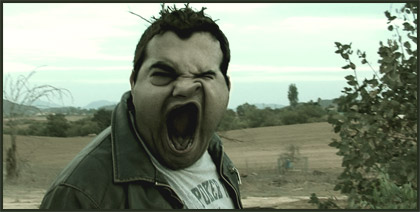
man wanted to be the first … maybe next time.
Watching it right now.
Andrew I love your tutorials. I can’t wait until I’m finished with my exams and get on the Computer to tryout the new ones.
Jakob
i try it good result thanq
I like advanced jibber-jabber
I agree. I like the more advanced one. (I understand why some people want an easier tut. But, I suggest always watching the more advanced one. If you don’t understand it then that means you have something to learn, which is why wer’e here.
“If it’s worth doing, then it’s worth doing well”
Finished. I think it’s amazing how simple but very powerful this effect is (I see there a lot of potential). I want to try it out on my own but don’t have the time(right now).
Do you think it would be possible to pump up some muscles with this technique.
Like: you have a shot of a guy(or gril what ever) showing his biceps and when he tense(not sure about the voc.) it, it’s pumped up.
Or the same with a sixpack just by adding some shadows?
what do you think. will this look real or phoney?
gruß Jakob
I think it’d work. I’m trying to do it in 6.5 but I’m having trouble opening both comps so I can pickwhip the values.
Hey Charles, you just copy paste the values as shown in the basic version.
Cool, nice work.
nice one andrew you really kick ass. thats nice that everything you change in the liquify tool everything stays where it has to be. great thanks man.
wowowowow ur amazing andrew thnk you so much for this great tutorial its very helpfull on my next project;)
This is the best tips i had ever came to know in visual compsoiting ..
thanks brob
Thanks, this is going to be something I’ll work on asap.
Going on holiday right now, be back on Saturday. Bye bye everybody!
I think this is the best tutorial so far
thanx for that ill show my version soon
sorry andrew, i don’t know where to write this but:
1. have u considered a forum aspect to your site?
2. have u considered having the thumbnails of your tutorials be short roll-over movies of the finished results so people can quickly see what they are about to follow+achieve?
just a thought? i’m sure you’ve already thought of these ![]()
cheers
right ,now i’m gonna watch this tutorial!
Another great tutorial, Thanks a lot
I have a quick question. Is there a way to have the liquify stay with the person’s face when they turn their head to the side? I ran into that problem when working on this. Thanks.
Not really, the liquify is not a 3d filter and doesn’t know how to extrapolate. Not to mention you would need 3D track data to do it anyways.
andrew, in the longer tutorial you mentioned the actor always being square to the camera? what does this mean? does he always have to be the same distance from the camera?
and will you ever do 3d tracking tutorials?
i love you,
mcwazza.
Facing the camera. Straight on.
hey man, i will try to make but don’t have footage of my face. Anyway, will try with sams footage. hehe
Cheers
Sandy
Thanks Andrew. This means I’ll need to be picky with my choice of video. Anyways great tutorials!
Hey! You stole my Jibber-Jabber phrase! I want a free Video Copilot Tshirt for monetary compensation!
Andrew,
could you still pull off the effect…if your actor, was doing his mad face……but he was shaking it side to side…EVER SO SLIGHTLY….so give the feeling that hes screaming REALLY loud?
Could it still work? or would we have to go wth something more drastic?
Awesome tutorial. Always wondered how you would do that
I thought of another way to possibly improve this tutorial, when you use the scream sound (probably from DSFX right?), add a camera an a null to the comp, parent the camera to the null and then add the sliders for the wiggle expression to give a camera shake.
Does that sound right?
Kramer:
Great stuff. You mentioned more DVDs. Perhaps you could produce “genre-specific” DVDs with mad tutorials like this one on them. I know you already have “Action Essentials” but I mean more great tutorials, less files and whatnot (even though the files are great, too).
This Demon one would be great for Horror. You obviously have Action covered. Followed by Sci Fi, etc? See where I’m going?
Anyway, always great work on your end.
Hi Andrew
First of all thank you very much for this amazing tutorial.
i got a lot of knwoledge from your site ….
thanks for SAM too …. he did a lot of effort with you.
anyway i don’t know where can i put this link to see it.
this is a very nice effect … take a look and please try to make another greate tutorial for this.
http://www.adobe.com/designcenter/gallery/swf/index.html#u_sContent=firstborn
thanks
Hey Andrew thanks for the sick tutorial, they are really awesome keep it up, and to m.abulazm, that was a really cool effect i’ve seen others like it and they said that they use After Effects but i’m always wondering how they do it
Andrew your the bomb as always. I made mine kinda look like that creepy Emily Rose demon effect.
that was pretty cool rob…
in my movie im going to go for a redish demon look but i wont be able to test it for my movie till a ways away and i cant wait
Andrew i was wondering
in a part in my movie the demon is going to get hit and each time his face turns into a demon each hit… i was wondering if i could do this since he bends over when hit and isnt facing the camera as much if you know what i mean….
thanks andrew!!!
Hey m.abulazm i think thats done with RealFlow 4
Hey andrew this not really about the tutorial
but got me thinking about adding effects to videos
i heard that the abs on the actors in 300 is CG
is it possible to do it in AE or you have to have a 3D package?
Ok Here’s my problem Andrew.
When I select precomposion it gives a new window where i can select the “type” of the new comp right?
But when I try to select the 2nd one it just keeps selecting the first one too. and when i press ok it generates an another comp with normal setting.
here the pic so you can understand.
[URL=http://imageshack.us][IMG]http://img522.imageshack.us/img522/8977/immagineen3.jpg[/IMG][/URL]
(italian version)
i tried reinstalling but nothing changed
.
do u have a solution for this?
sorry bout my english
Thanks Andrew it worked! FANTASTIC JOB!
hai andrew i have a question can i use the same technique with motion tracking lets say while the guy is walking will it work to?
First attempt, copied Andrew to the letter though so don’t expect a demon suprise
hey,
great tutorial. But i found using fractal noise, layering 4 different layers with different colors better than the grunge texture for the veins and texture of the face. Just for the people who ordered Riot Gear and have to start the demon warp project without the grunge texture.
But do you think this is the same thing they used to erase Johnny Depp’s eyes in Once Upon A Time In Mexico????
Thanks.
Amazing as always, you even managed to create an even more simplified version of this great tutorial that I thought was very clever and quite simple from the start! You are so extremely talented.
I know you get a lot of requests for other tutorials, and I wanted to request a tutorial on something close to this one, one where you morph a face to another face, or something else. Like the classic Michael Jackson video for instance, Black Or White, where you morph one face to another face, or to an animal or whatever. I´ve been trying to come up with a way of doing such a morph, a morph between two different items whatever they may be, but havn´t been able to come up with something that looks even close to how I want. I know it´s not even close to the same thing, but morphing one vector shape in to something else in Flash for instance is a piece of cake…
Please have it in mind anyway
Hah! I thought the “advance” tutorial was VERY easy to understand! I guess that means Im good at AE? Hmmmmmm…
Chris,
There’s a reflex: morph plugin in that can create the effect you’re looking for. There’s a few tutorials on it. Granted they’re not as user friendly as a tutorial from Andrew.
By the way, I wonder who started calling Andrew Kramer “AK?” Everytime I read that it makes me think of an AK-47.
I JUST FINISHED MINE!!!!
CHECK IT OUT! HERES THE LINK!!!:
Andrew (and everyone), I’m going to try my hand at the demon thing soon, but until I get to it I thought you might like this one. I did with some kids while helping at a camp.
I’ll just say your violence towards Sam has been inspiring…
http://www.youtube.com/watch?v=ZMPqfv9WfAg
Oh, and I used Film Magic Pro along with your patented vignette mask.
After Effects is an advanced program and anyone having difficulties understanding Andrews tutorials… just stick to Microsoft Paint thats a good program to get your foot in the door.
Sam Gilbert
i finished mINE TO http://nl.youtube.com/watch?v=BNRtvIZgMRA
Here is my first attempt. I kind of rushed through it and the footage quality isn’t great, so don’t be too critical plz. Here is my rough first try. Expect a much better one soon. I think I am going to have a demon get it’s head blown off for my next non-serious movie.
http://www.youtube.com/watch?v=P2PfboJa7D0
I am going to try and borrow a better camera so I can do a better version. I love this effect! It is so versitile. You can use this a million different ways. Thanks Andrew!! This one was fun, and funny!
http://www.youtube.com/watch?v=7Np3K3wbCrA
That’s my try xD
http://www.youtube.com/watch?v=f3dpv77S2-s
First try.
Does the REVERSE TRACKING really just crop the image enough so that you can’t see the black outline?
No. The reverse tracking makes it so your footage is stable, but the precomp itself is moving in the background of another comp. So your footage appears stable, but in reality, it has a bunch of tracking data you can use for overlays. So basically by reverse tracking, you are undoing the track that you did, while retaining the tracking information.
How is that possible? If the footage isn’t straight, straightened it out will leave borders that are all over the place…and considering the head is now tracked and straighten…boy I just don’t get how it works…I need a tutorial in reverse tracking…
Hi AK, if you can please answer this question on e-mail or on this blog.
Is it possible to add “Horns” or\and more eyes to the deamon faces using this effect??
I succseded to mage vampire teeth but horns seems to be much harder
Sorry but my English is bad
Thanks, Theo
Great tutorial…
I’m wondering something off-topic though..
my Quicktime has a problem i think.. it does something crazy when I try to render out with quicktime…
and when I downloaded the Project file to use the footage… The footage has the same problem….. it’s all damaged…
why? I have quicktime pro 7 and it didn’t used to do it.. now I have vista and it does it and I have reinstalled it and still same problem.
anyone?
(it’s all jumbly and goes white, jumps, noisy…)
http://www.youtube.com/watch?v=ZF-GlkhQJN8
my first try tell me what you guys think and what could be better
!
thanks
@ David. Think of it like this. You are basically creating a layer that sticks to the eyes, that moves in the background of your original footage. You do this by stabilizing the footage and precomposing it into a new bigger comp. The footage now moves around inside of your new composition, and if it is big enough, it won’t go outside the bounds. Then you take this back into your original comp, and get reverse the tracking. This makes it so your footage is no longer moving aroun, and looks normal. If you zoom out in the comp window, you can see the bounds of the precomp moving in the background, and THAT data is what you will be attaching your overlays to, because it is tracked to the face. Does this make sense? I don’t know why I wrote this because the tutorial explaines it a lot better.
I gotcha. Ok, you are bringing back the footage to the original movement, but now the tracking data is available.
Hey people, her is my second try, my first is still under development ![]()
http://youtube.com/watch?v=NxWm2iP5gRU
Enjoy Andrew
Heres my 2nd try, with better lightning than the other
nice tutorial
thanks alot
andrew i really want to see a tutorial on motion graphics something similar to this video
http://www.youtube.com/watch?v=7EaglZAN4fU
im talking about the beginning because i know that the rest of the video was almost everything done in 3d
thanks and i hope some people will back me up on this and it will convince to record a tutorial
peace!
Im done mine, i just gotta host it,
Andrew i just want you to remember one thing when and IF you watch mine, i only managed to watch the tutorial up to the liquify part because of my slow net(should speed up in another day or so)
OMG MY SITE GOT HACKED BY LOCO MEN!!! I HAD NOTHING BACKED UP
Andrew, could you please help me with my site, i had nothing backed up and locomen hacked my site, i had about 5 tutorial but they are all on the other hard drive which my brother formatted i think
:(
Ok i found out, i have MOST things still backed up, not sure if its everything tho
those locomen bastards… why would they hack a 12 year olds site? thats just inhumane!
Hey Zony, where did you get your sound FX from?
Hey Andrew! I just finished mine and I used the advance tutorial to make it. Here it is. http://s189.photobucket.com/albums/z84/Bequinta/?action=view¤t=8e17c586.flv
I can’t use the “track motion”
i don’t know whay!
after effects don’t give me….. can sombody help me pleeeezzz??
sori abut my english….
used this effect to scare the crap out of some unsuspecting friends, nice tutorial
p.s.(the advance one pwns)
With a huge thank you to Andrew Kramer for being one of the best teachers I have ever had, even if not in person. Here is my first Demon Face Warp test, based on the awesome tutorial. DemonFaceTestAdd to My Profile | More Videos
Damn Joey! That was a good try:D I liked how he fit to the sound, and that scary shaking you did to xD
Nice!
My try will be up on youtube soon..
Here’s mine.
This is Natalia – she works with me – this is what happens when you piss her off.
what inspired you to make such a great tutorial? you know it kinda reminds me of that one part in the exorcism of emily rose (best exorcism movie ever)
Here’s my crack at it. Zombie movie here I come!
oops…go here instead….dammit!
be patient andrew
^^
I’ll make one too, great tutorial
But i need the footage, and it’s too dark tow film righ now.
I’m scared, i hear songs, coming from under my bed.
HE’S COMING!!
I gotta go
byee
Wow, looks awesome you guys!!!! Keep up the good work.
Hey Andrew, it would be cool if you showed several different applications of your techniques, and included several different footage files in the tutorials. This would give us some variation, and allow us to see more than just one use for the effects. This one can be used for a whole lot more than just demon faces! I would love to see what other uses people have come up with, because it has flooded my mind with ideas, and I have a feeling that it is just the tip of the iceberg.
@ S.Gilbert
from a free site called therecordist.com
i just googled creature sounds
haha heres my attempt
http://www.youtube.com/watch?v=BwTZtZzWXro
i used my mini dv camera. and since the quality has noise in it.. the tracking wasnt that smooth.. but it still came out ok.. wat do u think?
Mine won’t open for some strange reason, the link won’t work. NO, NO, NO!
Hey Andrew, Sam n all Check this out, I made my Demon………
http://www.youtube.com/watch?v=–cdGqJq-_U
Some details are missing in this Low Quality vdo, so I will post another High Quality in Rapidshare. Till then check this out n plz leave a comment if possible!!!!
Thnx & Regards
Sandy
Another day, another tut?
Sandy, The url contained a malformed video id.
Hello neighbor, I’m in Murrieta as well, what the hell is there too do here? haha
Sorry Andrew for posting again but do u get my point?
I can type the link but it will CHANGE AGAIN.
DASH is MINUS SIGN (-)
The link has TWO MINUS SIGNS between
“http://www.youtube.com/watch?v=” & “cdGqJq-_U”
Once again Sorry for posting AGAIN.
Warm Regards
Sandy
What is your youtube name sandy? May we can search therefor?
BTW Andrew, I have a question. Regarding the advanced demon tut. I applied the grunge texture like you did in my movie but when I look closely I see that the texture is moving … why and how can I stop that?
Motion track that texture.
Hey Sandy, that is strange the post is fine when i look in the admin section but it just shows up with only 1 dash instead of 2 in the middle.
youtube.com/watch?v=–cdGqJq-_U
Andrew, i think i have a way to recover from the hack so it doesnt happen again, i cancel my hosting account, and start a new one for the same domain, what do you think?
Dang that sucks man
yeah Andrew!
Anyways, i have to be careful abt DASH signs in the future.
haha
Warm Regards
Sandy
Hey Andrew, i have a question on this…
say if my character gets hit in the stomach and bends over a little bit… and hes not looking at the camera and the face changes… is that possible to do? if you know what im saying that is… =]
thanks a ton andrew and keep up to amazing work!!!
Hey I bet that you could track something else and make I guy get punched in the stomach and have the back stick out a bit like the pnch went really far into his gut. Yeah! I’m gonna try that!
andrew you know that blog you posted bout the fighting and making it look real well i used that to make a sequel to a test i did here them both together on youtube
dude i’m testing out after effects cs3 how do i enable the pickwhip option?
Nice work… this tut can add a lot to a film!
@ Douglas D. Menezes
WHERE do i get a meteor effects like that one from your little clip ?
http://www.youtube.com/watch?v=xFBAQx9UewY
and nice job with the color correction
Zony, that was awesome! The landing was poo, but the meteor itself was amazing!
Here is my little demon test
Tell me what you think!
http://youtube.com/watch?v=ovxMbdreDG4
DAMN!!! I’ve never gotten that many views
in my whole life!!!!!! nobody ever looks at my
vids, but I’d be surprised!! WOW
okay i may have put it out wrong, i did NOT make this http://www.youtube.com/watch?v=xFBAQx9UewY .
Mr Douglas made it Helge
i just want to know HOW to make it
Douglas D. Menezes that is
Here is my attempt.
Hi guys!!! Take a look to my demon face test!! Hope you like it!
Hi There!
This is what i made of it!!
http://nl.youtube.com/watch?v=tNLP6yV1uhQ
(and yes that’s the new Potter, and yes, i finished it!)
Very good tutorial, it is original, thanks for your tutorials.
whos demon face test is this because i need to ask you something ?
and it wont let me send u a mail over youtube ?
p.s its so good
Once again you done it!
Genius Technic and one concept that can be applied to many scenario’s.
HELP US SOME MORE OBE-ONE YOUR OWN ONLY HOPE!
P.S. Fight like Apes not a Wookie.
Hmm, i tried to make this “evil Zombie Sickness” effect, growing from my arms and out to my fingers, slowly using AK face tut and the adding a linear wipe transition, but darn its hard to motion track my own hand, not to mention moving fingers :S – i also tryed to moving the masks with the fingers but that doesnt really, also moving the mask sux big time -.-
but i think u could all imagine how cool to would look to make this color and texture zombie effect from from our wrist veins and slowly growin out to our finger tips. well atleast i think it could look sooo nice ^^
Anyone thought of this? ideas? tuts?
AK?
damnit, i write too fast , and then i forget a few words while typing . rofl -.-
DANG!!! YOUTUBE has BLOWN-UP with a ton of Demon Face vids… I could watch them all day, all are great, I think this tutorial may now be my favorite! Thanks Andrew!
Hi !
Thank you so much for this tut
I tryed, with a video test, I added to the Tracker Control, the Scale analyse, because in my video : from a begining position, my head goes in front of the camera, and comes back at the begining position (sorry for my french).
So, now, I need the expression to REVERSE the movement from the Stabilize Motion of the Scale…
I hope you will understand me … ? … Thx again xxx
Here’s mine. PS. Thats my sister there:D
Hay People Here’s my 2nd try i like this one better, hope u guys do to.
Comment and tell me what u think thanks from Ell
Andrew you sneaky little devil!
Why don’t you show us how you did the reflections for the shades?
Hey Andrew, I’m a big fan of yours, and a fan of your product Action movie essentials. Well i was wondering, sense the blood splatters in the product are way overused, if you could teach us how to make our own. That would be great because every one would have there own unique blood splatter. Thanks.
-Mathew
the footage given is wierd.. white bg?
Hi,Guys for the vampire tooth’s i how u do?
??????????????
is liquifid tools??? (sorry my english)
Here is my Second try
http://youtube.com/watch?v=V-I0DJqndQA
Hope you enjoy.
Hehe
no doubt mine is the best one here! (:
no..I m just kidding, it needs a few twiking but I add an extra touch
enjoy
http://www.youtube.com/watch?v=So1wWv_ysXg
Need…. new… tutorials… where’s… my… dose?
lol
Things look quite calmer now, after releasing this tutorial, Andrew
Waiting for the next big thing.
See ya
hi andrew. this is the first time that i wrote to you. i’m an VFX lover. First i want to say that I really appreciate your job and also many thanks for the great tricks about after effects. i’m fabio from italy. anyway this is my version of “Demon Sam” (Sorry Sam)
)
tell me what you think.
Fabio
here Is The Link
made my test here!
http://uk.youtube.com/watch?v=P1RO6BzuNew
My newest test of this:)
hahahah! Andrew U’ve filled youtube with demons!
yeah really great !
here’s what I tried to do, with a firend, from a rush of our small tv show “shootez court”
http://walezguene.canalblog.com/archives/2007/07/26/5721479.html
Hey awesome Tutorial i have learned all i know from Creative cow and mostly from you and your just… don’t know how you find these things just wanted to ask wouldnt it be possible to do the don’t know how to spell it to add the motion track on a Null object and add the Disturjion or how ever its spelled (I’m from Bulgaria sorry) i think it will do the same effect as far as i know but i don’t have a camera and can’t try it ;( sorry if the comment is stupid and Andrew keep these tutorials coming they are awesome !
Just as a question, if you wanted to track this in 3d, couldn’t we use projection? I mean project it onto a 3d surface, and have the surface as the rotation anchor, link the light and the “special effect” footage and keyframe the rotation in 3d space, matching it to the footage? I havent tried it and I’m still a little new to projection, but I suppose that could work. At least it couldn’t hurt to try!
Hey This is a sweet tutorial i loved it. Here is my short clip i did today in about 2 hours so its kinda sketchy. I would however like to see a tutorial on shooting projectiles…like fireballs from your hand or something else that goes into the third dimension. Enjoy. I love your work and your products keep it up.
Here’s my take on the Demon technique. I actually made a short film out of it =) Enjoy!
Another great tutorial Andrew!!!
Heres my first try….I will do a better one soon. Let me know what ya think. http://www.youtube.com/user/JLCsyr
Andrew,
Is it possible to do mulitple demons in a shot? Can you track more than one face?
LoL, cool one
Excelent wark all, to bad some like “ET Entertainment” keep on spaming blog, easy to miss others
http://youtube.com/watch?v=-8jMpoz_QMI
Check out mine i also did a green screen afterwards and i felt like doing some hulk stuff using the shatter effect that i found in designer sound fx
man the face warping thing is pretty rad but even better i think is the potential to use this technique for secondary color correction…
Gotta thank ya again AK……I made some money using your effect! It was the perfect ending to a custom commercial is just finished. The customer LOVED it! Thanks!!
http://www.youtube.com/watch?v=L12HcKtVLR0
PS – More Horror Tuts!
# Zony Says:
July 25th, 2007 at 3:20 pm
Hmm, i tried to make this “evil Zombie Sickness” effect, growing from my arms and out to my fingers, slowly using AK face tut and the adding a linear wipe transition, but darn its hard to motion track my own hand, not to mention moving fingers :S – i also tryed to moving the masks with the fingers but that doesnt really, also moving the mask sux big time -.-
but i think u could all imagine how cool to would look to make this color and texture zombie effect from from our wrist veins and slowly growin out to our finger tips. well atleast i think it could look sooo nice ^^
Anyone thought of this? ideas? tuts?
AK?
————————————
Hey good idea! I think this would be alot easier with a greenscreen! then u could apply linear wipe with no problems. maybe roto-ing the edges to the shirt or so..
Haha, lots of demons come up nowadays on YT!
I wonder why? Do you have an explanation Andrew?
Poor Sam…
Hello Andrew, love your work. I culdnt make a simpel thing in AE before, made all specials in PPro, that kinda sucked. Now i know a littel more then the basic of AE, thanks to you!
Well here is my test, of my litllebrother.
http://wattimedia.googlepages.com/Warptest.mp4
About 6mb and codec whit h.264
// Simon
Man wicked tutorial as per usual. thanks a billion.
Hello!
This is my first post on this page. I am a big fan of your tutorials as well as the others here. Almost everything I have done in after effects has been inspired in one way or another by some of the videocopilot tutorials.
http://www.youtube.com/watch?v=dTGIcArwfgU
Here is my demonface attempt. I didnt warp it in and out, just let it stay on the face in the closeup.
Check out my other youtube vids, all of them is based on one of your tutorials.
Hello, and thanks for the tut Andrew!
I have a question about reverse tracking, is it possible to the same thing that we did to the rotation and position (reverseing) to scale?
I have a video were my person is coming forward and backward. And in the tracker controls I also selected scale to be tracked, but can i reverse this? I tried using expressions, without any luck.
Thanks!
Finished my try at releasing my inner daemon last night, I uploaded it to youtube just now som it might take a few hours before its available. please submit comments and suggestions
http://www.youtube.com/v/SDWEj0Sd6ec
As for the audio… well I have no proper audio editing software on my laptop so I had to use the microsoft sound recorder together with AE’s limited audio effects, needless to say that its not a great result but all things considered im pretty satisfied.
Keep up the good work Andrew! your products and tutorials KICK A**!
Hey thanks for all the great tutorials. Well here’s my go at it.
hi all,
I’m new here but I go every time I can on this amazing web site!
Thanks a lot Andrew !!
Good job evrybody
here is my work, as we say in french a “delire” juste to have fun:
http://www.dailymotion.com/video/x2nnfm_loup-garou-ae_creation
See you
Hi Andrew!
Ireaaly hope you’ll answer to me…:
How to fix the scale value also (when i stabilize the scale)?
P.S. Thanx 4 all!!!
I did several different demon/zombies and put them together in a trailer for a movie called: Dawn of the Evil Dead Zombies from Hell at Dusk
http://www.youtube.com/watch?v=evdPGbdKO9E
Plus some head explosions and the like just for fun…
hey andrew, how come I cant get the stabalize motion to work. I have a shot of a guy running and the camera is behind him. Its sort of like gears of war style camera. I did the track and it was perfect. I applied it to the run footage. I did everything you said. When I finally type in *-1 to the rotaion and I review the footage thats supposed to be stabalized, its not.
Or maybe its such a small change but I dont know
THanks
I really need help
CLint
Hi guys just finished mine only a few seconds but i think its ok for my first.
Thanks andrew your the best man.
check it out on this link.http://www.youtube.com/watch?v=ILN88YiEgGs
B the way how do i put a proper link on my messages thanks.
Here’s my attempt at this sweet tutorial. Thanks AK! You rule!!
http://www.youtube.com/watch?v=zziZ5CfT2vY
This is me discovering my inner demon at work.
http://link.brightcove.com/services/player/bcpid1126028664
THANKS!
Hey Andrew,
Nice tutorial, although I just COULD NOT get that motion stabilizer to work properly… In the end I was tracking the ears rather than the eye, it produced a better result than what I was getting.
The warped face stayed pretty much attached to where it should have been, as did the colour mask, which was a plus
Cheers for the tutorials,
-Pat
PS. How ’bout a tutorial on missile trails/smoke?
I knoww I am a little late on this one, but I finally got around and turned one my friends into a demon. Check it out here…
I’m pretty sure that picture is Elvis if he were still around today.
http://s72.photobucket.com/albums/i180/Adobewan/?action=view¤t=Before.flv
Before
http://s72.photobucket.com/albums/i180/Adobewan/?action=view¤t=Final_1.flv
After
Fantastic tutorial. I don’t use After Effects but have been itching to get my feet wet. I love that you are able to track the face but, you’ve changed the motion of the original such that the face is always centered on the screen. What if you were to track somone running across the screen for example? In that case your frame edges would be impossible to cheat. Would you then have to go in an rotoscope a frame at a time?
Thanks again for making this great tutorial,
Tyler
I like the “easy” version. It seems to be a much simpler setup. Anyway, I’m definitely gonna have a go at it. Where can I post it if I want to share it?
combined this and the rorschach tutorial
OK, I finally got around to going through this basic version. The one thing that troubled me was that I could never get a very good track. And after ‘parenting’ the Adjustment layer to the ‘face’ layer, the mask still didn’t match. I’m going to watch the tutorial a third time to see if I missed something.
I think I will try the more detailed version next. I’d really like to get this effect down.
EDIT: I went to the Tracking “Option” settings and set Channel to “RGB” and got a much tighter track. I only had to tweak a few frames. My graphics card may not be good enough to do it with Luminance. I’m using a laptop.
awsome job really I’m just having trouble tracking or stabalizing. I dont know if its because I have a handycam and maybe it doesnt have the pixel quality of the high end cameras but I’m haveing some problems
Awsome this tutorial…
I’ve just seen it three days ago.
And as yesterday was a free day in France..
There i went (i don’t know if that’s correct… my english isn’t practiced at all…) i had an hour to kill
thanks again!!
I just finished mine. I got some sounds from freesound.com and edited them to make a scream and background noise. The track was a real problem, but got it good enough for my first try. it didn’t output right from Premiere, but you get the idea. Here is the link:
http://www.youtube.com/watch?v=dBD9_b3WRZc. Love the tutorials, Andrew.
its been awhile since this tutorial but heres mine… tell me what you think…hello? http://youtube.com/watch?v=x5pVgQT2-Ds
hi , you r doing a really job with this free tutorials thing going on.
i m not an expert like you , but i was wondering why do we need to reverse track , why dont we just track the motion apply it to a null and parent the liquify effect to that null ?
i used this technique n it worked for me . i used after effects cs3.
Dogar, try using the liquify on the footage without precomposing it first. The liquify will not stay connected to the face.
yes , i get it now . Basically the liquify effect is not moving , its the composition that is moving , so we do need to reverse track .
any idea on how to reverse the scaling , i tried to mess around but it dint really work out.
btw did u notice AE cs3 pentool’s behaviour has changed , it acts weird or is it me whose wierd.
Here is mine, I know a little late, but I just started using After Effects.
Andrews tutorials are big help understanding the program a bit better.
The Demon is nothing over the top I think, just a little try.
heres mine i just put some hairy picture to the clip and add sound
http://www.youtube.com/watch?v=rJ8OT89bnnI
thanks for your great tutorial..hope you wont stop putting great tutorial
here you can see my demon faces ![]()
3 demon faces euh no 4 ! 5 ?
http://fr.youtube.com/watch?v=Ls20rl_KHpM
Thx to Videocopilot :p
can you reupload this video plzz!!!! the 6 min video is musch better. thanx for the great tutorials!!!

Before Posting
We're trying to encourage more thoughtful commenting. Â Please take a moment to write a meaningful response to this post.
Also remember to read the rules on posting first.
Leave a Comment


sweet…thats more like it. Ill work on my face tonight after work