|
VIDEO COPILOT BLOG News, Updates, Projects Files & Tips |
|
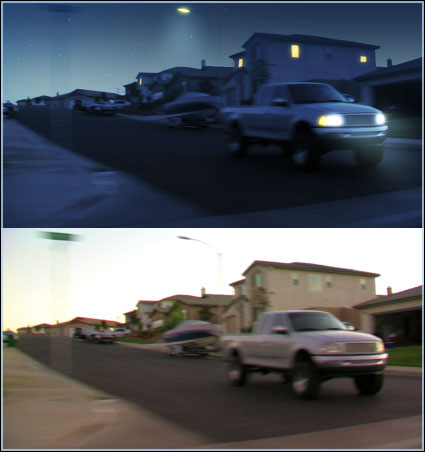
Day for night, an easy transformation right? Not always. Just darkening the shot and adding some blue doesn’t always sell it. Especially when you see crushed highlights and sharp shadows.
Some good tips for shooting day for night include:
- Limit direct shadows from the sun
- Limit specular hot spots
- Use a backlight to generate “moon light” in post
- Sometimes underexposing can help
- Shoot at dusk
- Don’t shoot the sun (duh!)
- Don’t shoot at night or this post won’t help
Here is an example. Obviously there are many possibilities, like a tutorial that may come up. I need to shoot some footage so if I can get out this week great if not next week. Until then, we’ll leave the light on.
By adding masks around ‘bright’ spots you can create simulated illumination.


SICK!!!!!!!!!!!!!!!!!!! I absolutely love these AE tutorials that you have been producing.
Another suggestion for a day for night tutorial– maybe in the future, could you do a day for night shot where you are overlooking a city skyline? I’ve always wondered how they got all the little office lights and home lights to turn on…. There are too many to try to make a mask by hand… so what could you do?
THANKS so much for your tutes!
Wow thats pretty nifty
I’ve try that at airport, shooting a plane landing.
Added some position light on wings, making all the windows lighted (one by one … we have nothing for nothing)… but my big problem is clouds (don’t know well if we can see clouds at night so far…) and a specular on the nose from the sun ! So the shoot must be be prepare for the show.
I’ve tried the shoot at night… a real nice black footage with color pixel noise ! mmmh….
Thats pretty clever stuff. Its almost like a spot the difference but with what you’ve had to add.
nice, little things make the difference. Plus, using film magic pro doesnt hurt
How would one go about adding the motion blur to the artificial light sources? This would just be trial and error with a directional motion blur I guess.
haha
“Don’t shoot the sun (duh!)
Don’t shoot at night or this post won’t help”
classic
Overcast clouds are really a plus. Also when shooting a car, Trapcode Lux can make it look pretty convincing by adding volumetric lights. You need to do some (hand)tracking to.
Finally someone those tutorials for video software, excellent place you got here i just became a member
[]
looking forward to something like this. I am actually in the middle of doing a film and I really want to know how to do something like this in a fake time lapse video where it gradually goes from light to dark. I have seen it done in movies before would be good to see how its done
Sounds interesting.
MM.
Hi from France Andrew and the others!
Have a look here!!!
It is a good tutorial for “day for night”!!!
Yes! I always wanted to know how to do this as realistic as possible. It’s a great idea for a tutorial.
Great idea for a tutorial. I’ve been doing some CC for a short film I’m working on where the interior scene is supposed to be fairly dark. Unfortunately the FX1 we were shooting with doesn’t do dark very well. The video becomes rather grainy, so we had to shoot with regular lighting to get the detail we needed then make the scene look dark in post. It hasn’t been easy but I’ve got it looking pretty good.
Regarding Ferdi’s post about volumetric lighting, I’ve done that before and it looks great with Lux. You get pretty good results by using the motion tracking in AE, so you may not have to hand track. You can see an example of it on my FX reel:
http://rendertainment.com/demo/fx_bb_high.html
as well as an example of one of the interior shots mentioned above (the first part of the Cartoon FX clip). And yes, that’s me running and jumping around in the Weather FX clip. If you’ve done some of Andrew’s tutorials you’ll probably recognized some things I’ve learned from this great site. The space animation was done a while ago, but if the blue earth tutorial had been up then it would have made it a lot easier, lol.
I like that French tutorial. Very nice.
looks very nice!
I am looking forward to the tutorial!
Andrew,
I can’t understand french, please make a new one in english, andrew kramer style!
Thanks in advance
fantastic!!! this is exactly the tutorial i need for my own production.
i tried so many different ways in after effects but none was good enough.
If you cant understand French, then simply use a website translator
Very nice. I love the little lighting effects touch u did with the street light and the truck headlights. Very effective. Hey AK, I just started a new Photo Blog and I was wondering if you could take a quick gander at some of my stuff. What I really would to do is start making slideshows with some subtle 3D projection. Unfortunately though, some of these may be complicated to pull that off. But it would be very cool to give my stuff some more depth that way. Anyways, I know your a busy dude but if you get a quick break take a look. take care
@Bill Kelly
I like the rain in the weather fx… I’d like to know how you did it.
@Andrew
Great idea.. will be waiting by my PC for the upload of the tutorial…
@Bill Kelly
I like the rain in the weather fx… I’d like to know how you did it.
Yeah, me too.
bring it!
Bill- nice stuff on the fx reel. i agree with Dustin. the rain looks pretty nice. also the 3d pics & displacement mapping were well done.
i should really put my vfx reel together…
“Don’t shoot at night or this post won’t help”
bwahahaha – I almost wet my pants for real
Bill Kelly.
Are you in Utah? Your Displacement Image in your FX real looks familiar.
Jacob
this is insane!!!
please make a tutorial about this!
I like this , its real nice
thanks so much
very helpful! im looking forward to the tutorial! you could possibly use some trapcode effects to enhance the lights… like car headlights or streetlamps…
thx Andrew! i’am waiting for it! its great…
Nice.
Nice job man
Cool, looking forward to this tutorial.
Andrew, do you think you could also include examples of how to make a surface appear wet, and possibly reflect its surroundings? I was playing with a few different ways the other day but couldn’t come up with anything really that great…
What i’m trying to accomplish is simulated rain, with wet surroundings reflecting an object moving through the scene. It’d be a great tutorial…. if you’re up to the challenge
*draws sword
Will you be doing a full length video tut for this??? I think this could be one of the most helpful tuts yet!!
Yes, definatly do a tutorial. Keep up the good work!
Please, make a tutorial for an industrial low fps camera with noise and titles! THX!
Cool, i had an idea but when ever i shoot the sun the bullet comes back down, stupid 9MM
Cool French tutorial.
Andrew, it is possible to create the shok wave (you know, cars flying, buildings burning and dust and fire)
You can add this effect in the Day for night tutorial. Maybe just a digital push on the truck.
Any way, thanks!
yeah, I hope this tutorial is coming soon, I need this day for night for my actually short film…
And their is in every shot a different light condition…
thank’s for your great tutorials!!
Who needs french if we have Andrew?????
Awaiting exhalted your tut D
Yeah, but those French are hard-working. I’m lazy…
Awesome. I’ve been wanting to shoot some night stuff but obviously it’s dark, (der) so this would be great. A tutorials would be awesome. Thanks Andrew.
hola Andrew!! saludos desde bogota, colombia
thanks
how hard is it to go opposite. from night to day
Dustin James, Some Guy, Pat Norman, Jacob Behunin
I used Trapcode Particular for the rain FX, though you could probably use CC Particle World as well.
Here’s the emitter settings and timeline:
http://img440.imageshack.us/img440/534/rain1ms1.png
For the particle settings, try Life = 20, Particle Type = Sphere, Sphere Feather = 50
Size = 2.3, and adjust the color to a whitish blue
For Physics try Physics Model = Bounce, Gravity = 275. In the Bounce Settings, set the Floor layer to Floor (it’s just a grid set at the angle you want and visibility turned off), Floor Mode = Infinite Plane, and Collision Event = Kill. Bounce = 25 and Bounce Random 52
In Aux System try Emit = At Collision Event, Particles/Collision = 8, Life = .5, Velocity = 150, Size = 1.5, Opacity = 10
Everything else you can leave at default. If you don’t have Particular you can downlaod the demo at trapcode.com
Then you want to duplicate this a couple times in your main comp, make the layers 3D and add a camera. Adjust the layers and camera in 3D space to your liking. It also helps to adjust the curves in your video so that everything is a little darker, and you may need to mask certain areas and adjust their curves individually to make them look wet. Good luck!
Sorry for getting off topic here Andrew, lol.
Not at all Bill. Nice stuff, thanks for sharing.
Night to day is not easy.
Wow, Andrew, I’ve been trying this effect myself a lot; thanks for “maybe” making this tutorial
Now, if I can make a little request here, could you also show us some nice moody color grading? As in, how to make a scene look sad, or cold, or happy. I’ve experimented with this but I’d like to see what experience says
.
Anyone interested should check out this link:
http://www.studiodaily.com/main/news/7306.html
They don’t exactly change it to night time, but it is along the same lines. They have a car, which was shot during daytime, driving through a cg rainstorm. They had to darken the scene to compensate for the cloud cover. They add Volumetric lights to the cars headlights to make it interact with the cg rain, and the final product is amazing.
This is completely unrelated, but I think everyone will like it.
http://www.studiodaily.com/main/technique/tprojects/8240.html
One of my favorite videos.
Hey Andrew, in France they like holidays too, 5 weeks/year !
hey andrew ,we can do this effect with video footage or a still ?
at Mind drop studios-
Here is a link to the video showing how that articles subject was put together. Its really nicely done.
http://trapcode.com/gallery.html
@ Bill Kelly
Very cool!
@Bill Kelly:
Wow, thanks! Didn’t expect such a detailed answer. The color grading is awesome. So you just masked your arms and adjust the curves? I thought it was something like a filter or a color preset, but it’s just a lot of hard work. But it’s worth it. It looks fantastic. And the rain sound fx enhance the realism.
After seeing your screens i was playing with some things before your tutorial to see if i can mimic this effect. tell me what you think, also id like to see how you did it, if it was similar, and how i can expand on what i did. thanks
your stuff always great
http://img2.putfile.com/main/7/19221341770.jpg
http://img2.putfile.com/main/7/19221341652.jpg
I’m sorry if this post seems redundant, but i didn’t see my links so I’m trying to add them into this post, if they do show up after the “awaiting moderation” goes away i apologize again for the repost.
oh thats gr8 stuff, really helps alot. Thankyou!
“Don’t shoot at night or this post won’t help”
hahhahhahahhahah
“u always give us some FUN StuFF Toooooo”
Anyways, Thnx & Regards
Sandy
@ Tuxedokat I think it’s pretty cool.
Feedback,
Seems a little to dark, to much black. I’d mess around more with the levels and try and bring back some high lights. Maybe tone down the saturation of the blue channel a little or increase it’s brightness by a little as well.
Lights are pretty cool and star sky ain’t bad either. Good progress!
Bah, tried some stuff. Just looks fake!
Edit: http://img223.imageshack.us/img223/2029/caratnightqs4.jpg
Any comments? The lights look abit fake but..
Andrew, if you could edit this post into the one above I would be greatful;
This is the original image: http://www.americandrivers.no/Car31.jpg
: )
Hey Andrew,
thank you for all those amazing tutorials which were so easy to understand and funny. I am from India, In the 12th grade..i made a movie called youth syndrome which has loads of special effects..and a lightsaber duel too
..The big problem in my movie was a night scene i filmed indoors (thankfully during dusk)…Please bring this tutorial out soon,it would be of great help….And i will Definelty mention your name and website when i release the movie in my school and on the net..
Thanks a lot,
Kenneth Sebastian
thank you!

Before Posting
We're trying to encourage more thoughtful commenting. Please take a moment to write a meaningful response to this post.
Also remember to read the rules on posting first.
Leave a Comment


This is great example, the small things really do the work!