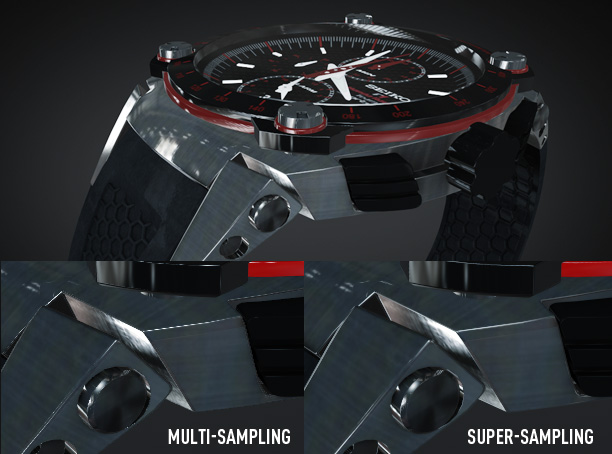
Exciting news for a boring (but crucial) feature… Anti-Aliasing! Element 3D is about to get some powerful new options next week that will clean your clock! Or at least your edges with impressive Super-Sampling!
What is anti-aliasing? Basically it’s the method used to reduce jagged artifacts in your renders with sharp highlights or reflections like the above example.
Currently Element 3D uses hardware Multi-Sampling which is very fast but with extreme highlights and thin edges, some renders may look flickery or jagged. Not any more. We’re listening to our customers and so we created an impressive new solution called Super-Sampling.
Key Benefits:
-Maintains crisp image quality and textures
-Smooths sharp edges and highlights
-Improved clarity of high-poly detailed models
-Easy to use, just turn it on!
Super-Sampling basically renders your frame “super” large and then re-samples down to the frame size. This allows more detail to be saved and smoothed properly from the extra data. But, it does this on the GPU using a special render method.
The new method will add a minimal performance hit but it will NOT require additional MEMORY! (This is kind-of a big deal…) The other great thing is that you can turn it on when needed or just the final render. Element is all about control!
To give you an ideas of the performance… A 10 second render time will be around 20 seconds with 2X Super-Sampling. Not too bad considering Element 3D is already blazing fast!
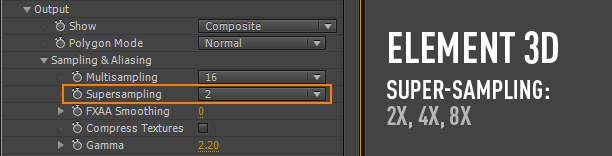
Available Next Week:
This update will be free to current and new customers of Element 3D and includes many bug fixes and improvements. If you think we’re going to let this product stand still, watch out!
Element 3D Available in the Video Copilot Store
Watch Element Tutorials and videos here
We're trying to encourage more thoughtful commenting. Please take a moment to write a meaningful response to this post.
Also remember to read the rules on posting first.
3D MODELS


I haven’t had my clock cleaned in a long time….will it hurt??
You won’t remember.
I don’t remember writing that…….
Jedi skill at work
LIKE!
Insaine. Hoping for a bunch more tutorials utilizing this program with Live-Action footage soon.
WITCHCRAFT!!! WITCHCRAFT!!!
Very cool. Planning on buying Element 3D in the next few days, can’t wait to play around with it!
Andrew, while you are fixing Element’s bugs, there is a nasty one I found regarding texture upload. Whenever I try to upload a grayscale texture, Element crashes. Would be nice to have that fixed. Otherwise congrats for truely amazing piece of software. Best regards.
Yep… this is fixed too.
Ha Ha! Just created some motion titles couple of days ago and my boss said:”What about these flickering edges? Clear them!” And I tried and tried but nothing helped. Very looking forward to super sampling
Ask and its given…!
I’ve took element since one week and I can’t stop using it (also finish my work!)
It’s really amasing combine with optical flares! I know I should response with meaningful post but I think congratulate to you and staff it is!
Hi 5 to all V.C. staff!
p.s.
I come from Italy, Milan.. next week I’m going to 3 week tour on the road in California, there’s possibility to visit your studios?
Cheers
Federico
I like VCP and boobs.
Where can I order the Boobs ? Are they 3D too ?
Just bought a top-of-the-line Mac 15″ MBP for Element 3D.
Great news. I’ve been experiencing some slight Anti-Aliasing problems with some rim highlights) but managed to fixed them by tweaking FXAA smoothing. I’m really looking foward to the update! BIG UP for the plugin – already saved me a lot of time with some projects
I’m getting scared, dad.
Very good thanks Andrew
Hey Andrew I really need your help with this, whenever I export this comp at full rez, the 3D ship flickers. I’ve tried everything I can think of.
here is what happens!
http://www.youtube.com/watch?v=YGfVIr4AhXQ&feature=youtu.be
Really really need help!
thanks!
Please email our support, could be a driver issue or something.
I’ve seen this before.
I believe the ships cloaking device had malfunctioned. It need to return to base for a technical overhaul.
( sorry, couldn’t resist!)
ha ha yeh! It might have something to do with the high polygon count or something coz i swapped it for a lower count helicopter just to test and it rendered fine. hmmm just not sure what to do. also when i turned on the motion blur the blue lights shined through any of the solid parts of the ship like they were transparent. so odd!
Could be as Andrew said, the Drivers of the Video card.
I had issues initially after installing Elements with rendering problems.
I went to the site and manually updated the drivers and it worked.
The Auto updates for ATI drivers did not work, I had to manually download them to work.
I dont think you can manually update drivers for the Mac, i think i have managed to get it to work, but i have had to reduce my overall textures from 3 down to 2, which is annoying.
What size textures are they?
Don’t know if you’re using 3ds max but if you are.. try this:
Tools->Snapshot
and after hit Delete to delete the old model (don’t panic the operation made a copy on top) and after that add a Edit Poly modifier on top and collapse it. Hope it helps.
Hi andrew, they are just the textures from the pro textures pack. but it turns out that im still having the same problem even though i thought i fixed it. ive tried everything. I’ve even exported the ship as an alpha to decrease the strain on the render. but it turns out that the element layers wont export as an alpha. it stays with the black background. the only result i have managed to get where it doesn’t flicker is by turning on the GL render but then the quality is really bad. really dont know what to do.
I think your just coming in too hot.
Email support your model and, we’ll look at it! Ask them to forward to me.
emailed it , thanks Andrew!
Got it, looking at it now.
I had the same Problem, i set down the multisamling to 1 and noe it works
I had the same Problem. I set the Multisampling down to 1, now it works pretty well!
yeh i did try that but no hope, any luck andrew?
I love this feature it’s awesome! Adds more smooth realism to the composition.
I also wanted to ask for another feature since you said designing logo’s in AE a while ago was a good way of working, I re-designed my company logo with Element 3D. And I wanted to ask if you could find a way to export the design to a high quality image like 300dpi instead of the usual 72 dpi.
If you just want a still frame, render it out at a much higher resolution, 5x higher should do it (300/72=5).
What export settings do you use to achieve a 300 dpi resolution still frame? I can’t find a way to make the resolution higher just the scale.
Just take it into Photoshop. Make the scale large enough in After Effects that you’ll be big enough for 300dpi.
If your original image is 500×500 pixels, then scale it up by 5 so it’s 2500×2500 pixels (500×5=2500), then save it as a still frame (Composition > Save Frame As > File), bring it into Photoshop and set the DPI to 300dpi.
This is something we are working on but GPU rendering is not designed for super-large comp sizes… One thing you can do with the super-sampling is turn down multi-sampling to 1 and this should allow you to make a larger comp size, then turn up super-sampling to 2X or 4X and this will smooth the aliasing. May work…
I’m sure this has been brought up, but I definitely would love to see more control over individual group anchor points..
hmm… do you have a use case?
I second this
I thrice this!
I had a simple pad lock with 2 textures to import.. So I put each texture in its own group. One texture was the bottom of the lock the 2nd was the top (arm) of the lock.. When I went to animate the lock unlocking and opening the arm would rotate at the center of the model.. when I needed to move the anchor point of that group at the left side.. So if each group had its own control over the positioning of the anchor point this would have been much easier.. I had to make 2 copies of element and mask around parts to make it work..
I second the second and thrice, so does that mean I 10 this? Either way, it would be very nice to have anchor point controls in element be a bit more robust, even if it means we buy an upgrade to the plug or something in the future (not sure how much coding work it would take). I use blender and it defaults to putting the anchor point for all obj exports at the scene center, and there is no way to make it do something different.
I agree! I was working on a globe and needed to adjust the anchor point so I could get it to rotate correctly. I ended up working around it, but I did notice that was problem.
It would definitely be an awesome feature to add in a future version
I found a way. Here’s my example.
1 model = Helicopter
Fuselage, Main rotor and little rotor are on three materials.
I set fuselage to group 1. Hide all materials but fuselage.
I set Main rotor to group 2. Hide all materials but Main rotor.
I set little rotor to group 3. Hide all materials but little rotor.
Clic ok.
In the composition you will see the full helicopter, no need to move any parts (just the little rotor axe cause it’s a bit oblique.
Now go to group 2, particle look, enable multiobject.
Go to multiobject rotation and you should be able to animate it.
Go to group 3 and do the same. Obviously, you’re enabling multiobject but you’re not seeing hidden objects rotating (even if they are/would), just the one you want.
Hope this will help many people here.
Regards
AD
Lets hope you’ll also resolve the issue when replicators are 3d objects.
Yep.
If this is considered a boring update, then by all means be as dull as you please!
Clearly you spent more time on the technical aspect than the name. I would have went with “Multi-Sampling II: Hyper Fighting”.
Andrew I still do not understand the exact
Element is the construction of models or only import models and the Textures?
It’s only importing of models and textures.
In a way, making 3D replicators is sort of like construction of models.
Doing such a nice job ! BUT
Maybe you can also check out the Ambient Occlusion bug on macs.
Grtz
Great update Andrew… noticed this problem with a 3D Smartphone so had to render in C4D because of the jagged edges. Any plans for importing objects from C4D with textures and materials in place? In your tutorials it looks simple to apply the textures but when receiving a pre-textured model it’s nearly impossible to rebuild in Element.
Possibly but it will never be perfect since the settings of C4D and other 3D programs do not match the ones in Element and the Values are not similar either. Maybe we can get textures to work if they are JPG and PNG but people will still have to tweak all the settings. It’s one of those features that could take a very long time to do and still not make everyone happy. But we are looking at ways to make it easier for people to rebuild textures…
I’m only using imported models and had almost no problem. Of course somethime you have to add some material in c4d, otherwise I’m fine!
Andrew how about being able to solo and uncheck all material layers? When a model has 30 material and their name are just numbers it would be useful. Also to see to what material a model part is associated to. Importing would be easier.
Regards
AD
Ya.. this was in the original design but the UI had too many lights and buttons… we could probably add it back.
I knew you already thought that, could you add an option in the preferences to reenable it?
Otherwise, add an advanced button that people can press to “unhide” all the settings, the one you’ve been secretly using untill now… just joking but I wish that was true.
super Andrew, I was just about to ask for AA
and you made it !!
Marek
WOW! Can you post up an example of this at 8X?
And already superb product – and incredible value – just went stratospheric …
Andrew….
When will this update be released?
Next week. Sometime.
Thats will super helpful feature!
edges is matter!
http://youtu.be/vpnGJY80Cnw?hd=1
http://youtu.be/kB4Xgv9NxgE?hd=1
thank you!
another great update! can’t wait!
2 questions:
1. how do you get it so your camera renders in real time when you move the model around in after effects?
and
2. what is the font you’ve been using for all your element 3d promos?
thanks!
Hi Andrew, plugin is amazing, can’t wait to see all the great upgrades you do to it and also project you create from it too.
i am facing a problem and i don’t know if a lot of people are too.
every time i extrude TEXT, the letter R seems to have some issues.
please see the image below
http://tinypic.com/r/14nctjq/6
thanks
This is great. Talk about listening to your customers! Now once the anchor point system is improved, Element will be perfect…jus’ purfect…
Thanks James… can you elaborate? How should it work for you?
I was making a searchlight, like the one from Fox, i exported all parts together , put in separated groups in 3dsmax, each with its own anchor point.
When i try to animate in element, i put the moving parts in group 2 but it got the anchor from the center of the overall group.I had to manually reposition the anchor, its annoying , never get to a perfect placement, but it worked in the end.After i finished i realized that it would be faster to render it in 3dsmax, considering the setup time wasted.
Just to clarify I don’t know if it’s a problem with the anchor point system, or a lack of understanding with how it functions, but for example I was unable to get the rear rotor of a heli to rotate correctly. It would wobble no matter where I set the anchor point (from model,model centre etc…)
I guess in an ideal world you would be able to move the anchor point like you can in a 3D program or in AE. I don’t know how complicated of a feature that would be. Probably a lot harder then it sounds. But it would be really great!
Can it retain the anchor point in an obj file? I can’t remember. But if it just did that, that would be super helpful.
Not having Element yet myself, I can only speculate. But my theory would be that since Element at its core is designed as a particle replicator, whenever you add multiple groups they would all be anchored around a central point. It makes sense from the replicator standpoint. But I don’t know, I’m not a doctor.
Man, what an awesome feature, and released on my birthday too!
Now I just need to hope I get enough birthday money to buy it lol
Great update! In some of my Element projects in 1080P or larger, there was a little aliasing but now everything will be perfectly sharp
Insane! Awesome Anti-Aliasing, looks very nice
still can’t wait till I can get my hands on Element, it’s gonna be really cool to see this plugin just keep getting better and better and better….
Love that it gives you the option to go to 8x. Probably rarely necessary, but just knowing that its available makes the creative process more enjoyable. I have a strange aversion to aliasing. (I really need to get out more…)
Glad to see you guys on top of it so fast. This is great news, because as good as The Plugin is already, its like a bonus, meaning we are now exposed and spoiled to the quality of this plugin. Thanks Guys!!
Thanks to Andrew Kramer now people are using After Effects like Maya you are A LEGENT {replay to this comment Andrew}
I have a small question, does Element not support alpha channels for models or have I just not found that feature?
Thanks.
No alpha texture channel but you can turn down the materials opacity. http://www.videocopilot.net/help/element/ For example we have a jet and the canopy window is separated into it’s own material with lower opacity.
Thanks for the fast reply,
I was aware about the opacity feature (saw all the tutorials) but I was using a lot of vegetation from a game I’m working on and the leaves use alpha channels.
Oh well, not a deal breaker, still would be nice to see this feature implemented in Element 2.0
Not really a feature possibly, but a limitation of OpenGL version. There are ways to have On or Off opacity maps… so you could do some basic stuff but it would not look that great.
Talking about opacity, I had some problem with glass looking materials. I had to render several bottles behind a glass and when I turn on the glass window the bottles disappear. I think Element it’s not able to handle multiple materials that are not set to 100% when they overlap, am I right? Maybe you’re working on it or there’s already a way to do it, or maybe it’s just another limitation of GL?
I’m waiting for a tutorial about using camera tracker and element togheter. I already had a try and it’s very intuitive. I need to go back to the “108. Particle Shadows” tutorial and learn how to cast shadows…. again
Regards
ALmost Darkslide
Andrew, you said it is because of OpenGL version, does this mean a higher version allows it, what version are you using? Are you limited by Apple not supporting the latest versions to get feature parity between Windows and Mac? This feature would really make a lot of work posable for me in Element, I combine green screen video with 3D regularly, no need for ray trace 3D so Element would speed up rendering immensely.
Can you do a tutorial on making our own environment maps? Love the ones E3D comes with but would like to experiment with higher res images. Oh and the super-sampling… nice!
If you have an IPhone, 360 Panoramic is a really cool app to do this with. Auto stitching. I’ve even used the photos as IBL lighting setups to good effect.
Ok, so i would like to discuss anchor points, if thats ok,i made this animation in the link below, the searchlights where exported from 3dsmax,all pieces were grouped together, and inside that group the moving parts where group together with a diferent anchor point, so that they could rotate from the right spot.When i bring then to element, they assume the anchor from the center of the entire group, so i had to manually reposition the anchor point for the moving partes, but thats not easy to do.I never got to the excat place they were in 3dsmax.Im i missing something or this is the onlt method right now?I would love to see some tutorial explaining how the export and not loose the anchor placed on the 3d software, if thats possible, thx.
http://youtu.be/UFI41pojItI
Sorry i double posted the some thing, the other post was not visible,now its is.
hi Andrew, i ve got question – ive got 2 Windows installed and when I open Afx on the other windows it asks for license again ? what should i do ?
Any chance there will be an option to texture clones/replications separate from the parent in the future? Like in c4d?
Can you elaborate? I’m not that familiar with how that works…
For example, I want to be able to make a grid of cubes using the replicator in Element, but be able to shade or texture each cube independently. In Cinema 4d, you can create a multishader that will shade each clone in that manner.
https://vimeo.com/23493491
thanks!
Sweet! Looking forward to this update! Thanks for the heads up Andrew!
I love this product. I am looking at getting ZBrush software will this work in conjunction with Element. THanx Andrew
I agree on the whole anchor point system. im not a computer wizard so im in no way bashing ELEMENT. Like in a 3d program, i would be better if each group had its own “origin” point. I had a model that I had assigned to a group and when i rotated it, it rotated in a large circular motion-instead of rotating around a central point.
I’ll post a tutorial on how it is designed to be used. May help understand it better.
much obliged sir!
Haven’t purchased Element yet, waiting until I take the plunge and purchase my new system- but just out of curiosity- is it possible to parent any settings in the element particle replicator to particular’s emitter? could possible do some interesting things.
possibly*
So what you would do is create a 3D null, parent Element to the Null then Parent the particle system to the Null. Bam!
..and get yourself a nice Elementicular.
…how bout Parlament?
When specular or normal bump used in element and after render it. is light layer to be effective on specular and normal bump?
VC team,
there is a bug or something when viewing vc mobile version.
Every “reply to this comment” is not a reply but just a regular post so it’s hard to see who is replying to who
… And yea element is great juu hi jee
rock’n roll baby (I am not a rocker)
Thanks asART.3D
I also visited your website and portfolio and it’s even better
Thanks a lot! …cheers from Croatia
That’s great
I look forward to see it!
Thanks for sharing
Hi asART. 3D
That’s awsome!!!
Thanks again!
Andrew I have a car model and when I try to put the pump map for the tires the plugin crashes do you know why and is there a fix for it? Thanks
Great news. Although my ati 2600 is not supported I will use it on my 12core which works fine. I’m just waiting for the right job to use it.
But when can we expect an update on Optical flares? I cannot use it anymore in CS6
( which is a big problem.
Hey Andrew, I purchased the Element 3-D and it is amazing. A great and wonderful tool. I love it!!!
I was wondering if there is going to be some volumetric options available? or Textures that can create cotton or clouds? Just wondering?
Thanks Dwaine
Great work, Andrew and VC team! The difference in the sample video is stunning. Looks great!
can i email my model zip file in an attachment to you.
Awesome work, looking forward to this update! Any intentions on supporting integrated GPUs like the Intel HD Graphics 4000? I’d love to take Element on the go on my MacBook
Works great on our MacBook! (17″ pro, 2012, running Lion)
ahh it wont work on my computer… Im so sad… please add support fot intel hd
What should I do if I want to sell the computer on which the plugin is uploaded, and license, and what do I do so I can upload the plugin to the new computer, or are there any restrictions?
Looks great. I think that Element could also be an excellent texturing tool. Perhaps you could focus a little bit on that in one of the upcoming videos.
As for me, I think I will wait for shadows to appear
Andrew, i want to know if i track a scene in three 3d using in built camera tracker in cs6 and parent any element 3d object to it, will it move along with the camera?
Check out this new lyric video for the band Subsource that I created completely with Element 3D.
http://youtu.be/UpUwl4Jna-Y?hd=1
Hey Andrew,
I don’t post here alot but this plugin and it’s engine reminds me alot of the broadcasting package we use for live television in the Netherlands. I’m a freelancer for TV and we are using a broadcast system called Xpression. This package is now also used worldwide. It’s also OpenGL based and works like your Element plugin. It renders realtime and is really fast. This is needed for Live TV, because we have to be able to adjust things on the fly, without having render times. I think the engine, and your Element engine are quite similar, and tho i was wondering why actually not alot of software developers thought of making something like this before. Anyway, congrats with your plugin. I haven’t bought it myself (just because I don’t have alot of time atm), but i probably will in the near future. Some info about the broadcasting package can be found here. http://www.rossvideo.com/graphics-system/xpression . Note that this is not spam and i apologise if it seems so. I just thought i’d let you know because it’s really quite similar to your Element 3d plugin.
Hi Andrew, thank you for this great tool. I wanted to know how that goes with the helicopter. So I experimented a bit. Here are the results: https://vimeo.com/46486248
Thanks to you and your team.
Sorry but it doesn’t looks good.
Hi Andrew, look at this script for after Effects, it creates shadow and reflection for Element 3D and more, check it out and find out more……..click the link and see the video
http://vimeo.com/46479528
That is what i was thinking about. Now Vimeo and Youtube will be filled with crappy Helicopter animations
I can’t get the script to run…Curious about this.
This is actually pretty huge, Element now cast light on AE layers. Shadow Darkness works directly from the light controls, diffusion has to be controlled via fast blur, but a lot easier then other methods to fake it!
Hey Andrew,
Is there a feature in the works allowing to scale objects on the 3 axes independently?
Also, will it be possible to rotate textures, beyond just scaling & offsetting them?
Anyways fantastic plug-in! Worth way more than its price.
I am absolutely blown away with everything VCP! The elements plug in has changed AE for the better no doubt. I have one question and maybe it’s dumb but I would like to ask. Is there a way to build some kind of collision expression within Elements? Would be cool to make the particles not mesh into one another when animated. That’s all I have. THANK YOU a million times over for all your great products and killer tutorials!
Hey Andrew! Love this plugin (like we needed any more reason to love it or VideoCopilot). Is there any way to bring in a shape and extrude it like the text tool?
Brilliant! Thank you!
can any one take a look at my screen shot and please tell me why my object is not sharp for the love of god.
http://i1068.photobucket.com/albums/u456/sammaghawiri/element3d.jpg
Can you use the pre-fractured objects to scatter the pieces, and then animate it coming together? Or is that not what it’s meant for?
Basically I’d like to scatter it across the composition in pieces, and then bring it in tighter to reveal the logo. Keep having trouble getting it to look good with fracture.
Helps a lot, thank you so much!
One more question I’m hoping you may have an answer to… If I have an object in 3Ds Max that has two layers (think text… One bevel, then duplicated and made bigger for outline), how do I bring this into Element and give the outline a different texture than the foreground?
Thank you so much for your help! Saved me a lot of time on this project. You already sound like a pro at it
Hi .. here is an example of what I have done so far with ELEMENT 3D !
It’s just a fantastic tool to work with it .. I’m loving it !
Visit my work here. Would like to read your comments:
http://www.youtube.com/embed/jrwLusda4pc
Cheers !
nicely done man. I’d suggest to add some smoothing to the model in the 3d program you’re using tho, and some aliasing to finish it off. At the close ups the geometry is a bit choppy.
Hi Albert .. Many thanks for watching. I will follow your suggestion in my upcoming works. Thanks for your comment. Cheers !
Andrew, This is an amazing product. I have nothing to work on right now where I have had to use Element yet, but this is truly amazing! I have been playing around with it and there are so many possibilities with this. I know you can not build anything crazy like you would a 3d program but this is awesome for those who can not afford a 3d program. Allowing masks to become 3d objects was genious and could open up some pretty cool possibilities. I just wanted to say thank you for all of your hard work, this site has helped me understand AE’s features and inspire ideas for shooting. I suppose thats what you intended with this site but either way great job.
Element 3d is the best. Thank you Mr. Andrew. God Bless You. here is a test made by me using elemnt and some free models.
http://www.youtube.com/watch?v=RAkyDYjTYh8&feature=youtu.be
Andrew, any chance of Element being ported to NUKE?
I even have more tutorials planned this week and also a 3D Tracking tutorial to talk about integrating 3D with live-action footage. More importantly though, we’ll learn how to manage a scene with 3D tracking data and not have everything in weird places and crazy scale values. Should be fun as we push the limits of AE!
Hi Andrew.
i have already mailed Support about this but maybe im not the only one with this Problem..
Element 3D takes a Huge Amount of RAM when working with multiple Models
2 of them about 100000 Polys
its currently Rendering and Takes up 35GB of RAM.
how is this Possible? even when working with much higher Poly Models in MAX i have never used this much RAM before?
kind Regards.
I got the same problem…Element 3D takes up 64 GB of Ram on my CPU? I am puzzled here!?!?!
Hy, can my 260 gtx run this??
In adition after 1 hour of rendering it crashed AE with an error that my system does not meet minimum specifications. After restarting ae it rendered fine and only took 12gb ram
Andrew,
Can you look at this text sample? I’m hoping you can assist. I am working on this for a co-worker and I’ve notice two things. One, when I apply motion blur it seems look off at beginning. If that is normal, ok.
http://www.youtube.com/watch?v=F1m7f63TglU&feature=youtu.be
Second, on the backside of the text, there is no bevel. Is there a way to fix that or is that the nature of the extrusion capability? I noticed some weird black spot (.06 seconds in) as it approached the camera too, not sure what that is. I have it set at 16 samples and FXAA at 2.
By the way, this rendered in 2:27 minutes.
And final question, any way for folks to get those cool sound effects shown in the bio hazard tutorial?
Thanks,
Eric
For the bevel question, just check Bevel Backside in your bevel texture options
Thanks Travis. Appreciate it.
Eric
I need this today!!!
Element 3d its not supported to Win XP ??
Great! AA was the only set back. Thanks for clearing up. Element makes my life so much easier and allows more time to work on other production.
Really loving Element, however like everything this day in age, the gap is closing between those who spent years learning the craft, and amateurs who simply purchase a plug in and flick a switch. Steroids have entered our arena.
Please can you advise when the Update will be available?
Is it at all possible that we will get an email notifying us of the Update if we have purchased elements already?
Thanks
It seems like whenever I apply a preset bevel to text, there are ugly pieces jutting out and weird geometry— and this is on most fonts that I try, not just weird ones. What’s that all about?
some body help me when i go to the scene setup its telling your video card does not support the selected configuration reduce ur layer size i am using intel hd graphics 1gp can any one help me out of this problem
Same here , but i don’t think it works with intel HD graphics card , i have toshiba Satellite P755-s5265 and it give me same error
it happens the same to me! help!!
This is also happening to me – does anyone have a solution?
Same here, please tell what to do, i use nvidia GeForce, reduced quality of all layers but still it gives error.
@Andrew are you alive man ? :/
Did I do a mistake by buying this?
It’s really a great plugins! BUT I have a same problem with them ,could you solve this problem? May be you don’t like the HD serieies video card?
Andrew– you are a God. Thank you for your amazing product!!!
We’re using it in our pipeline but had a question about managing multiple projects on multiple machines with Element. Tried posting on the forums but not sure anyone has a clear answer so far: http://www.videocopilot.net/forum/viewtopic.php?f=42&t=89686
Could you please help us?! Basically we want to know how to ‘reconnect’ Element projects/models that we move to another system. Thank you so much!
awesome drew!
just on observation/question though, since i downloaded it once already, in my VCP download section it says “Mac Installer – v1.0.322 4 tries left (84.99 MB) will this be adjusted because of updates?
That is NOT boring!
Sharp…literally!!!
Hi
When will the update with Improved Anti-Aliasing be released
Regards
Flemming
Any ETA on the aliasing patch? Running closer to a deadline and it would be great to have
I believe he said sometime this week.
Hey there,
I’m curious for the Update
Can you do something about the strange artifacting on OBJ Objects with DOF enabled?
I posted the problem in the forum days ago but still no answer. Is it a known bug or maybe a hardware issue?
Thanks
Any idea when the update will come out this week?
? Andrew ?
Tomorrows Friday…Still wondering about the next Super Sampling Anti-Aliasing update release?
Hi,
I recently bought Element 3D and now i can do 3D so easily and that’s fun!
By the way, this is my first 3D intro so if you can tell me what is good or bad i would appreciate that
Video: http://youtu.be/jHpKNhnjJ1k
Element 3d its not supported to Win XP ??
Spanish pleace.
Please help with some way to center a pivot point for animation….
I recently was asked by a director why we had anti aliasing on a couple of shots where the brightness was maxing out (I was shooting with the 7D) I couldn’t answer him and in the end i just asked him to mask those that bit of the shot and blur it out. he wasn’t too happy as he had to track the shots in order to mask them. (I was using a little camera slider rig) so egg on my face. Any idea how I could have made it easier for him to fix this?
Very cool tks Andrew Kramer
“your video card does not support the selected configuration, please reduce the layer size”
i have a i7 m620 with the integrated graphic card.
i updated the driver – but it doesnt work.
does element do not support these kind of graphic cards?
thx a lot!
I have installed it already and have the license, how come when I apply Element 3D from the effects tab it says : “your video card does not support the selected configuration, please reduce the layer size ” How can I reduce layer size? that does mean lowering the resolution? I have Nvidia GeForce 9900 with 1GB of VRAM. Tnx!
i have same problem please help me
HHHHHHHHHHaaaaaaaaaaYYYYYYYYYYY Do i need Cinema 4D or 3d Max to use element 3d? Im trying to buy it but i need to know it i need to get these software first
Hello, does element 3d support my macbook 13″ 2012 i5 with intel hd 400 GPU?