Andrew Kramer on July 30th, 2012 4:17 am
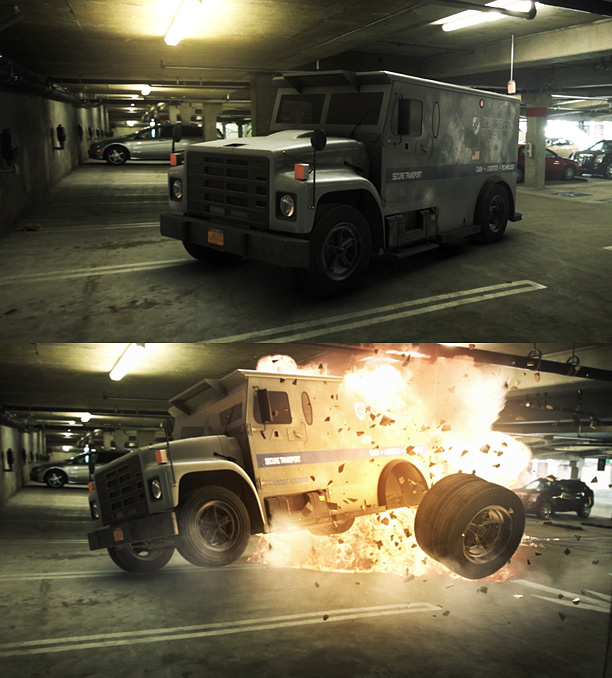
Here is another fun example using Element 3D with live action footage and 3D Camera tracking. I’ll be posting a 3D tracking tutorial soon but for the explosion, I used some Action Essentials 2 along with some colored lights to create the fire illumination.
The truck model was imported in to Element and one of the tires had a separate material so that it could be animated separately from the rest of the vehicle. All animation, lighting and rendering done inside After Effects with Element 3D!
Element 3D Available in the Video Copilot Store!
104 RESPONSES TO "ELEMENT 3D & LIVE ACTION FOOTAGE"
POST A COMMENT!
Before Posting
We're trying to encourage more thoughtful commenting. Please take a moment to write a meaningful response to this post.
Also remember to read the rules on posting first.
We're trying to encourage more thoughtful commenting. Please take a moment to write a meaningful response to this post.
Also remember to read the rules on posting first.
3D MODELS


Looks great! Really nice compositing!
Very Cool!!! It’s VFX compositing possibilities like this when time is of the essence that has me so excited. It’s been great so far!
Thats awsome
we hope to see the tutorial or some tips on it =)
Everything Video Copilot makes becomes History!
Oh, what makes this element
That is awesome , really insane ! I loved it , can’t wait to see the tutorial, Andrew Kramer you’re genius
hi .. its very good
thank you
Wooow very cool , can’t Waite for tutorial . Andrew when tutorial comes ?
With plug Camera Tracker
Did you shake it?
Or its elements have the same capability?
Action Essentials?…the only thing we wait is how to do this, anyway…..GREAT JOB ANDREW!
also…plugin element aint like 3d software to simulate physx, so how did the truck will going to hit the floor?
Looks great! You should release a vehicle pack
Phew lucky I didn’t make a tutorial
your’s will be 1000x better than mine :p
Awesome! How much polygons is the truck? Because I am having problems loading a 3D model into Elements.
Good Work! But Why are you using the Same Background?
Really awesome…. keep it up….
WOW! Can I also do this with my neighbor’s car?
haha,is amazing
Blimey, do you never sleep?
Thanks once more for another great tutorial.
…or maybe you do what a friend used to do – queue up all his emails to send in the middle of the night so it looked like he was working around the clock to impress his boss!
CUD YOU MAKE AN TUT, THIS IS ****** NICE!
Can’t wait for the tutorial!
WHoah!!! Andrew!!! Your Great!!!!!!
How about the shadows? Does Element3D had a recent update with shadows features?
The shadows are faked using a few simple techniques that will be shown in the tutorial. Real Shadows is major feature that is planned for V2!
Hey Andrew,
If you talk about shadows you could do some promo for Kevin Schires “Shadow Caster” script. He’s done a tremendous job for the community and really deserves some appreciation. Now also works with Particular and Form.Download the script here: http://www.schiresk.com/afx/scripts/Shadow Caster.jsx
This version 2, we have to buy or be a free upgrade?
Version 1 hasn’t been out a month yet, and people are wondering about the price tag for version 2. Wow.
And when’s V2 planned for?
Great work as usual!
Please can we have a tutorial that covers realistic lighting..?
In this example I ended up cheating by using a levels adjustment. What’s the best way to match the originals ‘volumetric’(?) lighting effect..?
http://www.youtube.com/watch?v=EWQdNhE_7uE
Pretty cool, lol the light of fluorescent got a different
Great job guys, so when the tutorial comes out?
Can’t wait to see the tutorial. Awesome as usual Mr. Kramer.
ye nice the shadows looks realistic
element 3d is the best is the future end
more
you are super creative end super god for real
very cool the presence of the shadow ta realistic
3d element is the number one of the adobe ae plugins
element does tracking too??
I don’t believe so. I think he’s probably using the camera tracker in AE, Mocha or he might use the new 3D one in CS6… it’s very nice…
Boujou tracker is also good. He used that in the meteorite tutorial
The CS6 Tracker, I’ve found works fantastic, and extremely easy. What’s great is Element sees the camera, the moment you place it in and the CS6 tracker is the easiest ever. No messing with nulls really. Place a camera and null, copy null position to your 3D object, adjust size and position and bam. Done. (no null parenting either)
Here was a quick test I did using Element (futuristic grenade). I didn’t get around to messing with the shadow yet but notice how tightly it is locked in place. Took a few seconds to do. http://youtu.be/mC2152QmCoI
Eric
Kirk Productions
Ya, the CS6 3D Camera Tracker is very easy, and it works awesomely well. I love it…
very nice Andrew *___^
Very cool, I am quite impressed
This 3D route is so inovative. With some pun intended… This is taking it into another demention. Thank you so much for everything you are doing and thank you for taking my money to allow this to happen on my PC.
My son and I are actively working some projects together to learn more. This is our bonding time. I really think of it as my time with him and Andrew and maybe Sam.
Thanks again
Looks really great! I’m looking forward to the tutorial…
This plugin is just going to get better and better and more better!
Andrew you r the best..i really liked your tutorial specially the element its trmendus , fantabulus…..
If Element was around when they made the matrix, John Gaeta would’ve been working at burger king…
Andrew, are you doing any work on the new series called Revolution coming in the Autumn ( sorry, the Fall….)
Mr. Kramer, I have a request: if you post a video, could you make it available on VideoCopilot’s site as well instead of on Vimeo or YouTube exclusively? For many of us users, these other sites are blocked on our workplace internet, where we access your site much of the time.
Just a humble request/suggestion from a raving loyal fan who would love to see everything you post!
agreed, we have Vimeo and Youtube blocked at work also.
Timber_Wolf_2 and Darren , where are you live ? (which country ?)
Where are you living ? (which country ?)
they said at their workplace…. some company block youtube, vimeo, facebook etc to keep their employees focus…
Oh OK redinou , i understand now
Some of us have missed out on a lot of tutorials because we don’t have particular, now there is Element 3D. Should we, the people who don’t have any plugins for our AE, expect anything that we can actually use in the coming months, or should we just chill for a while and things will get back to normal?
I know you’re excited about the new product, and it looks awesome. It’s just an honest question about what the next stack of tutorials are going to be like.
Yo James!
We will be adding all sorts of new tutorials that cover all aspects of Visual Effects. Of course some of the upcoming Element tutorials are not only about Element but compositing with live Action Footage. For example 3D camera tracking and managing 3D scene data and blending elements with your background plate. Whether you use Element or a dedicated 3D program these tips will come in handy.
Element represents a bridge to doing things that were not possible or require 3,000 software to even do simple things in 3D. It is clear that the Visual Effects and motion graphics industry is excited about 3D and we want to teach people using a variety of programs like C4D, 3D max and of course Element.
Hi James, you made me start writing my first comment on this site since 2005, when first tutorial was published. I work as a professional motion graphic designer since that 2005, also.
Just a simple question: How can you ask someone that is sharing free resources, assets and knowledge (the field of expertise is irrelevant) when is going to share some other free resources, assets and knowledge that are more suitable for your budget?
no i think he has right. many of studends havent got the money to buy particular or element. and his question is absolutly legitimately! shame on you melat3mg !!!
Except in almost every tutorial that uses Particular, he points out that the same effect can be mostly achieved using CC Particle World. And in the ones it can’t, he says so.
As far as Element is concerned, I was a student a year ago myself, I know full well what living off of student loans and maxed out credit cards and boxes of KD is like. But at $150, with determination you should be able to budget yourself for a few weeks and afford it. I don’t have Element myself yet but I can’t wait until I do and to revisit all these videos.
Plus there have been countless times where it’s been weeks if not months between tutorials. Mid-Air Emergency was March 21st and The Jungle was June 1st, almost 3 months later.
No offence intended but I think that’s just an all around an undeserved complaint.
When used normal bump and specular map in element then render . is effective the light layer on normal bum and specular map?
When will more tutorials follow? Most is currently just show-offs but I missing 0 – 100 tutorial like in the old times
Holy shiiiiiii-
LOL man I love Video Copilot!!!
you keep destroying that poor parking!
Can not wait looks awesome !
bought/installed now just looking for the time to play with this awesomeness. damn clients.
Hey, Moldy, I can say 2 things to make you happier:
first, I do believe. Second, send your clients my way, and you can play with element3D – it’s a win-win. You get to play with element, and I get to raise the cash for the full studio bundle. Woo hoo!
my first test, any suggestion to make it better?
http://www.renderking.it/2012/07/30/element-3d-test/
Andrew,you are an inspiration.cant imagine a world without videocopilot,it would norm & void!
Great work Andrew!
Can’t wait when update come out with better edges rendering
http://youtu.be/-c-1L3ejrJg?hd=1
That was really cool !
Could we make a bit after this scene with element 3D ?
I mean could it simulate/animate the dropping of the wheel or maybe the car ?
Now if we had anchor point control we could animate the truck driving up (wheels spinning) then exploding.. (hint, hint) All kidding aside.. this is a fantastic plugin..
I understand that there is work arounds.. but.. you will have to use masks and animate the masks along with each element layer, which in turn you will have to pre-compose each layer..etc.. Not only is this time consuming, it would be easier for me just to animate in my regular 3d program.. Not sure if you understand what I am really talking about..
Element was never designed to be able to rig a vehicle but there are some tricks. In fact you can actually rig a vehicle much easier than this, I’ll try to make a quick tutorial soon.
I agree Element is a great plugin there is no disputing that.. And I understand it wasn’t meant to rig objects, I am merely just stating if we had control over individual group anchor points it would make this plugin even more powerful.. But it seems like thats not going to be an option, So I’ll lay my comments to rest on the subject. I am by no means unhappy with this plugin at all.. Its changed the way I do everything. Cheers
Wow, that is pretty freakin awesome…I love Element 3-D I am currently using it on my trailers. Can’t wait to show y’all my work!
This looks fantastic. I am intrigued at Element because I have dabbled in 3D with Blender, but it never took a hold. It always seemed far too complex for me to really get into since I was more video and graphics focused. Naturally, I’ve spent a lot of time in After Effects (when I’m not shooting or editing) and I could see myself utilizing Element for a lot of my ideas.
Here is my question, will there be some more thorough samples to really show it off? I love samples like this armored truck blowing up, but it freezes before the physical motion finishes. Or the picture of the F-18 jet fighter on the Element product page. Totally looks awesome, but I have no idea how real it looks in an actual video.
If I see that kind of stuff, I’ll be much closer to actually wanting to pull the trigger on it. Thanks for developing it and I look forward to using it should I go that route…
The reason I am making all of these sample videos is to show people that the plug-in is capable of doing all sorts of things from particles to single object animations. There are tons of things you can do right now using the plug-in. But it is also not a replacement for traditional 3D apps.
Element doesn’t do everything and it’s not meant to. Things like physics are more ideal inside a program where you can position deflectors and control the interactions for each object. If you really wanted to use some physics, you can combine Element with physics data from C4D if you want. http://vimeo.com/45948269
As for Jets and flying vehicles, there is really no limitation you just animate them flying around…
Element is FAST and does a lot of amazing things right now… I’ve only began to scratch the surface and I’ve seen things created by others that have blown my mind.
There are a few people say things like, “oh it doesn’t to this, or it can’t cast shadows so I can’t use it.” That’s OK! Use it when you can save some time, or make a shot better. There are even clever ways to fake shadows and still benefit from the amazing speed advantages that make Element so unique.
I would say, look at everything you CAN do with the plug-in and remember, A lot of this was not possible last month… Then if there is something you must do in a 3D program, rock and roll!
I still use 3D max and C4D, I think that knowing how to use a 3D program makes Element even more powerful.
Sounds good Andrew. I’m impressed with Element. I like how it brings 3D to After Effects in an accessible way.
Andrew, the 3d explotion in this video, is it real or from action essentials pack?
Explosion is from action essentials pack .
I heard you talk about camera tracking tutorials,the question is is it going to be camera tracking in CS6 OR CS5 cuz alot of us not have CS6 yet. just to be ready. and any idea why my element object from the packs i bought wont look sharp inside my comp like the ones you did. cuz so far that is the only reason why i havent created anything yet.still waiting on an answer that no one seems to help me with. love the truck though.
Hey ! Clancy30 let me give you one of my philosophy :
Any question you need to ask has already been asked! You just need to look closely and find the answer !
http://www.videocopilot.net/blog/2012/07/improved-anti-aliasing-in-element-3d/
Hugo Strange, thank you for your philosophy, and my bad that i did not look at evey blog and comment to find a solution for the issues i am having. thank you sir.
By the way I didn’t have too look at every blog/comments … the Answer was the blog post before this one where you posted your comment,with big letters “Improved Anti-Aliasing in Element 3D”
P.S: just for testing , I typed {element 3d anti aliasing} inside Google search box …and that link I posted was the first item that came up !
Searching Is a major part of the Internet, so I’m told ?
Andrew… I´m pretty sure someone already told you this. But you are the Prometheus of VFX, bringing fire to us mere mortals!
I bought the Studio Bundle, and I got my money back in the first gig I used for.
I would love to know where AK get’s these amazing 3d models from? Will there be other packs or individual models we can purchase from VC?
Hugo Strange,
still didnt fix the blury issue though. gonna wait till the update to see if thats the issue or not.
Hey Andrew,
You wrote in another post that you would be making some vehicle models available.
Im guessing a couple of helicopters and a war jet at least. Maybe an armored truck too?
May I request:
1) A UAV, military grade.
2) Some more complex missiles. Like in the weapons pack but maybe some syfi too.
3) A10 thunderbolt!!!http://www.fas.org/man//dod-101/sys/ac/a-10-19990422-f-7910d-517.jpg
Dang I love these ugly sons of a warthog! PLease make one for your new pack!!!!
Also,
When will these new packs be available, how much will they cost (99 is good, you’ll sell a million)
Pre Fractured individual parts would be nice. And are the models in the packs easily imported to other applications?
Cheers to you.
AHahah
Hey Andrew, May I request:
- 1 peperoni Pizza
- 1 big Sprite
- 1 Big Mac
- 2 chicken nuggets boxes
Thank you
Quick question,
Does anyone know how I can link an element to a camera (or null).
It’s probably a simple expression but I’m a noob at expressions.
The element has a Position XY and a separate attribute for Z where as the camera has a position XYZ parameter.
Thank you in advance to anyone who can help.
Never mind, figured it out
I think the wheel is looking fake … cuz it like new after explosion …
I can’t get why people are so angry about shadows because we all use particular every day and it’s no problem we have learn to deal with the fact that it doesn’t deliver shadows. Our job is to make things look nice or real so let’s do it let’s tweak things and do our work and stop waiting after a piece of software to do the complete job for you
Simple question here.
Can element rotate individual text letters along a ring shape?
I’m thinking of he Universal Pictures logo.
I’ve tried shapes, multi object, pre-rotating along paths in the text layer and I just can’t seem to make it happen.
Any takers?
Is element 3D capable of using video or nested comps as a texture/material? I am in charge of creating a training videos for tablet based software that my employer is developing.
Example – http://www.youtube.com/watch?v=katHeEMOdtY&feature=g-upl
I currently have a 3d-ish solution that I have created by using six flat photos to create a crude 3D version of the tablet. Since i have done it all using only after effects, i have the ability to use a precomp for to control the image on the screen. It looks pretty good for what it is.
I would LOVE to create an actual 3D version of the tablet to use with element, but it will be essential to keep the ability to use either a nested comp/precomp or rendered video, in order to keep production time to a minimum.
Yes, you can use a Custom Layer as texture and then apply this texture to a video surface. Bam!
Well consider me sold then! You guys rock!
hey andrew did you manage to find anything out about that gittery space ship render?
Hi .. here is another example I have done with ELEMENT 3D.
Hope you will like it. I would appreciate reading your comments.
http://youtu.be/9tzXY6eTUuk
Cheers !
Im a one man video prod shop, and this seems like a great solution for a small guy like me to add some big budget type power to my small town projects and commercials. At most I’m looking to do things like fly fruit across a scene or maybe drop a fire engine on a car and crush it.
Seeing as I have little 3d experience, is elements a good solution for a novice like me looking to get up,to speed with encorporating 3d elements into my video projects on a small scale? Thank you!
And it keeps on getting better! Thanks for this great Tutorial. I have a question about 3D model compatibility. Are you planning on incorporating Google SketchUp model integration into Elements? I love Sketchup and love the fact that there are a million free Vector Models available on line. Would be cool to incorporate them into AE via Elements if possible.
Cheers!
I can’t imagine how this 3D Element plugin works
Finally, something better than zaxwerks
)
Awesome work Andrew!!
Hey Andrew, I was just wondering which particular lens was used in this shot? I am about to buy a new lens because I want to start a new webseries. For close-ups I bought the 85mm 1.8 as I like the DOF of it. But for wider shots I’d need a lens that creates a look similar to the one you have in that pictures. Could you help me out?
i want some car model pack please!!! release the future pack and the metropolitan pack i can’t wait i’m tired of waiting i need the models please andrew… dude i’m begging you!!!!
Hi Andrew ! it’s a long time that i learn AE with all your tutorials !
you are like hm…you know a kind of master for me !
But one question remain in my mind.
Can you please tell me how the hell i can find THAT truck models !
i bought all your pack, and all your products on your site BUT,
i never found that kind of models…can you please help me on this ?
Thanks !
Andrew Kramer is the best !
i cant found the truck elemnt 3d in the complete studio.. bundle….have u found it