VIDEO COPILOT BLOG
News, Updates, Projects Files & Tips


TWITTER FEED

NEW TUTORIAL: Particle Shadows

future

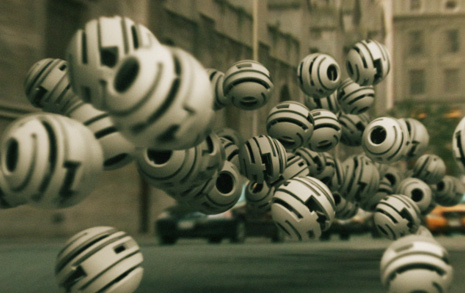
In this EXCITING new tutorial we’ll learn a powerful method for casting realistic shadows with Particular. At first we will setup a simple scene using a custom sprite and then dive in to creating the Shadow illusion. I even included a quick demo showing you how I created the future balls in 3D Max.

This handy technique finally offers a simple way to create nice looking shadows for the things your already create with Particular with an added level of realism.  The shadows are dynamic and fully customizable for hard or soft looking results. I hope this helps some of you out, I know it has been a great addition to my work.

The project file is available to download using AE CS4 & Particular 2.

Watch Tutorial

95 RESPONSES TO “NEW TUTORIAL: Particle Shadows”

YEAH! thanks for this!

hmmmm, having trouble getting to the tutorial…

Great one Mr K!

Awesome, thanks alot, really useful!

by ReddAnselmo

Nice technique mr. AK!

by Daniel Harrison

wow, great thanks MR.Kramer
actually I would love to see more things like this..

Pressing F5 in browser since morning!
Finally!
Thank you!

Very good Andrew! and if to start insects
Thanks for this tuts and idea

coooooooooooool thanks Andrew

Greetings from Egypt

P.S : my name is Andrew too

Wow this looks amazing, finally a 3D tutorial!

Love it, they keep getting better.

So f**king great!

awesome Andrew Kramer, thanks

Wow dude! I Dig the Depth Of Field ;)

what a load of balls

awesome andrew
you never disappoint
check out this video that me and my friends made:
http://www.youtube.com/watch?v=O7lEAnQQSzc

This is cool, as are all of Andrew’s tutorials. But what I really want to know is this, how did AT&T make the commercial with all of the huge silk rolls falling off of national monuments, buildings, etc.?

YES!!! Thank you Andrew! :D

by Next Level Designs

hey andrew, how are u doing. quick question … if we used the idea of the relighting tutorial where u designed a 3d light source and it relighted the road surface … can we not relight it as shadows as well … like a darker light … but then again … it might take longer to render as well using that technique … lol sorry for the waste of time good night and thanks

As always, much appreciated.

cool am gonna check it out now.

Just Brilliant! Nice tut.

by Keninchina

what I like is the 3D Max tut as a bonus! Getting something awsome for free and finding out there’s a bonus, you just made my week Mister Kramer!

yes I’ll watch it now
I love you man :)

Well.
I think it’s so much easier doing it on 3D max without much of time.

but you’re the AE boy anderw. Thanx.

by Prateek Kumar

Hey Andrew, I had a quick question. Will you switch over to After Effects CS5 anytime soon because some people (like me) do not have a 64-bit operating system. If you could answer back that would be greatly appreciated. Thanks

by Tincho de la Fuente

Excelent! Thanks Andrew! Good Luck from Argentina! See you

You always come up with techniques we can actually use.

John over at Motionworks posted that terrible comment about how you’re sabotaging the industry.

I think you’re the best teacher a guy could ask for.

by Aung Ko Ko

Thanks Andrew! how about ur payment plan tutorial? long waiting.

Thanks, amazing =D
Andrew how much memory ram do you recommend for editing at 1920×1080? I’m having trouble about it, it becomes very slow.
would be a good tutorial on Integration of 3D objects in video using Boujou, for example.

Thank you for the little 3D extra in 3DS max ^^

Thanks Andrew.
I can’t wait to see it (as soon as I finish up my work here)

by man_sokpisey

full of creative techniques
form cambodia

hi andrew….thank u very much for introducing action essential 2….with tat elements i did a short film ….it was selected for international short film festival…
http://www.youtube.com/watch?v=j045yMp_eiM

lol@ the white Larry Bird. Bird wasn´t white – He was half mustache half man!

Thanks Andrew.
I drew some inspiration and made this over the day.
Youtube is processing it now…
http://www.youtube.com/watch?v=fLVxtPSY5wc
Enjoy, feedback from anyone would be awesome.

ahahah suupper good ..thnxx andre kramer for this great tutorial

THANKS ANDREW!!!! THIS IS SO COOL!
You inspired me to download 3Ds Max :D

awesome tutorial 8)

check out this video Andrew
http://www.youtube.com/watch?v=1EJVa1RWXHw

andrew you are so talented …… i dont even know how you even figure this stuff out !! i wish i was as good as you haha . keep up the good work

Awesome!

Keep it up!

I will support you anyway

Andrew,
You look at things that don’t exist and think how can I do that. This is a very special gift. Then you make that gift available to the world. Words fail to speak how special that is. Thank you for all that you do.

Awesome tutorial Andrew! I created a demo similar to this a few months ago and posted it and the source files on the Trapcode site. Mine wasn’t as cool as this though – I hadn’t thought of using Depth of Field to soften shadows or fading them using the near fade options. Brilliant – you’re a genius!
Oh – and if anyone’s interested in my demo anim and project files (it does cast shadows on a 3 sided shape which is interesting I guess), you can see it here: http://www.digitaldistortion.net/rsrc_particularShadow.html

hmmm…pretty advanced stuff Mr Kremer….this will take a couple of views to sick in…..you are a madddd Maddddd Mannnnnn.

Thanks for sharing!!

this is great tutorial ))!

by goldorachox

thank’s Andrew come in brussel drink a beer with us ^-^

Stupid question: Trapcode effects have to be purchased right? Using CS5 and I don’t see those other then those on the TC website. Sorry for asking.

Nic.

Thanks Dan!

Finally! :D Thx so much Andrew Kramer

I don’t know how to create “zoom and focus” thingy effect. I turn the BG in to 3D layer, accept shadows an all that to off, orient it to camera, but cant get it right?

I have to get the BG layer to 3D, right?

Woooooooooooooooooohoooooooooooooooo…. It came out finally… euh.. may I know when the tutorial on Payment plan is suppose to come please??

Oh these future balls, always a problem! :D

Wow! i did not knw that was possible !!!!!!thanks Andrew Kramer thoese balls look like thoes roll up droides in the star wars episode I lol

Thanx for the tutorial but what about the other tutorials you promissed like the Shatter glass and the 3D stereoscopic tutorial?
thanx again

i can never be the first to comment well what ever. WOW this is the best tutorial ever Andrew Kramer does it again thanks men really appreciate the hard work.

Amazing tutorial as always from you Andrew am one of many fan’s in Iraq that we like what you created and the best project that your site having its really Awesome man
and i have request if you can make us some thing amazing about the soccer World Cup in Africa some thing no one think about it plz

Thanks man you the best

I am amazed by how much Helpful information Video Copilot has supplied me with in the 2 years I have been a visitor. Keep up the freakin awsome work.

This is absolutely superb, Andrew. This truly bridges the VFX and real worlds, for the small-operations/budgets, more tightly than, perhaps, ever …

Sick tutorial as always Andrew, was just wondering though how did you create the zoom effect with DOF in the example video during the tutorial, i think the example video was called ball_zoom. would be ace to know.

:D

Very bad, Andrew!

definitely one of the best tutorials I’ve seen here :D (and I’ve seen ‘em all)

Of course it’s great… It always is.

You do tutorials… LIKE A BOSS!
http://www.youtube.com/watch?v=NisCkxU544c

thanks Andrew :)

by Morten Enoksen

Would be nothing withut Video Copilot!
Check out my page :)
http://hadselvgs.com/martin

Cant wait to get on this one! Thanks Andrew!

by Aleksander

That’s great!
Btw maybe you could add like, sort of a mini-tutorial on creating those reflective balls in both AE and 3Ds?
That would be nice!

by Javed.A.Shah

Hi Andrew,

All I can say is that you are the best!!!

I have a request for a tutorial and I will give the website reference:

http://www.amteq-group.de/

http://www.time4ever.com/

Please can you make a tutorial to make such particle animations???

Thank you.

Warm Regards,

Javed.A.Shah

Nice tutorial!
Thanks to your website i made this
http://www.youtube.com/watch?v=JRz8VkwNwX8

Damn, I was so close! But my grid got completely messed up so the shadows were no where near aligned with my balls. But I always get it on the second try.

At 55 I will probably never get good enough to get a job doing this, but it sure is fun and keeps the brain from going to waste. Cheers!

your tutorials are the best!!!!!!!!!!!!!!!!!!

Bloody brilliant!!

A tad bit off-topic, Andrew, but I’ll ask anyway. I’m considering buying Particular 2 for CS5, but you said in an earlier post that you have three products under development. With your recent “Optical Flares” triumph, could one of those projects be a particle system? If so, I’ll wait for yours!

Hi

Is any one else having trouble with particals popping onto the screen. Iv tried the pre run setting but nothing happens.
They are born from the light as it moves but the particals need to be born before they get on the screen. ?

yeah, thanks for the reply everybody.

- ANY TIMEEE

Hey Andew great tutorial but I was wondering if you could do a Tutorial about how to make the balls that fly on the street because they are really awesome

im gonna be honest and say that it have been a long time since i was exsited about a toturial here :P

give us something new and exciting.
i dont even know what to use this effect for

Check my try to recreate AK’s smoke trail with reflections too. The reflections use the same technique as shadows(without DOF and fading).

http://www.youtube.com/watch?v=fzFGmbcK1gE

During summer holiday me and my friends will be shooting a student short film with ghost theme..postproduction will be done in AE with some serious VFX…If we will satisfied with result I will post here a link for your critique folks.

Nice tutorial again ;)
I have a question.. In the suretarget 1 tutorial u gave it a 3d look. a client is asking for a 3d text with sure target BUT with CS5 you can create a 3d text and then import it into AE. Hope you can make a tutorial about it cause the render times are crazy!! And when i make this 3d text a 3d layer in AE it actually flattens it. What would be the best way to import the 3d text from photoshop and use it in a 3d invironment with the Suretarget plugin??

Hope you’ll take a look at it.
Cause importing 3d text and make it easy to use with suretarget would kick ass :P

Come back to New York Andrew..

Once again you have fed us with incredible techniques with an awesome result. Thank you so much Andrew, you really are awesome! (I just wonder how often you hear that on a dag?:P)

Awesome! I’d like to know you did the last zoom in the composition (i mean with that depth of field really realistic). Ty ak ;)

I did everything well, the shadow turned out delicious. But when I tried to create a movement of the camera.., just cannot do it. Andrew, can you suggest something that made it work?
Sem from Chechnya.
P.S
I love all of your works Honestly, I learned to work in AE through your tutorials.
Thanks a lot!!!

HEY! Andrew!
thank you for another exciting tutorial!!!

Thanks. Not just for this one but all of the tutorials. These really open up the mind to possibilities. As a guy just having fun with some software (TrapCode, Digital Juice, Adobe) they help me expand on what I thought I knew a lot about already.

Thank you Andrew for yet another brilliant tutorial. You are truly a brilliant artist.

en en maya particle

nice job m8!
Hope to see more from you.

hey thanks for the tut andrew

this was wat i was exactly seeking… great one bro

Thanks Mr AK-108 !!
Guess what’s dat ?

Andrew ur so great man! keep doin
we love u!!!

Thanks man, you really create some rocking tutorials and that helps me to think outside the box!

Thanks Andrew, this is an awesome solution. Maybe a plugin could be developed using this, as well.

Hey guys, I am a new AE user, so this may be elementary – but I’m looking to soften the edges of a shadow – just feather them back maybe 15%. I have 2 flat images in Zspace, and the shadow behind a picture flying into the frame looks great, except for the hard edges. So I don’t want to change my Point of Focus, Light intensity, Positiion, etc. Is there a transform I am missing in the light itself, or the asset that will not change the opacity of my shadow, but just feather back the edges, as if I were just diffusing the light with a skrim or net or something. I’ve tried changing the light type to parallel, but again I’m new in AE so I don’t know. Preleminary thanks for the help! -rob

Post a Comment!

Before Posting
We're trying to encourage more thoughtful commenting.  Please take a moment to write a meaningful response to this post.

Also remember to read the rules on posting first.

Leave a Comment