VIDEO COPILOT BLOG
News, Updates, Projects Files & Tips


TWITTER FEED

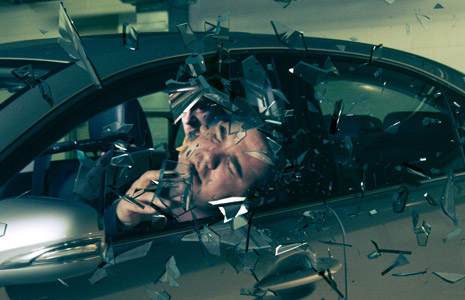
NEW TUTORIAL: Advanced Time Freeze

time_freeze_adv

Good news, the Payment Plan tutorial is now online!

In this in-depth 30-minute tutorial, we will be adding suspended glass into a live action shot using a 3D program. This technique can be used to combine many types of 3D element or layers for infinite creative possibilities.

Watch Tutorial

I’d also like to thank our new hosting partner JX2 media for their great support and service as our tutorial demand has increased. So if you are looking for a high-level hosting service be sure to check them out.
www.jx2media.com

163 RESPONSES TO “NEW TUTORIAL: Advanced Time Freeze”

Awesome, can’t wait to see this!

Finally, awesome

Looking forward to checking this out, thanks!

Woww! great tutorial…

Vamos River Plate (De Argentina)
Los de voka son todos putos…

by trinadhreddy

Hey Andrew I love Your Products And Tuts.Thanks For The Basic Training Series…

Sixth comment i think ;)
lol
Im so glad that it’s coming
I have been wanting to do loads of time stuff, which i did a little of in my latest project, but I can’t wait to see your methods!
Keep it up Andrew! :D

-Luke

Really Great!
in the next week I’ll try make it!

by Shavkat from Tashkent

Thanks you Mr.Andrew! Gonna watch it right now!

This is so awesome I’m so excited now my action movie will be awesome

WOoooooooohoo finally its out

Its graphics time !

Wow I waiting for this tutorial. thank a lot

thanks alot andrew

Wow that was so unexpected, but thanks!

How the tutorial is very serious kind of work pretty, cool Andrew, God Bless

Please Mr. Andrew

make more and more tutorials like this!
with some action, its very exciting!

Excellent, Andrew! I’ve been following your tutorials since you were on Creative Cow. The videos just keep getting better and better. Thanks for sharing all of this information you have.

Great work, you are the true master :)

Keep the tutorials coming.

Im having trouble getting the script to work, any help would be appreciated.

Awesome,andrew i was whating for this all most for ever thank you andrew for doing your job.

Wow.. finally waiting is over…
itz just awesome n’ great idea for low budget time freeze …
thanks Andrew keep it Up :)

I have been waiting with baited breath. THANK YOU. This looks amazing. Keep up the great work.

Pretty sweet stuff. Love the techniques…

wow !! this is great job and I can’t wait to see the tutorial.
Andrew You have been doing such a great job and I wish you all the best,
Melike From Chicago

Every time I say to myself “Andrew is probably finally taking a well-earned vacation” I find you’ve been working your tail off, and you come out with another super gem for people.
I only hope we make it worth all the effort, because this is really generous.

good tutorial, thanks andrew

Hi, was waiting for really really long for this one.
Thanks AK

I haven’t even watched the tutorial but I just want to get a comment in while the going’s hot!

Mr Kramer I heart you!

Thanks Thanks Andrew! I so addicted ur tutorials.

Whoa, that’s lots to take in. I’m starting to take in the basics and routine work, then you throw in lots of new stuff. Need…More…time… Scotty change the Dilithium Crystals, reverse time!

Great stuff Sir AE, thanks again for sharing!

Nic.

Andrew, did you see the interview Sam did with John Dickinson?

Nice! It’s good to get the fix early in the week. Thanks Andrew.

Awesome, Been waiting for this one! We all greatly appreciate your time you put into these!

Andrew, if it wasn’t for you I woundn’t have a job!

hi andrew.my name is ali from iran.
I love exercise and am a professional work
I wish I could train with you I saw
In my country strong and professional projects will not do much.
I like to be the first in Iran.
In your opinion, is a way to do this?
Please help me in this issue.
Thank you very much.

Amazing how easy this stuff can be. It’s all about knowing your program, how it works, and how your imagination can power it! Love this tutorial, I’ve been waiting for this one since the short!

uhhhhhuuuuu greatt:d
thank you Andrew Kramer

HELLO FROM KOSOVO!!!

This is the first tutorial that i dont like it. i hope you can do a good one tutorial next time.

Oh My God. That’s Very Very… Cool.
Thanks Andrew. Ilike You Very Much.

Thanks Andrew
I was waiting for this tutorial.

I love you More then everyone.
I am Edris Mohammadi from Iran,Kurdestan, Sanandaj.

Thanks AK! I’ve been needing a good glass texture :)

Hey andrew,
you can generate great stuff with this technique! Cheers!!
I went to download the script file and get a load of code instead of a script file??
Browser issue?? Mac safari guy here…hmm just tried Firfox. Tried to save the file as .jsx but it no workie. Is there somewhere to get the script.
BTW We use the hell outta Optical Flares, hands down the best flare package out there.
And its a big room full of geeks here.

Well done Andrew,
but I think it would be very useful to show the part of tutorials that turns with the camera around the car

Great tutorial Andrew !

great as always…

It’s really a nice tutorial!!!

Thank u so much Andrew :) .

Woooooooooow! Love you Andy!!!!

by Alexy Papazian

OH MY GOD! :o

U HELPED ME SO MUCH!!!!

Is this tutorial loading slow for anyone else? Usually I can just play a tutorial straight off, but now I have to wait about 10 mins to watch 5 mins of tutorial…. Is this the new hosting service or what?

Thanks,

Cam

by Silver Dance

hi very cool tutorial thank u man
but where the blood from sam?

Andrew you new host is SLOOOOW Or is there too much trafic??

Same as above..too slow :(

yup, the new host is slow as hell. Thank you anyway :)

Yes this cool .but new hosting ((( very sloow downloding video!

Every tutorial with 3D elements are made with 3Dmax… :( I have Cinema 4D :( Because I’m a mac user. So sad about it because this is very cool tutorial. Anyway… the section of 3Dmax is very hard to learn because Andrew is SO FAST. :) I’ll never use cinema 4d faster like him!!

Gdesign,

It is very easy to adopt it to Cinema 4D. If you don’t know how then you should check out other tutorials.

Is it hard to learn the 3DS Max because Andrew is fast? You gotta be kidding with me! If it’s fast, why don’t you stop the video? LOL

so cool, i can’t wait to watch your next tutorial.^^

by Aykut Bozkurt

i haven’t watched it yet but the screenshot seems pretty cool.
and for ”Gdesign” as a reply to him,it is not about 3ds max or c4d,or blender or whatever…you can always create 3d objects in any program,but the main idea is to understand what it is giving to you from the tutorial and another issue about it is creating unique projects from the knowledge you get from these tutorials…
i hope it was a helpful info about what Mr. Andrew is trying to achieve…
Btw tnx for this nice tutorial Andrew…
have a nice day and take care ;)

YOU ARE AWESOME ANDREW!!!
Another great tut. And also fun to watch.
So much great info.
Thanks.
// Niklāvs from Latvia

by Olivier-Mauritius

WOOOOOOOOOOOOOOOOOOHHHHHHHOOOOOOOOOOOOOOOOOO!!!!!!!!!! At last… it came… niceeeeeeeeeeeeeeeeeeeeeeeeeeeeeeeeeeee!! Thnx Andrew!! You rock!!! AN-DREW!!!AN-DREW!!!AN-DREW!!!!

Since you changed the hosting servers i need to wait like 10 yrs to load a tutorial, before it was loading fast now like i said 10 yrs. Is this going to be fixed. Is it only me??? Great Tuts by the way.

Hey, what’s up Andrew!
You have done great tutorials but, this tutorials would be better in a Mac don’t you think ?
Why don’t you buy a Mac pc for you ? It’s a good investment and i’m sure you’ll not repent.
I’m not a mac promoter but i think it would be better.

SeeYa!
From: Brasil

by ⓐⓢⓢⓐⓢⓢⓘⓝ

I’ve Been waiting for this tutorial a long time thanks Andrew keep doing your great stuff..

WooooW .. Breathtaking tutorial *_* Thanks andrew .. :D

Sorry about the slow load times. This is the first there has been such high load amounts (about 3x more then other tutorial releases). The web server config needs to be tweaked. It should be fixed in the next hour or so.

-John Oliver
Jx2 Media

Been waiting for this one for a long time Thank you very much… Hey Andrew this is is not a request(I know how much you guys don’t like those on the blog and i dont want to screw up before I even get a chance to meet you :-) ) but just a quick question and i know you guys probably thought about it and might have a valid reason for not doing this but wouldn’t it be simple to have a download button or something for downloading a tutorial. I don’t know, I just thought it might be easier for some people you know, (especially me :-) )

We have tweaked the config and that should have fixed everything. If you are still having problems, try restarting you browser.

Sorry, and thanks for your understanding.

-John Oliver
Jx2 Media

@Fabio:

Please explain why it would be better with a mac?
Now i’m very curious about it !

I hope the slowwwwwww transfer rate is not going to be the standard speed with the new server. I can barely watch it :(

The number of views have doubled since we fixed the config. Our tech department is working on it right now and things should be running smooth soon.

The load time should be fixed, you just may have to pause it for a bit in order to watch it smooth. Like Andrew said, we are getting way more (about 3x more) viewers then any previous tutorial launch. We are talking thousands more.

Please be patient as we sort out the huge loads.

-John Oliver
Jx2 Media

Can I use the script for Blender aswell?
I dont have the money buy 3d max.

It´s slowwwwww, I can barely watch the tutorial:( for us but great for you, thats mean that you have more fans, so keep posting mor stuff

Hello. Im in the UK & It’s taking ages to download video. I watch your tuts all the time and having trouble with this one. I know you said the Server is a lot more loaded than usual, I just thought i’d let u know about us UK Viewers too. Thanks

damn this is so slow D: mysterious increase of viewers o.O

Having the same “problem” as Matt……your video/tutorial is preloading every 10 seconds orso.

im not complaining or anything…just Bitching hehe (-:

Btw, the host is not new, we are just getting many more viewers than usual. Which is a great, but we’re talking about terabytes of traffic!

I just made another update to the server. That should help some. Again, we are sorry about problems. I will be following this all day to make sure things run smooth from now on.

-John Oliver
Jx2 Media

Incredible! I’ve been trying to figure out how to do 3D tracking inside of After Effects. Seems like this technique works great!

Working much better now, thanks John!

No problem Matt! Just let me know if it slows down again.

-John Oliver
Jx2 Media

I’m thinking about testing this idea, but lets see if anyone else thought of it too – couldn’t you get a similar result by using the shatter effect in AE? if I recall correctly, it can use comp cameras and you can adjust the settings to have the glass come to a stop in space. So from there the only hurdle is getting it to look and behave like glass. thoughts?

by HARDBUILDING

Andrew Kramer

THANK’S FOR YOUR WORK … HAVE ALL HONOR FROM ME

All i can say is, there is no greater master of visual effects than andrew kramer. PS Andrew, I’d love to see some Maya tutorials, don’t leave us Maya users abandoned! Or maybe just include some steps on how to do the meteor in maya?

This is really good, however, the technique doesn’t really transfer well to other applications.
For exampel, how do you do the refraction map, or even freeze the particle system, in, say, Maya?

hey, awesome tutorial. even if i have to pause sometimes to really follow along. great work.
i was wondering though, how i use the extraction script for blender. i’m new to blender and therfore dont know, what to do :P

I am having problems with this tut crashing my Flash Player Plug in. I have never had this problem before.

by Dustin James

Still moving really slow…

Thank you Andrew for this amazing tutorial
i just did this effect and here it is

http://www.youtube.com/watch?v=DQEh5ZfrRFc

thank you once again.

Great Tutorial… Please C4D (Sorry for my English, I from Argentina)….

Great! I´ll be waiting for this since you publish the short! Amazing Andrew! Thanks from Argentina! God bless you

This is not playing correctly, stops every 3 to 6 seconds with the spinning thingy just going round and round, tried everything to watch it but no joy.

great tutorial again !! but i have to say that this new host really really slows down the streaming i guess more than 10 times :( (( than usual

Look great ill watch im atching it right now! Check out my Youtube Channel!
http://www.youtube.com/dammediafilms

@Nikolay: We have been hosting the tutorials for months now. There has never been this many people for a launch before. We are dealing with it the best we can without shuting down the server. Once things calm down a bit, we will re work the config files and we will make sure this does not happen again.

John Oliver
Jx2 Media

Yes anther great tutorial…by none anther than A.K.

Actually I thought we will see AE Shatter in action

oh the burden of being popular. Congrats on the success, sorry for the new found headache. You guys got this though. John make that server your b&@%h =)

@Gabriel: LOL, Yes, my fault. I should to stop video and improve my 3D program knowledge! XD But I’m starting now with cinema 4D and about “Andrew is so fast”… well… is just a joke :) Andrew is the BEST! Is my problem, above all.

@Aykut Bozkurt: YES. I’m very very very grateful for this tut. I think anyone is so cool on the web like Andrew. Now, in this specific case, I don’t understand so much because I’m not a 3Dmax user. But I understand the main idea..:) And…I must improve my cinema 4D knowledge.

How do I get the glass out of my eye from this lesson. It hurts.. Even the small fragments.. ouch… gee thanks alot Andrew…. I’ll send the doctor bill to your address.

Dialogue is not your strong suit…LOL, but pretty awesome freeze frame. Great dynamics in audio design as well.

@A.S. What mean you?

by Aykut Bozkurt

@Gdesign,ok we got a deal then ;) i am glad…
Infact it is not only about after effects.After effects is like a baby,needs to be fed with the right stuff.A good footage,green screen using,lighting,importing 3d objects,animations or char. into the scene,composing them together…and many more…So that has to be the real deal ;) learning more,not only after fx,but combining all together…Btw you can study the c4d from net tutorials,cos lots of sources around there to be discovered as well as what ‘digital tutors’ do for max education…use many forums,use the power of community,etc ok? ;)
@Andrew Kramer I am really thankful for your innovative way of searching and working since the beginning,to the more complicated ones relaased or to be in the next future…How about making some more advanced tutorials,taking the line to a higher ground like using some rigged chars composed in some real footage? i don’t say it to be a free tutorial,cos it is really advanced(i am very aware of it) but maybe a new product of videocopilot… that should just be perfect.

thanks for another great tutorial.

3Ds MAX owns!
Loved the tutorial, thanks Andrew! You’re THE GURU!
Keep ‘em coming. CHEERS! =]

Not necessarily a “plug” for JX2 Media, but in my very gruff and demanding (let alone relentless) opinion, their customer service is the best I have seen, as demonstrated in this one thread alone.
I’ll definitely look them up when my current service expires.
BTW John Oliver … I’m in Midlothian … so … “howdy neighbor!”

who was your teacher! please some more 3d tutorials

At last the tutorial I’ve been waiting for. Thanks again Andrew. Definitely you’ve helped me a lot!!!

Andrew, I love U<3 Awesome tutorial as usual:D We're totally getting spoiled by ur tutorials, cuz u freakin' deliver every time, man:P Seriously;) eirik.moltzau.olsen@gmail.com

this is so so so cool!!!!!!!!!!!!!!!!!!!!!!!!!!!!!!!!

by sahil siddiqui

hey andrew why dont you make videos using MAYA rahter than using max just wanted to know ?

Might there be a version of the script for blender? Just wondering ;) would appreciate it

my brain hurts so good…

Awesome!

by mauricio Alzate

wow thanks thanks thanks!!!!!!! I was waiting!!!

Hi Andrew
This is So cool
i wish you make a new product on Action Sound Effects Riotgear2 Evolution2 or something cool….

Thanks

MY BRAIN MAN!!

LOL this is a very good one!

ehhhh, did i miss something? Question about the HDR Image. Is there a tutorial about how to make that sort of image? or could I just use a normal image in the sphere. Really need an answer because I want to try the tutorial with my own footage. I seen something about some sort of reflection orb on the internet. Did you use this to create the Image.

Hey Andrew, great work as usual with the tutorial. Still can’t quite get my head round how you managed to compress an 11 sec full HD clip to under 3Mb for the download!

That’s some ‘mad skills’ as they say these days. Any chance of letting us know the render settings you used?

Thanks

thanks a lot andrew! this comment is from france^^

Great job Andrew, been waiting for this one. We are lucky to have you teach and push us to use our imagination

Another great tutorial, FYI, for you Cinema 4D users like myself, yu can use the export script Andrew used or one designed for AE and Cinema. The link is from the same site Andrew used, http://aenhancers.com/viewtopic.php?t=653. Hope this helps some of you guys and gals out there. Stay Animated!!

Nice. I wonder if the techniques here could be be used in the Meteor tutorial; excluding the Boujou tracking_ cause the 2D tracking does a good job of really faking the 3D look; something I never knew. To tell you the truth I thought this was done was Rayfire_ guess not. Anyways, learn alot here. Thanks Kramer.

AAAWWWWEEEEESSSSOOOOOMMMEEE
Thanks to the Andrew Kramer’s School! ;D

Good day 2 you.
Great tutorial, and awesome idea about converting 2D to 3D tracking with AE.
One month ago I almost finished my diplom project, where I’ve been trying 2 make the same affect with other tools (2d tracing right within the maya and so).
It’s not yet finished, but I wounder if you find a minute and watch it. It’s a social ad, actually.
Looking forward 2 hear something from you.

http://vkontakte.ru/video_ext.php?oid=503&id=145670235&hash=cf1449489bb92b6e&hd=3%22%20width=%22607%22%20height=%22360%22%20frameborder=%220%22

But if in c4d which should be how to do it!
I Thinking about this tutorial
1: AE a good picture inside track
2: 3dmx which produce reflective glass
3: To do the final adjustment AE
Can the c4d users to provide some help!
Thank you

Wow, amazing stuff here. Thank you so much for providing such an in-depth look at the process, (i.e. incorporating video footage and 3D objects with good ol’ After Effects), rather than simply another tutorial.

Oh, and don’t listen to A.S., your commentary on the tuts and blog shows are great, and I guarantee are one of the biggest reasons you’ve got so many fans.

Well I I saw it for the first time after months.

and there´s truly more than whit in it.

Wow It’s amazing.
Thank you!

Please Andrew make the part of tutorial that turns with the camera around the car

by Alexstardust

Hi Andrew your tutorial is awesome :D

Ok look you are the best of the best and everyone here know that. On a Tv show, I found this effect :
http://www.youtube.com/watch?v=mo5K0nMIelI
(a bit like a bullet-time)
Do you know how to do this effect ?

by nasarhussainbutt

you are greet……

hey wats up andrew!! i’m avnish…16 yr old…love ur tutorials man!! they’re great..keep it up!!

by Aykut Bozkurt

@marhiao : great advertisement,i loved it,that dreamy look seems perfect and 3d texts are cool+the music is really nice when it hits the guitar ;) .tnx for sharing your work here and i wanna know what brand of camera and model you used when taking those footage? i will buy a camera soon,and that video you have shooted seemed great!(if it is not that expensive maybe i can buy it)…

thanks Andrew :)

JX2 Media will rue the day they ever started hosting VCP tutorials!!

thank’s for this work !

@Irongsun

Of course this can be done in C4D.

There are a few tutorials from Cineversity and other places around the net that will basicly convert this tutorial into Cineman4D knowledge for you.

What part are you stuck on Irongsun ?

Nice 3D trickery Andrew.

CG lovers from China, thank you, very much, and love your tutorials, has been watching you, wish you more good cause

@Aykut Bozkurt: thank you,
My good friends wrote that music for me. They are awesome :)
For most of the shoots i used my nikon d90, and for some I also borrowed Sony FX1.

yet another awsum tut andrew,
i love the tips on 3dmax
1 thing however, if i had too be over critical aboot anything,is ,i work in the bottling industy and as a result i see a lot of broken glass. in the tut you decided to make the edge of the glass darker than the glass its self, infact the reverse is true the broken edge of glass is ussualy more offten than not ‘lighter’ than the flat plain of glass, sorry to be such a bore,lol

hope this is some help

once again , truely isparational

What will we have done without you. you are the man….peace

For anyone looking for a great Cinema 4D glass tutorial, below is a link to a great one from Greyscale Gorilla. It includes how to create the refractive glass texture.

http://greyscalegorilla.com/blog/2010/04/reflective-and-refractive-glass-block-tutorial-part-1-cinema-4d/

Hey andrew cant wait to check out your tutorial when i get home. Unfortually that will take a while so i got a question for you. Is there a way you could make the tuts iphone/touch friendly?

Gonna watch this later. Thanks heaps Andrew!!

Thanks men! Another very exitent tutorial!

good stuff, sir. I was just wondering if we might expect to see you use Mocha to track in a future tutorial?

Love this~~ can’t wait to see !

by Aykut Bozkurt

This is gonna be out of topic a bit but excuse me Mr. Andrew for that…
@marhiao : ok tnx for the nice info about the camera and camcorder,both nikon d90 and sony fx1 are about 2000$,i will think about those,or maybe another option can be a handy cam of Sony HDR-XR520V…I may buy this cam maybe,still not sure…The only thing i want to be sure is the quality of the footage.Whatever,i will decide later ;)

by Semih CAGATAY

ohhh Terabytes of traffic , it should be great to start publicity of famous brands in your website kramer . ;)

by mauricio Alzate

thanks a lot… Andrew you are the best… Thanks thanks!!!! … I try do it.. this is the result, but ever i have problem with the track points or stabilization. http://www.youtube.com/watch?v=TwRx2a_3LQ0

2 words daam awesome

very cool tutorial. thanks a lot~~

thanks for tutorial.

by dopple effect

uff is crazyy… hey andrew i was watching the jumper movie, i would like u post a tut with that jumper effect,i think is so cool.. youtueb has some videos about it, but it looks very fake and bad quality, i know u may do it a lot better,
keep doing this crazy things!!

nice one Bro…

Man oh man I’ve been waiting for this thanks Andrew!!!

can you do some maya tuts

Hi,
sir fist ofall happy frindship day!!!!!!!!!!
its nice tutorials i thing sir you must try more 3dmax tutorials i like it ………………
good day take care…………..

i get lost when you change Camera/perspective,
CAPO
from argentina

Hey Andrew, do you know of a AE Export script for Softimage XSI users?

Hey Whats up, nice tutorial. i want know how set up my cam?? is a sony hvr-Z7N … someone can help me i appreciate

but the car class don’t crash in this way !!

hey, anyone can help me? i am a user of MAYA 2011. but this tutorial used 3D MAX. how can i do it in MAYA?
mail: roy2bd@yahoo.com

this Tutorial is not the AE..

this Video 3D max tutorial….

Post a Comment!

Before Posting
We're trying to encourage more thoughtful commenting.  Please take a moment to write a meaningful response to this post.

Also remember to read the rules on posting first.

Leave a Comment