 ALL DESIGN TOOLS

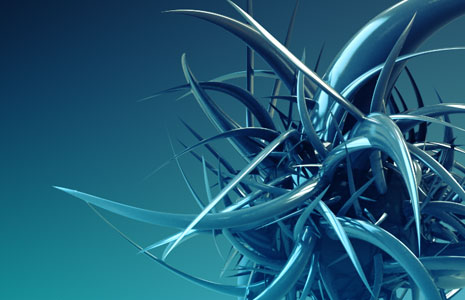
Slow news day I guess but here is another experimental project I've been working on. It was created in 3D max with a particle system randomly positioning the spikes. Rendered with V-Ray.
July 12th, 2010

194 Comments
Yatin
13 years ago
If your planning to come to india Do let us Know
for Shot or just Vacation Trip
You are always Welcome in India.
Koz We just want to meet once.......
i m follower n Big Fan of yourz
Amazing
keep up the Good Work
for Shot or just Vacation Trip
You are always Welcome in India.
Koz We just want to meet once.......
i m follower n Big Fan of yourz
Amazing
keep up the Good Work
Vincent Duong
15 years ago
nice u should make a 3ds max vray tut cuz im in love with vray rite now!
13yrs old
Canada
13yrs old
Canada
Jmwvideo
15 years ago
I rate this 5 stars....... Everything you do is just mind blowing. I love your work. Do you know how to do anything in Maya? I am new to this blog.
Luis Felipe
15 years ago
i love ur tuts when they have 3d max included all those are very amazing and fun... u should open a new topic for 3d tuts im just saying would be a good idea, i think u earn more fans around here watching more tuts and interesting stuff, and a like too much optical flares product is so cool
luis felipe
15 years ago
Pavanrzx that s was close, i was doing the same thing but i cant find what type of lighting ak used
luis felipe
15 years ago
i think this is better than the yellow one that made, andrew please bring that tut for al ur fans
Vizion
15 years ago
Really wish this stuff was a little more possible for Blender. Or if it is, I would like someone to teach me how to even go about something like this.
Scott
15 years ago
Here is what i made after being inspired by this peice. I am new to 3DS Max so this was a fun test to see if i could make something close. I used Mental Ray to render mine. http://i56.photobucket.com/albums/g197/Baron69458/SpikeWallpaper.jpg
bb
15 years ago
Hi Andrew, really nice!! thanks for the inspiring stuff, maybe i can inspire you too..
we have made something similar at school with processing (an open source very easy program (http://www.processing.org/download/)) and rhino..you can see what we have done at:
http://wiki.caad.arch.ethz.ch/WF10FS/WFCAADTheorie
i'm sorry for my bad english..
we have made something similar at school with processing (an open source very easy program (http://www.processing.org/download/)) and rhino..you can see what we have done at:
http://wiki.caad.arch.ethz.ch/WF10FS/WFCAADTheorie
i'm sorry for my bad english..
Yasin
15 years ago
When the darkness rise there will be always a hope.
(When your boss get you angry)
Andrew Kramer makes you happy )
)
(When your boss get you angry)
Andrew Kramer makes you happy
)
Great stuff Andrew - always cool to see what you've been toying with! Inspired me to have a bit of a play too
I used Maya for my 3D renders and After Effects to composite. Just a colour and AO pass.
http://marksbl0g.blogspot.com/2010/07/new-post.html
My main hurdle was getting the rotation and scale randomness to look good - still not 100% where I wanted it - but good enough for a half hour project
Keep up the awesome work!
I used Maya for my 3D renders and After Effects to composite. Just a colour and AO pass.
http://marksbl0g.blogspot.com/2010/07/new-post.html
My main hurdle was getting the rotation and scale randomness to look good - still not 100% where I wanted it - but good enough for a half hour project
Keep up the awesome work!
Pavanrzx
15 years ago
Hey Andrew Nice Design.
Please Check Out Mine Here:
http://pavanrzx.deviantart.com/art/Just-Experiments-171921792
Please Check Out Mine Here:
http://pavanrzx.deviantart.com/art/Just-Experiments-171921792
you should make a gun and use that as the ammo and it'll be the porcupine launcher gun!!!
yes that is a Despicable Me reference. get over it >
yes that is a Despicable Me reference. get over it >
D3FO3
15 years ago
Nostalgia*
I used to love the FX is this music vid. Song is gr8 too!
http://www.youtube.com/watch?v=oTXje6Y6R_U
I used to love the FX is this music vid. Song is gr8 too!
http://www.youtube.com/watch?v=oTXje6Y6R_U
Adam
15 years ago
Great stuff Andrew. I'd like to know how you came up to this cause i've seen something similar to this at "Gino Rossi's" sale poster. Have you seen it or it's just coincidence?
That would make a great wallpaper if it were only BIGGER! I don't see why I u always do stuff at low res.
Mariano
15 years ago
Why i see your tutorial "3D Ledge" on FlashForward Episode 7??
BTW, tutorial about that "thing", i jut need that for make a little production.
BTW, tutorial about that "thing", i jut need that for make a little production.
Joey Hipolito
15 years ago
@X101 - yeah.. but we must learn also from others, they are great but i feel drowsy whenever i'm watching their tuts...haha
cheers for andrew kramer, i wonder when he will be answering our post...
i will be glad if read this all and give a response, not each...but as a whole
cheers for andrew kramer, i wonder when he will be answering our post...
i will be glad if read this all and give a response, not each...but as a whole
Aykut Bozkurt
15 years ago
greta rendering with v ray,it is so powerful,and the shape created really looks nice.you shall clone that shape a lot and create a cave with full of those.can be useful maybe 
it should be appriciated if a tutorial for that particle system is published by the quality of you Mr. Andrew,we will be waiting for it.
it should be appriciated if a tutorial for that particle system is published by the quality of you Mr. Andrew,we will be waiting for it.
This is so cool how do you come up with this Idea Andrew
you are Great as always...i wish you do more tutorial in 3D max which you are really good at, and Maya etc....
you are Great as always...i wish you do more tutorial in 3D max which you are really good at, and Maya etc....
X101
15 years ago
@ Joey: You can say hat again men! Andrew's voice got me stock with his site... he he he eh he
Joey Hipolito
15 years ago
@X101-- yeah, there are tuts on net.. but the voice of andrew kramer is amazing.. makes the listener feel excited about learning.. unlike other people who talks like dead
Silver dance
15 years ago
i love that high image Resolution
but make something with mantal ray
thank man good job.
from south-sudan
but make something with mantal ray
thank man good job.
from south-sudan
QUATRO
15 years ago
HERE'S THE TUTORIAL! I HOPE YOU LIKE IT! =]
http://www.youtube.com/watch?v=0uhPGKBgBeI
http://www.youtube.com/watch?v=0uhPGKBgBeI
QUATRO
15 years ago
I'll be posting the tutorial on how to create these cool looking spikes soon. I'll add the link in the comments here.
CHEERS!
CHEERS!
melvin
15 years ago
omg i been trying to brake my head on trying to learn 3d max v-v the program is hard i wish you could make some 3d max basic training for other people who are trying to learn
i saw your basic training on after effect and i actually learn so i hope you get to se my comment from melvin
i saw your basic training on after effect and i actually learn so i hope you get to se my comment from melvin
David H
15 years ago
Have you checked out Octane? I bought it for my 3D rendering, not really good for animations yet, since it's still in Beta, it's not necessarily a good production stand by, but its got some serious rendering juice, and realtime camera positioning, and material preview.
Mike Hall
15 years ago
KRAMER FOR SUPREME LEADER OF THE MILKY WAY
KRAMER FOR SUPREME LEADER OF THE MILKY WAY
KRAMER FOR SUPREME LEADER OF THE MILKY WAY
KRAMER FOR SUPREME LEADER OF THE MILKY WAY
KRAMER FOR SUPREME LEADER OF THE MILKY WAY
Sergiu Baiculescu
15 years ago
nice one andrew
ps:do something to have more activities on this website,i'd stay here for all day long but,i've learned all and seen all twice at least...
ps:do something to have more activities on this website,i'd stay here for all day long but,i've learned all and seen all twice at least...
Magic
15 years ago
Great stuff Mr. Kramer
in one of your tuts you told that c4d was the BEST 3D app for aftereffect integration, I bought C4D right away, hope to see some tuts for C4D too, thanx Mr. Kramer
in one of your tuts you told that c4d was the BEST 3D app for aftereffect integration, I bought C4D right away, hope to see some tuts for C4D too, thanx Mr. Kramer
rob
15 years ago
how bout a beginners 3DS Max tut for us noobs. i would love to start learning it. you're my teacher. i can't afford college. keep up the freaking awesome work!
faddy
15 years ago
great work, i wish to see some golden orange in the ambient or background light?
it will draw the eye more to the alien object with some contrast thrown for the taste.
errr...!!
it will draw the eye more to the alien object with some contrast thrown for the taste.
errr...!!
Balthazar
15 years ago
Hi all,
It's very easy :
- make a sphere
- make a cone
- apply "Bend" modifier to the cone, with angle 90° or 100°
- Next step, we will create Particle Flow. In Command Panel, click Create tab. Change drop down menu to Particle Systems and click PF Source button. Click and drag in Top Viewport to create PF Source icon
- After you create PF Source icon, now open Particle View window. Just press "6" button in your keyboard
- First we need to change particle appearance. Select Shape Instance operator form bottom and move it into Event 01. Place it exactly on Shape operator, in order to replace it. In Shape Instance 01 rollout (on the right pane), click button under Particle Geometry Object and the click "spike" object in viewport. You have just made spike object used as particle.
- If you move slider of the time, you may notice particle appearance still hasn't change. Select Display 01 operator in Event 01. Change Type to Geometry. Voila! Spikes now appear as particle.
- Now we want the sphere as emitter. Just align the PF icon on the spere, and resize it so that its size is the same as that of the sphere.
Finally, you just play with "Bith", "Speed" and "Shape" values for the final result as you want.
http://moe.mabul.org/up/moe/2010/07/14/img-2316061vfbb.jpg
Best regards,
Balthazar, from France (sorry for my bad english)
-
It's very easy :
- make a sphere
- make a cone
- apply "Bend" modifier to the cone, with angle 90° or 100°
- Next step, we will create Particle Flow. In Command Panel, click Create tab. Change drop down menu to Particle Systems and click PF Source button. Click and drag in Top Viewport to create PF Source icon
- After you create PF Source icon, now open Particle View window. Just press "6" button in your keyboard
- First we need to change particle appearance. Select Shape Instance operator form bottom and move it into Event 01. Place it exactly on Shape operator, in order to replace it. In Shape Instance 01 rollout (on the right pane), click button under Particle Geometry Object and the click "spike" object in viewport. You have just made spike object used as particle.
- If you move slider of the time, you may notice particle appearance still hasn't change. Select Display 01 operator in Event 01. Change Type to Geometry. Voila! Spikes now appear as particle.
- Now we want the sphere as emitter. Just align the PF icon on the spere, and resize it so that its size is the same as that of the sphere.
Finally, you just play with "Bith", "Speed" and "Shape" values for the final result as you want.
http://moe.mabul.org/up/moe/2010/07/14/img-2316061vfbb.jpg
Best regards,
Balthazar, from France (sorry for my bad english)
-
EYY andrew i know that you like some copyleft pictures for your tutorials here in this link : " http://www.flickr.com/search/?w=all&q=ESPA%C3%91A+fantasma&m=text " , You'll find a lot of pictures of SPAIN CITY'S the day of the world cup . you will find some fantastic shots of ghost street's lool . enjoy it..
Andrew you r tooooooooo good. After Effects and 3D max r the most power full software. Adobe & Autodesk Rocks.
@Quatrp: Quatro, when your renering with VRay you can't just place one light at the top hoping everything's gonna be all right. You have to do studio lighting. Studio Lighting means you have to place 2-3 maybe more studio lights (VRay Plane Lights) or in other words Diffused Light Boxes 
Hope that helps
Hope that helps
QUATRO
15 years ago
http://www.ipix.lt/images/16398161.jpg
My weird try with VRay (First time use, I might add... I always use Mental Ray)
My weird try with VRay (First time use, I might add... I always use Mental Ray)
sunil thapa (nepal)
15 years ago
looking great and good .......... would you pleae MR. ANDREW KRAMMER post some basic tut of 3ds max.. coz i thought u r great in 3ds max like as after effects......... os please help us those who doesn't knows 3ds max ... providing some 3ds max basic tuts........
please hear our voice.........
please hear our voice.........
DJayzed
15 years ago
Great pic! I was actually able to make a pretty good version of it in Blender which was cool (cause it's free )
Obviously not quite as good as Andrew Kramer's but with a bit of tweaking it could be a cool particle or something. This guy's always comin' up with awesome ideas...
(cause it's free ) Obviously not quite as good as Andrew Kramer's but with a bit of tweaking it could be a cool particle or something
. This guy's always comin' up with awesome ideas...
Chaudhary Deepak Kumar
15 years ago
It's look great Mr. Kramer you always done creative related to compositing.
Thanks
Thanks
You always have visually interesting stuff to show. I am also interested in how it would be possible to not have the intersecting each other without having to do this manually.
Justin
15 years ago
AK PLEASE DO A TUTORIAL ON THIS! You'll be my hero x10 more than you already are if you do. I've been hired to do a project that requires something very similar to this and I can do it no problem, but if I could make it look as good as this then it'd be great for my reel and get me even more jobs. Pretty pretty pretty pretty pretty pretty pretty please!
Makarand
15 years ago
that look complex mesh but for design such thing is very easy
i guess u have done video tutorial on designing random object in 3Ds max..
but this look more cool
i guess u have done video tutorial on designing random object in 3Ds max..
but this look more cool
I agree with some posts from above, including any about how we would love Maya tutorials! Any idea where I could find a great collection at andrew?
Miriam
15 years ago
Hi Mr. Kramer:
Could you do something nice to tribute the Spanish national soccer team (called "La Roja" or "La selección") after their first World cup winning?
Maybe something super cool, as usual, using the national colors of our flag, red and yellow.
Thanks...
Could you do something nice to tribute the Spanish national soccer team (called "La Roja" or "La selección") after their first World cup winning?
Maybe something super cool, as usual, using the national colors of our flag, red and yellow.
Thanks...
Jamie9
15 years ago
Here is my recreation of the spike ball.
http://img693.imageshack.us/img693/2897/spikeball21.jpg
That's now my desktop background.
http://img693.imageshack.us/img693/2897/spikeball21.jpg
That's now my desktop background.
X101
15 years ago
I see lots of pple talking they want 3dMax tutorials, well i believe with google you can find anything you want on max. @ Andrew, please keep the AE tuts coming cos you made not only me but many pple what they are in been professional @ AE. Cheers all
tanner
15 years ago
whats up man, this doesn't have anything to do with this tutorial, but im making a movie that the mane effect is fir that needs to look real and behave as real fire, and im having trouble with this so if you could help me that would be grate
Joey Hipolito
15 years ago
Looks good mr. kramer.. do you have tutorials of 3ds max.. from basic to near pro... tutorials on interfaces/tools of 3ds max.. i will gladly watch out for that.. you have a nice teaching skills..your voice makes your viewer interested on your tuts..
-joeyhipolito-
-joeyhipolito-
QUATRO
15 years ago
@Remix: Both VRay and Mental Ray are Photorealistic renderers. Now they both have their pros and cons, starting with rendering times, ease of set up and so forth. I would not consider either renderer as BETTER, because it heavily depends on how an artist himself sets up the materials, lighting, shadows and filters. I put the scene together in a few minutes, so this is not meant to be nowhere near as good as Kramer's
lucado
15 years ago
I´m trying to learn Blender since The Bullet. It´s free and awesome. Tutos PLEASE Mr Kramer. Thanks!!!
Matt8teen
15 years ago
Cool rendering man a tut will surely help to good lighting n stuff for 3dsmax. Hey Andrew thanks man for the afx tuts it helped me alot!!!!
IT LOOKS CRAP!!
Ha ha, joking. As usual it looks friggin awesome!!
Here's a random objects render I done a while back:
http://spenelo.deviantart.com/art/Random-Arbjects-Wide-wallpaper-146840999?q=&qo=
Also, what's the specs of your system/s? Like 5 million gigs of ram? Lol.
Ha ha, joking. As usual it looks friggin awesome!!
Here's a random objects render I done a while back:
http://spenelo.deviantart.com/art/Random-Arbjects-Wide-wallpaper-146840999?q=&qo=
Also, what's the specs of your system/s? Like 5 million gigs of ram? Lol.
kyle. B
15 years ago
Dear Andrew,
It would be so awesome if you could do more 3d Max tuts. The program is so hard to understand for a newb, but with you fun and educational videos you could make us all pro???s! :]
All the Best
It would be so awesome if you could do more 3d Max tuts. The program is so hard to understand for a newb, but with you fun and educational videos you could make us all pro???s! :]
All the Best
Jaz
15 years ago
I love this. It's now my desktop wallpaper.
I'm guessing a Tint was added followed by a S-shaped Curves adjustment. You then reduced the Red, increased a touch of Green and finally increased the Blue.
Andrew has a predilection for all things blue!
;o)
I'm guessing a Tint was added followed by a S-shaped Curves adjustment. You then reduced the Red, increased a touch of Green and finally increased the Blue.
Andrew has a predilection for all things blue!
;o)
Martin Turanta
15 years ago
Hi Andrew, that is WOW!!......truly Stunning and Awesome.
am Martin From Kenya and i would like if you did more of 3d max tutorials, Thanks and that was a GREAT JOB!!!!!
am Martin From Kenya and i would like if you did more of 3d max tutorials, Thanks and that was a GREAT JOB!!!!!
Ryan
15 years ago
WOW!!!!!.....truly amazing stuff....by the way Andrew Kramer, can u please say how the tentacles was created...is it any plugin or did u jus modeled it...
Joachim
15 years ago
Sweet!
You should render out a 1920x1080 version or higher so that I can use it as a desktop background
You should render out a 1920x1080 version or higher so that I can use it as a desktop background
Nice Work Andrew, please make a tutorial, i have gotten to as far as making a cone and then adding a bend, please make a tutorial
How long did it take you to create that, 10 minutes?
...does this project involve animation? Cause that would be cool.
...does this project involve animation? Cause that would be cool.
damion
15 years ago
How many hours did it take you to render that? Man VRay is not a quick render to say the least unless you dumb it down.
OlympiaLogger
15 years ago
My gosh! What a phenomenal coincidence!!!
It looks EXACTLY like my ex-wife's soul!
It looks EXACTLY like my ex-wife's soul!
John Keir
15 years ago
Looks like Sonic has fame has gone to Sonic's head and he's hit Rock Bottom! Drugs and all that horrible Paraphernalia!
Great work!
-John
Great work!
-John
QUATRO
15 years ago
http://www.ipix.lt/images/59720047.png
My attempt in recreating the effect.
The colors are not the same, neither is the lighting, but I was not trying to COPY the stuff
I rendered it with Mental Ray, using a skylight for nice AO and a MentalRay Area Omni to create nice highlights and soft shadows.
I also noticed Andrew put a sphere for particles to cling to, so I did the same, but a much smaller one.
My attempt in recreating the effect.
The colors are not the same, neither is the lighting, but I was not trying to COPY the stuff
I rendered it with Mental Ray, using a skylight for nice AO and a MentalRay Area Omni to create nice highlights and soft shadows.
I also noticed Andrew put a sphere for particles to cling to, so I did the same, but a much smaller one.
Mostafa
15 years ago
Andrew its my first time i post comment on you :
sure i have too many question for you one of them from where your brain come i saw in your tutorials a lot of ideas very creative new intelligent some cool stuff evry thing i like
but i want you to make more 3D tutorials cause yours the best of all web site about cinematic and moves VFX all of that its very nice from you
about after effect i guess so you teach all graphics lover about after effect and sure u still have more to show
and something else i wanna see link of what you create i always found your name on some titles of TV show like insider and a lot but i want you to but some of your works to show us how Andrew creamer work on graphics
THnx bro for everything you give me in my life
swear to you aftereffect without you 30% of use with ppl no more
and please spacial grating for : Sam
sure i have too many question for you one of them from where your brain come i saw in your tutorials a lot of ideas very creative new intelligent some cool stuff evry thing i like
but i want you to make more 3D tutorials cause yours the best of all web site about cinematic and moves VFX all of that its very nice from you
about after effect i guess so you teach all graphics lover about after effect and sure u still have more to show
and something else i wanna see link of what you create i always found your name on some titles of TV show like insider and a lot but i want you to but some of your works to show us how Andrew creamer work on graphics
THnx bro for everything you give me in my life
swear to you aftereffect without you 30% of use with ppl no more
and please spacial grating for : Sam
Here's what I made using Particle flow in 3ds Max
http://remixfx.deviantart.com/art/Sphere-Randomness-171073253
http://remixfx.deviantart.com/art/Sphere-Randomness-171073253
MattM
15 years ago
You didn't tell me you had a space cactus. I'm disappointed you've been holding out on us.
deep
15 years ago
You have a beautiful mind that chalks out so many wonderful ideas.... i wish i had such imagination...
GREAT JOB
GREAT JOB
killer
15 years ago
De Lujo... Mr. Kramer, siempre reviso tu pagina, gracias por todos los tutoriales....... UP THE IRON....
olek
15 years ago
hi,
doesent look bad. more 3d tuts are not necesary because their are realy enough good tuts on the net. what i would like to see are tuts for post effects in ae from AK.
doesent look bad. more 3d tuts are not necesary because their are realy enough good tuts on the net. what i would like to see are tuts for post effects in ae from AK.
QUATRO
15 years ago
By the way, speaking of 3D - here's a thing I've completed in a few hours yesterday. I hope you like it =]
http://www.ipix.lt/images/78446618.png
http://www.ipix.lt/images/42771128.png
http://www.ipix.lt/images/78446618.png
http://www.ipix.lt/images/42771128.png
Looks alright similar to a few TV commercials for cars I saw last year....like you said slow news day...
Everyone here loves you though I must say.
Everyone here loves you though I must say.
QUATRO
15 years ago
Nice, I'll try this too
I've never tried to instance geometry on a particle system for abstract art uses...
The HDR lighting looks neat!
I've never tried to instance geometry on a particle system for abstract art uses...
The HDR lighting looks neat!
i agree with Jaron yes u should stick to something im a motion desiger and i use cinema 4d for most the time because the default render is very powerful and sweet and fast so u dont have to wast time waiting for the rendring
lurv10
15 years ago
looks awesome! i would really like to have more 3d tutorials but please use a little bit more of other 3d programs like c4d. you should also make a basic training for all of the 3d programs to, because 3d will soon come to the browser and it will be a very helpful knowledge
Jaron
15 years ago
Andrew! All of your 3ds max tutorials are very helpful and don't worry about what people say about blender, cinema 4d.. etc. You should stick to 3ds max because in my opinion, (from what I've seen) it helps you express your style the best.
Damien
15 years ago
I'm still amazed that so many people keep asking : "Please do a tutorial for !"???
As Andrew wisely said (in his tutorials and comments), the software you're using brings much less to your work than your imagination and creativity can. People think that because they're using Maya, or 3DS, or Softimage??? they'll have a better render. What about the composition? What about the lighting? What about the story your image is telling?
You just have to pick the tool that WORKS for you and start to be creative.
As Andrew wisely said (in his tutorials and comments), the software you're using brings much less to your work than your imagination and creativity can. People think that because they're using Maya, or 3DS, or Softimage??? they'll have a better render. What about the composition? What about the lighting? What about the story your image is telling?
You just have to pick the tool that WORKS for you and start to be creative.
Alex
15 years ago
Can you sometime do a 3d tutorial in blender, since the program is free and therefore, everyone could do it.
maikel
15 years ago
men estas escapado....tu no te cansas de maltratar el after effects...estas de madre.....
I sorry ,Im from Cuba and Dont Speak English very good but you are the best in the After Effects,really you are the best men......
maikel.
I sorry ,Im from Cuba and Dont Speak English very good but you are the best in the After Effects,really you are the best men......
maikel.
james paddock
15 years ago
exelente el trabajo que se desarrola en video copilot me gustan muchos sus productos son facinantes
@Mathias.
There's quite a few tutorials on the web for doing this sort of thing in C4D, obviously they don't have the same endearing charisma that Andrew Kramer delivers his with, but they're pretty handy! Have a look at this link:
http://www.instantshift.com/2010/03/12/90-smoking-cinema-4d-tutorials-and-best-techniques/
They're down the bottom there!
There's quite a few tutorials on the web for doing this sort of thing in C4D, obviously they don't have the same endearing charisma that Andrew Kramer delivers his with, but they're pretty handy! Have a look at this link:
http://www.instantshift.com/2010/03/12/90-smoking-cinema-4d-tutorials-and-best-techniques/
They're down the bottom there!
Brent
15 years ago
I'm pretty sure that you've come up with an medically accurate representation of a kidney stone...At least how it feels.
MightyDWC
15 years ago
As always, looks great Andrew. To side with the masses, would be nice to see this and or any/more 3dmas tuts. One blog show you mentioned something about bringing in people just for this purpose. Have you thought anymore on it? Keep up the good work. Long time fan.
Danny
15 years ago
I'd like to see some tutorials on what vray and mental ray are and how to use them
DigitalGreen
15 years ago
very nice Andy
could you make a tutorial? it would be great for like:
a meteor hits the earth, scientists come and investigate it and there they find that spiky thing
could you make a tutorial?
it would be great for like:a meteor hits the earth, scientists come and investigate it and there they find that spiky thing
Ivan Javorović
15 years ago
Really nice job with the shadows and reflections.Can't wait for the up coming tutorial.Keep up the good work.
Ivan
Ivan
vinay
15 years ago
hey andrew plz create a tutorial of ur bullet product promo
plzz
bullet promo r very mind blasting
plzz
bullet promo r very mind blasting
Mystic7
15 years ago
Looks like something my PITBULL PUKED UP!!!! Sorry, but somebody has to keep you grounded
Alexy Papazian
15 years ago
That Loooks AWESOME!!!!!!!!!!! I waiting for a tutorial!
And did u chose someone for music composing????
And did u chose someone for music composing????
Venom
15 years ago
Looks cool With some "Optical Flares" It'll look better, and then it's a new cool desktop background
You're the best, love your work
With some "Optical Flares" It'll look better, and then it's a new cool desktop background You're the best, love your work
Magiciandude
15 years ago
Cool, but it would be nice if none of the mesh was colliding
Nice colors though.
Nice colors though.


