|
VIDEO COPILOT BLOG News, Updates, Projects Files & Tips |
|
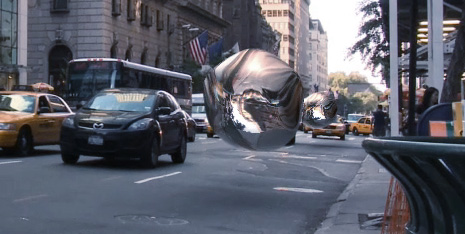
One of the things I demonstrated in at the LA presentation was the use of normal maps in After Effects to simulate realistic refraction and reflections. The technique is very fast and very powerful using a free plug-in called Normality.
Stefan, the developer even worked in a few solutions based on some feedback I sent over. He really built a great tool, in fact there are so many possibilities that I have been working very hard developing this new tutorial to demonstrate several examples of what is possible.
SIDE NOTE: I Just finished the new build of QuickMatte for Windows and Mac so I’m going to try and get that out shortly.

Really cool!
Waiting for QuickMatte!
Sounds really cool
Regards from The Netherlands
Cool, Nice effect as always.
..repeat comment edited.
If it wasn’t for the lack of people screaming WTBacon I’d swear that was real, amazing what can be achieved in after effects kudos to Stefan on a truly jawdropping plugin
Andrew,
you are pumping out some really cool stuff!! even my camels are getting excited!
Graet Andrew !
awesome …
OMG HE DID IT!!!!!
so you can put the reflections on the car now!! amazing mr kramer.. amazing.
and is this same scene you always put on here in New York?
Very Cool
I love Flight of the Navigator. It’s the first thing that came to my mind when I saw that screenshot you posted above
that’s totally awesome. We love you Andrew!
i needed this like 2 days ago. man this is awesome. wow.
can’t wait to see the plug-in!
A free plug-in? Definitely gonna check it out right away. I hope you blew their minds in LA.
And I can’t wait for the tutorial and the QuickMatte!
Its pretty cool, i just cant really see a good use for it because anyone with any sence would do their 3D work in a 3D program…but never the less its still good to have the option i suppose, if you wanted to composite water. Anyway cant wait to see what this QuickMatt is like
thanks again AK
not very Good…!
Well, I tried the plugin out a couple of months ago. The most exciting feature is definitely the instant shading – lighting in AE.
Malta Annons demonstrates quite good what you can achieve with his Youveelizer plugin – which almost has the same features as Normality, in exception of the lighting compability.
Take a look at the videotutorial on his page. Ironicly i find the original composite – that came out of his 3D-software – still better looking than his post-processed final result in AE. His ‘light-matching’ feature is nice though.
Looking forward for Andrews results.
Interesting, however I still cannot figure out how you do a normal pass in Max. I’ve discovered that is I used VRay it would be possible but strange as it may seem I don’t have Vray. Hoping your future tutorial for this will demonstrate how to generate normal passes in Max and a few other 3D programs of course.
Keep up the great work and yes, can’t wait to see this QuickMatte plugin.
Wow, looks great! looking forward again and again
@ Elliot: This wouldn’t replace good 3D work at all, instead it is a relighting solution for enhancing 3D renders. But when you combine the near-real time speed with the live-updating of a compositor, you get instant results that might otherwise cost a lot of test rendering in 3D.
@ Andrew Lee: I’ll be providing info on creating normal maps with the standard 3D max renderer. I’ll also provides some tips on exporting from other 3D apps too.
@TwentyFourBecks: I haven’t watched his demo yet, but his preset seems to be based on the revisionsfx.com RE:Map plug-in which is specifically for changing image textures 2-dimensionally. (Which is a pretty cool feat!). However, Normality is designed for re-lighting using AE lights and adding reflections/refractions.
Cool, looks like the blob from the intro you made from Fringe.
Its pretty cool ; awesome work man
Sweet, I’ve been trying to figure out how to implement something like this into an energy orb like the one it 3d light casting. Awesome stuff as always man, thanks for all you do for the video community.
Andrew, may I ask you why you use 3DsMax so often? I thought the industry standard for CGI in “normal movies” and animation films was Maya? (Or atleast software made by the company itself, based on Maya) Or is that not true? Im getting more and more in to 3d work, and at my school they teach Maya because it is by far the most used 3D package out there.
Regards, PK
Pretty cool. Nice example too :p I have that movie on VHS still. One of my favorite 80’s sci fi movies, along with The Last Starfighter.
Thanks Andrew, looking forward to that
@P1stolK1ng
People use the software they feel comfortable with.
Just give the various packages a try and find out which one satisfys your needs.
hi i think this thing can be made in 3d applecation with more control ….. ??
Looking forward for quickmatte!
@Fadiisber: Obviously, yes.
But the point of Normality is that it is much faster and more interactive… no waiting for rendering means you can be more creative.
Andrew I was and after I went home I downloaded the Plug-in and let me tell you everybody who is reading this comment. This is the Best free plug-in I have ever used! Andrew thanks for the mentioning it!
Awesome! Flight of the Navigator I was like 8 years old when that came out! I’ve been wondering how to create refracting light in AE for a minute. I need to generate a force push refraction ripple effect for something I’m working on right now, and that plug-in might just do the trick!
Hey Stefan Minning! Welcome buddy.
He’s keeping eye on us ;D
Cheers Andrew! If there’s anything I can do to help with tutorial, just let me know!
time with us is short and the life is not too long so keep visiting videocopilot.net to get more out of your life…………hows that andrew.
Whoa man! My inefficient & archaic methods of bouncing items between AE & Modo for scene-refraction may finally be upgraded!
Hi Andrew! I love your site! You have learn me very much! Please can you do a tutorial about CROWD REPLICATION? How to do a army of 50 extras?
My God, great effect!!!!
awesome!!!!!!!!
Did anyone ever design on Deluxe Paint IV for Amiga?
This reminds me (although vastly superior) of the gradient fill option that was availabe in DPIV. It performed a linear gradient based on the shape and contour of an object that was more natural than Photoshop’s has ever been. I remember using that effect to make a mountain range as well as natural metallic surfaces. Ahhh, color cycling animation… those were the days: OF HEADACHES AND FRUSTRATION!!!!!
Thanks for sharing this info!
Andrew, this kind of looks more like reflection than refraction. I think having a moving car in the bubble (just like behind it) would help make it look more transparent.
The Silver bubble in the image is from fringe, isn’t it?
BTW Everyone!!! You can render a “Normals” pass on a photoshop 3D model(CS4). Now finally you can use the After Effects lights to actually light the interactive 3D models from Photoshop and animate the models as well!!!!
This solves SOOOOOOO many problems and solves, what I believe to be, the biggest hindrance for using Photoshop 3D models in AE.
Hmmm. Photoshop 3D Integration…interesting idea for a tutorial…
Thanks AK
@Eric: Oh yeah, I remember that! Color cycling animation was the best!
Hmmm… sounds like a good idea for a new AE plug-in!
(Just kidding…
wuw !…
I would just ask Andrew Kramer on a Issue that could be super cool, compared to Normality plugin. if he could make a tutorials about Render Pass for compositing (normal, difuss, spec, bump) example 3dmax —> AE.
Also can’t wait for the tutorial about stefan’s great plug-in. Keep up the good work Andrew & Stefan!
I’ve been using normality for years now. I actually expected it to show up here sooner.
Great plug-in!
–
Kevin
I am a recent convert to the world of After Effects and I’d have never made the leap without the brilliant tutorials and community here. Kudos to you Andrew. Adobe should buy you a new car every year for the work you do supporting their wares. Just curious, since my budget is pretty much a page full of mocking laughter, how do you rate Blender as a 3D program? Free is the only thing I can afford, after seeing how much 3D Max and similar programs cost that won’t be changing very soon either. Thanks for everything!
I remember that effect in The Matrix applied to the mirror which causes Neo to be offline… now its so simple to make… its not even made in real 3d application.
Normality is I think a good plugin.
I hope that Andrew could make a tutorial about it so I can understand what the function of it is?
PS: Do you need to make 3d models in 3d max to use the normality plugin?
awesome!
I’m downloading the plugin right now.
It’s great when you post about free resources and tools, for those of us who don’t have any money to spend on software.
Keep up the good work!
Kai
HAHAHA oh wow, Flight of the Navigator! that is so weird you posted that, just last week I was trying to remember the name of that movie!
Can’t wait for the tutorial
Dang!
Between Andrew and Stefan, I wish I knew a quarter of what you guys know put together.
It’s like Disneyland for technoids.
Maltaannon introduced similar plugin called Youveelizer. I think it does the same thing. I prefer the free one.
@Luarasi: Youveelizer is used for texturing, Normality does lighting. Quite different.
Andrew, which is the best one: After Effects or Motion?
Flight of the Navigator used to play on repeat at my house about 20 years ago! haha.
Another giant leap from VC. You guys should have been on the moon.
- ShoeToad
Cool. I am the kind of guy that wastes a lot of time re-rendering until I get the lights where I want, very useful stuff here. You can save time with this plug in and like this you can be a little bit ‘normal’ and don’t spent all the day in your computer. haha…
I Think it may be done in 3d softwares and composited in ae…

Before Posting
We're trying to encourage more thoughtful commenting. Please take a moment to write a meaningful response to this post.
Also remember to read the rules on posting first.
Leave a Comment


Looks great. Is there anything you cant do with AE!?