 ALL DESIGN TOOLS

I'm just about finished with the Earth Zoom tutorial. I've also been reading all the suggestions and the information has been very helpful. I'm going to get the Tutorial up soon.
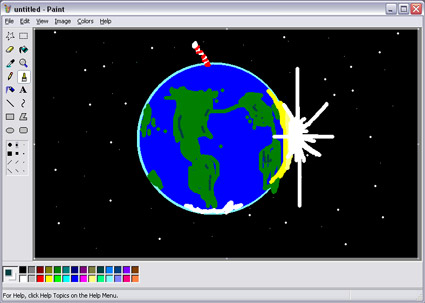
PS: Here is a small taste of the quality you can expect!
July 1st, 2007

117 Comments
Igor
15 years ago
Hey, Couldn't find where is area to segest the tutorial. Have you ever had thought of making a tutorial, where is removing parts of the body, like arms, in such a way that they cross the body and looks real? That wolud be nice I'm sure.
Patolinx!
18 years ago
In muy country us$100 is a lot of money, but andrew products make me win more. Its a cool and very useful tools for any video professional. And buyin it i guess its support andrews work and tutorials.
I learn a lot for free,
Buy Videocopilot products! They are great!
I learn a lot for free,
Buy Videocopilot products! They are great!
Helge says: im thinking of buying some of Andrewâ??????s stuff 
------------------------------------------------
me 2 , but no money still, 50 $ is not much in US, but here in HR ...well... it is, but hopefuly ill get some money at least for riot gear, as i saw it is most useful
------------------------------------------------
me 2 , but no money still, 50 $ is not much in US, but here in HR ...well... it is, but hopefuly ill get some money at least for riot gear, as i saw it is most useful
xlibris
18 years ago
Andrew i cant wait anymore!
I'm going crazy while waiting for the tutorial!
Please I love you! looooooooool!
I'm going crazy while waiting for the tutorial!
Please I love you! looooooooool!
Helge
18 years ago
We're all going crazy while waiting for the tutorial, and I bet Andrew is sitting infront of his big tv giggling with evil in his eyes 
Helge
18 years ago
Andre, Im actually using them to buy a new camera, but im thinking of buying some of Andrew's stuff
Helge, I hope you'll gonna invest some of the money (in case you win) into Andrew great products which you can found here
http://www.videocopilot.net/products.html
http://www.videocopilot.net/products.html
Helge
18 years ago
Im gonna use this in a commercial im making where i can win 25000 norwegian kronas Thats like a little over 4000$  Thank you!
Thats like a little over 4000$ Thank you!
BBB
18 years ago
More than 100 posts... I think Andrew is happy now.. Bring it on!
In case you can't find anymore: my documents/andrew/video/tutorials/2007/cs2/earthzoom/render/final_def_great_superb_upload_now.mov
In case you can't find anymore: my documents/andrew/video/tutorials/2007/cs2/earthzoom/render/final_def_great_superb_upload_now.mov
Hodrog
18 years ago
come on! andrew , i cant wait anymore for the tutorial, i think it's gonna be amazing.
patdynek
18 years ago
Meanwhile I'll render my old earth animation without crappy camera (forgive me, I was blind probably) and put some link here :>
Maybe I will be one of first viewers of new tutorial \o/
Maybe I will be one of first viewers of new tutorial \o/
Can't wait for the tutorial! No way is that created with ms paint I think its an HD stock photo. Very nice.
Jacob
18 years ago
I'm really looking forward to this tutorial.
And with that quality, i mean, WOW ; )
You're doing a great job Andrew.
And with that quality, i mean, WOW ; )
You're doing a great job Andrew.
Iliès S.
18 years ago
We'll just have to wait guys (and ladies), render time will take forever with this quality.
Ili??¨s, cg student,
Belgium
Ili??¨s, cg student,
Belgium
Marc.B
18 years ago
"Andrew Kramer Says: Well, there is a little more to it. Graphics and blog entry plus upload after rendering."
Did Andrew told you he still having a 56K modem ? ^^
Did Andrew told you he still having a 56K modem ? ^^
bangsat
18 years ago
i like your site..i even like your mspaint earth zoom...
so cool, a perfect mouse drawing
so cool, a perfect mouse drawing
Some Guy
18 years ago
I know what Andrew means. I was just kidding. It's hard to wait. I'm feeling like in that Time Freeze tutorial. The time seems to stand still.
thats true, it gets annoying doing it every time for every single tutorial, but its worth it in the end, cuz you know you have thousands of people who watch, learn and enjoy your tutorials and have a great time.
i will be making another tutorial soon myself, but my mics not working so ill have to hold out till my new computer gets back from repairs(hdd problems)
i will be making another tutorial soon myself, but my mics not working so ill have to hold out till my new computer gets back from repairs(hdd problems)
Andrew Kramer
18 years ago
Well, there is a little more to it. Graphics and blog entry plus upload after rendering.
no he means rendering as in rendering out of camtasia for the final flash tutorial files, i know because i make tutorials, usually it takes longer then the actual tutorial, so it must be a long tutorial, 30 minutes +
Some Guy
18 years ago
Your rendering speed in tutorials is much faster than this time. Your computer must be very slowly. That explains the usage of Paint.
well i might be able to if its up in the next 5 mins, i got some spare time before Top Gear starts, hope your uploading speeds are faster than mine
Excellent, but unfortuantly i cant be the first to watch, my dad wants to go on the pc
looking forward to the excellent tutorial tho andrew!
good luck, hope you included that bitmap as a souvinier or however you spell that
looking forward to the excellent tutorial tho andrew!
good luck, hope you included that bitmap as a souvinier or however you spell that
Guys.. Just for your notifacation! If u seek training for after effects go to www.fxphd.com, they are like an online VFX school.
Check it out!
Check it out!
Andrew, once again you have left us in to much suspense, is it a joke, are you really making the tutorial, ar you gonna do it on fourth of july and throw in an explosion of earth like in a cinematic scene as a present?
to many questions that we cant wait untill they are answered!
incidently i was working on a tutorial for after effects, just about to make one, but then, mic doesnt work, plugged in and everything, just not detects at all
to many questions that we cant wait untill they are answered!
incidently i was working on a tutorial for after effects, just about to make one, but then, mic doesnt work, plugged in and everything, just not detects at all
Leo
18 years ago
Hola!!
Podr??a haber escrito este comentario en Ingl??©s, pero creo que vale la pena hacerlo en castellano para mostrar el alcance de esta web y cuanto me ha ayudado a aprender! Soy Leo de Argentina y estoy fascinado de cuanto he aprendido con estos videotutoriales en poco tiempo. Me sac??³ completamente el miedo de usar After Effects ya que lo ve??a muy complicado de usarlo. Soy aficionado a la edicion y apenas con mis 18 a??±os te agradezco mucho Andrew Kramer, ya que lo que estas haciendo es muy valioso. Segu?? asi!!! y espero el proximo videotutorial about earth zoom.
See you!! Bye!
Podr??a haber escrito este comentario en Ingl??©s, pero creo que vale la pena hacerlo en castellano para mostrar el alcance de esta web y cuanto me ha ayudado a aprender! Soy Leo de Argentina y estoy fascinado de cuanto he aprendido con estos videotutoriales en poco tiempo. Me sac??³ completamente el miedo de usar After Effects ya que lo ve??a muy complicado de usarlo. Soy aficionado a la edicion y apenas con mis 18 a??±os te agradezco mucho Andrew Kramer, ya que lo que estas haciendo es muy valioso. Segu?? asi!!! y espero el proximo videotutorial about earth zoom.
See you!! Bye!
Haha, I laughed.
CAN'T WAIT.
Have you considered my tutorials Andrew?
Oh by the way..congrats!
1 Of your great products and 2 or your great tutorials were used in one of the greatest Machinema's ever made:
www.waroftheservers.com
If you have heard of 'Half-Life 2', a mod to it Called Garry's Mod is a sandbox mod where you can muck around and build stuff.
At the start of the 2 hour movie, he used the Fast Fly By text, Riot Gear and the 3D room!
CAN'T WAIT.
Have you considered my tutorials Andrew?
Oh by the way..congrats!
1 Of your great products and 2 or your great tutorials were used in one of the greatest Machinema's ever made:
www.waroftheservers.com
If you have heard of 'Half-Life 2', a mod to it Called Garry's Mod is a sandbox mod where you can muck around and build stuff.
At the start of the 2 hour movie, he used the Fast Fly By text, Riot Gear and the 3D room!
Jeff
18 years ago
Wow 3D in MSPaint, you must have the conoa Plugin for it. Didn't think it did such an amazing job in Paint, but you, Mr. Kramer, proved me wrong. Wow, looks like it is worth every penny. Impressive Globe you made there. I can't stop looking at it photo realism.
Some Guy
18 years ago
Can I have this picture in 1280x1024 please? I want to set it as my desktop wallpaper.
Does it comes with some Paint Presets???
How can i make keyframes in paint, or import video, that is awesome...
How can i make keyframes in paint, or import video, that is awesome...
Does anyone knows how to use the rotation tool on Paint? I can't find it
Andrew, keep up the excellent sense of humor!
Regards,
Eduardo
Andrew, keep up the excellent sense of humor!
Regards,
Eduardo
Oops, I'm not supposed to talk about the North Atlantic Bridge. That comes in the future. There is a starbucks every 5 miles though.
Great, looking forward to see your technique! Check out my site to see my earth zoom (under demos->animatie demo).
Dustin James
18 years ago
I like where the land is extruding from the earth on the South-Eastern hemisphere.
PS. I would like to know how to make those clouds and things..
PS. I would like to know how to make those clouds and things..
Misma
18 years ago
i think this time you messed it up Andrew
i don't like the quality in this last one
i don't like the quality in this last one
Chris Cruise
18 years ago
Awesome!!! MS PAINT!!!! AAAAH HA! In your face all you 3D guys!!!!
I sent you a p/m andrew, but maybe you didn't get it. But please explain how you did this, veeery slowly!
Oh yeah, one more thing. I know that creating this effect will bring my machine to it's knees, so can you NOT include any clouds or land masses in this tutorial? SWEET!!! Thanks Andrew!!!!
I sent you a p/m andrew, but maybe you didn't get it. But please explain how you did this, veeery slowly!
Oh yeah, one more thing. I know that creating this effect will bring my machine to it's knees, so can you NOT include any clouds or land masses in this tutorial? SWEET!!! Thanks Andrew!!!!
lols at all i just want to know that do you guys really know what andrew is being talking baout or its me the fool ova here :d just wondering...
bruno
18 years ago
yay! a ms paint tutorial!
you did it again andrew!
ps: there is a bridge of land there between europe and america?
you did it again andrew!
ps: there is a bridge of land there between europe and america?
looking forward dood! And btw, i hope you have heard all of our prayers about tutorials!
i can list em up:
- How to use track information from Boujou4 into AE probably!
- Some Trapcode Particular Tuts
- Some rotoscoping
- C4D to AE - Make 3D and video blend together! By that i mean, good lighting techniques in C4D
- Something on how to create this: http://www.ryan-w.com/ryan-w/clips/lightning_duel.mov (wich are made in AE, with some help from boujou)!
PLEASE LISTEN TO MY PRAYERS!
i can list em up:
- How to use track information from Boujou4 into AE probably!
- Some Trapcode Particular Tuts
- Some rotoscoping
- C4D to AE - Make 3D and video blend together! By that i mean, good lighting techniques in C4D
- Something on how to create this: http://www.ryan-w.com/ryan-w/clips/lightning_duel.mov (wich are made in AE, with some help from boujou)!
PLEASE LISTEN TO MY PRAYERS!
hitman273
18 years ago
i miss your voice Andrew, your Tutorials re very useful for me, hope to see your new Tutor soon.
Its so hot in Split today, grr
great painting mr.Andrew, on work i use paint a lot so i kinda know myself around it preety damn good, i know how hard is this.
cant w8 for the tutorial, but i have a rough idea how to create it, just ...nah, just cant wait
1ce more, u could use a forum
great painting mr.Andrew, on work i use paint a lot so i kinda know myself around it preety damn good, i know how hard is this.
cant w8 for the tutorial, but i have a rough idea how to create it, just ...nah, just cant wait
1ce more, u could use a forum
Arnie
18 years ago
Woo I now have a new desktop background.
Been waiting for a tutorial like this for a long time "excited I am"!!
can we make it so that you end up zooming in on a swarm of bees?
Been waiting for a tutorial like this for a long time "excited I am"!!
can we make it so that you end up zooming in on a swarm of bees?
DSW206
18 years ago
Andrew, your paint skills are a-m-a-z-i-n-g...this should be in the Louvre...looking forward to the Tutorial.
as a reply to the person above. The best way I know of to use Google Earth for a zoom if you can;t get the Pro Module is to set up your path as a "place" and click it a few times to get the zoom in loaded fully in your buffer, zoom out as far as possible into "space", click record on the mini-DV cam set-up on a tripod, click on the places and rapidly hide your side bar slide the mouse cursor off screen concurrently. Do it a couple times for safety. Pull your footage into AE and color treat it as wanted including flouro greens and blues throw a grid with a glow filter on it and voila! a cool looking background computer screens for your next Enemy of the State wanna-be home film!
as a reply to the person above. The best way I know of to use Google Earth for a zoom if you can;t get the Pro Module is to set up your path as a "place" and click it a few times to get the zoom in loaded fully in your buffer, zoom out as far as possible into "space", click record on the mini-DV cam set-up on a tripod, click on the places and rapidly hide your side bar slide the mouse cursor off screen concurrently. Do it a couple times for safety. Pull your footage into AE and color treat it as wanted including flouro greens and blues throw a grid with a glow filter on it and voila! a cool looking background computer screens for your next Enemy of the State wanna-be home film!
fersh0
18 years ago
Very good tutorial I am waiting for it !!! We also want the storm promo tutorial and the car hit tutorial !!!
Blessings
Blessings
m.abulazm
18 years ago
as usuall Andrew using the essential of PAINT to make amazing things
thanx a lot Andrew you are very kind person.
waiting the new BOMB
thanx a lot Andrew you are very kind person.
waiting the new BOMB
S. Gilbert
18 years ago
While looking at those High Res Photos I can't help but think, will I have enough proccesing power to do this effect?
Joe
18 years ago
hey tutorial looks great!
btw please could you get a tutorial together
for some special effects from the program
charmed. Like orbing, freezing (you have already done),
vanquishing and other styles of teleporting (with
other actors in the scene and how that would work.
Thanks!
btw please could you get a tutorial together
for some special effects from the program
charmed. Like orbing, freezing (you have already done),
vanquishing and other styles of teleporting (with
other actors in the scene and how that would work.
Thanks!
Orc Master
18 years ago
You even put the North Pole sign!!! You're seriously a genious!!!
Man, I can't wait for this tutorial. And I also already wanna know what'll be coming next
Keept it up! But hey, Venezuela's NOT in that globe! :|
Man, I can't wait for this tutorial. And I also already wanna know what'll be coming next
Keept it up! But hey, Venezuela's NOT in that globe! :|
Cody
18 years ago
Oh yeah great I can??´t wait to see the Tutorial.
I will send you an e-mail soon. because I have a little problem with an effect I created. I hope you can help me Andrew.^^
Greetings from Germany
I will send you an e-mail soon. because I have a little problem with an effect I created. I hope you can help me Andrew.^^
Greetings from Germany
tesssam
18 years ago
yea i have an idea why not a lot tuts about how to use ms paint with AE that would be kick ass.
lol
lol
Philipp Boeing
18 years ago
yea, this'll be a really cool tutorial!
I missed the deadline, but I just wanted to tell you, that I really want to see more Paint Tutorials! (who the hell needs AE or C4D? we wan't *real* pro-apps ^^)
I missed the deadline, but I just wanted to tell you, that I really want to see more Paint Tutorials! (who the hell needs AE or C4D? we wan't *real* pro-apps ^^)
Wow!! Had I known you could get those kinds of photorealistic results from MS Paint, I would have made the switch YEARS ago. Instead, I've been wasting my money and time with that other Hack program, Photoshop. I feel so cheated.
wow cant wait and i would like to see some tutorials on matte painting since i never seen one of this from you before
cant wait for the earth zoom
hurry up andrew!
peace from israel!!!
cant wait for the earth zoom
hurry up andrew!
peace from israel!!!
Joey
18 years ago
HAHA! Andrew, I love you sence of humor! So this will be your switch form AE to MS paint???
Gonads
18 years ago
Wowza, start writing tutorials on how to draw like that on paint please
P.s. can't wait for the tutorial ^_^
P.s. can't wait for the tutorial ^_^
James P.
18 years ago
Awesome!! Can't wait for the tutorial
Hey you could do an earth zoom for a cell phone video game with that "quality" pic!
Hey you could do an earth zoom for a cell phone video game with that "quality" pic!
Josh Dunn
18 years ago
It's breath-taking.... i.... can't even describe it.... amazing really... but seriously, can't wait for the tutorial, though i don't have any projects that need the Earth zoom effect, i've always thought it was a neat trick
Blair
18 years ago
Soon as in...?
Minutes? Hours? Days?
Come on, you can't tease us like this!!!
"With great power..."
Minutes? Hours? Days?
Come on, you can't tease us like this!!!
"With great power..."
heey, Great I will wait for it.
I tryed make it whit Google earth but it don't work. I hope you have something bether.
Greetzz
I tryed make it whit Google earth but it don't work. I hope you have something bether.
Greetzz
Great, looking forward to the tutorial, i was gonna work on the effect before you started to do the tutorial, but i couldnt find high quality images, but that image must be like 20megapixels ultra detail :O
Oh my godness! You better had payed attention in geography-lessons! Since when there is a land-brigde form Nothern-America to Europe?
But a nice light-effect!
I can't wait for the tutorial!
But a nice light-effect!
I can't wait for the tutorial!
Awesome. You've obviously listened to your fans and comments (all 300+ of them in the last post!)
... I wish I was that good with Paint ...
Cheers,
Jacob.
... I wish I was that good with Paint ...
Cheers,
Jacob.
Andrei
18 years ago
Nice render u got there...) Cant wait for the tutorial, and I was hoping you could do some tutorials on matchmoving, 3d camera traking...thats's killing me right now and I just cant seem to get it right. anyway, thanks again Andrew.
) Cant wait for the tutorial, and I was hoping you could do some tutorials on matchmoving, 3d camera traking...thats's killing me right now and I just cant seem to get it right. anyway, thanks again Andrew.
patdynek
18 years ago
Iâ??????ve done something similiar to Universal opening.
Weâ??????ve got earth, space, zoom, and a bit of light.
Low res FLV -> http://www.patdynek.com/old/earth/
ps. got no idea why it chunk out the rest of url previously, bit weird
Weâ??????ve got earth, space, zoom, and a bit of light.
Low res FLV -> http://www.patdynek.com/old/earth/
ps. got no idea why it chunk out the rest of url previously, bit weird
patdynek
18 years ago
I've done something similiar to Universal opening.
We've got earth, space, zoom, and a bit of light.
Low res FLV -> http://www.patdynek.com
We've got earth, space, zoom, and a bit of light.
Low res FLV -> http://www.patdynek.com


